29
TAKE A TEST STRIP OUT WITH CLEAN AND DRY HANDS FIRST.
WARNING
˙ Contact bars must be inserted all the way into the meter or you may get
an inaccurate test result.
˙ Every time you perform a control solution test, you must enter into the
“CTL” test mode so that the test result will not be stored in the meter
memory. Failure to do so will confuse the blood glucose test result with
the control solution test result in memory.
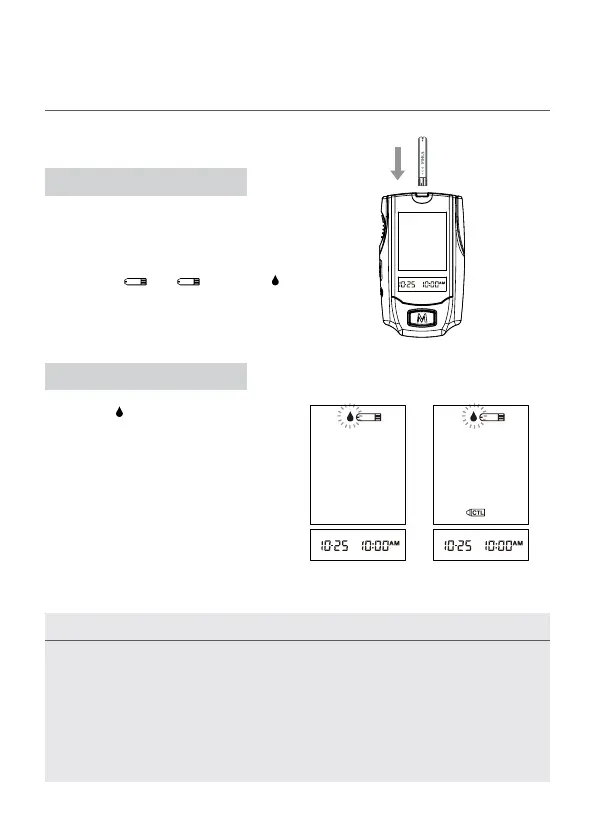
Insert a test strip with contact bars end rst
and facing up, into the test slot. The meter
turns on automatically and displays the
followings in sequence:
“CHK” and “
” → , ashing “ ”
with date and time.
While the “
” symbol is ashing, press
the C button and you will see the “CTL”
appear, which means that the meter is
in the “Control Solution Testing Mode”.
Under this mode, the test result of the
control solution is not stored in the
memory. If you decide not to perform a
control solution test, press the C button
again and the “CTL” sign will disappear.
STEP 1. Insert the Test Strip
STEP 2. Press the C button
Performing a Control Solution Test



 To Next Page