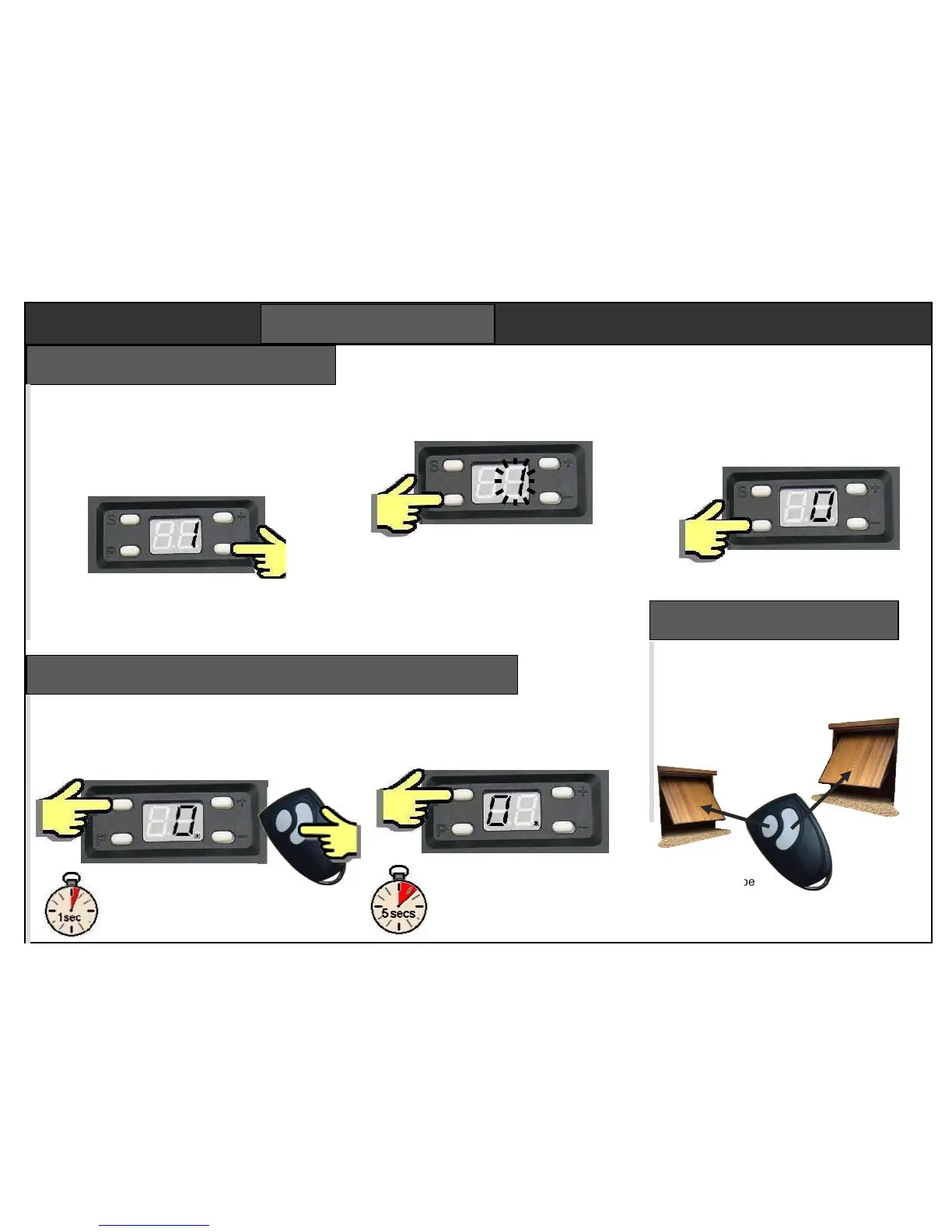
For two garage doors, set left door to
channel 2, set right to channel 1.
Whichever channel is pressed, both
courtesy lights will turn on because the
remote was saved
onto both openers.
The second
button can be
used for a gate.
Four channel remotes will work 4 devices.
Each button is dedicated to a channel.
Programming must be finalised correctly to save
any changes you have made. Finalising can be
performed any time after completing the force
setting procedure step 3.
Use + key to return to step “1”.
Hold down “P” key for 5 secs,
or until display shows “0”.
Hold down “P” key for 5 secs,
or until display shows “0”.
The opener is now ready to use.
SHORTCUT
To finalise after completing step 3
(force setting) you do not need to
return to step “1”. Just hold “P”
down for 5 secs.
Step 9 – finalise programming
Remotes cannot be removed individually.
To delete one remote, the whole memory
must be cleared. Good remotes can be re-
entered.
Press ‘S’ for 8 secs. The 0 will
appear on the left. Holding ‘S’ for
5 secs more until the 0
disappears. The memory is clear.
Add remotes Delete remotes
Remotes supplied with openers are already
set in memory. Openers can store up to 15
remotes. To add a new remote, press “S”
for 1 sec. The point LED will light.
Press either button twice
to add. More remotes can be
added while the point is still on.


 To Next Page