Forma Scientific, Inc.__________________________________________________Start-up
4-3
The seven-day circular chart recorder is located on the bottom front of the freezer
cabinet and is protected by a glass door.
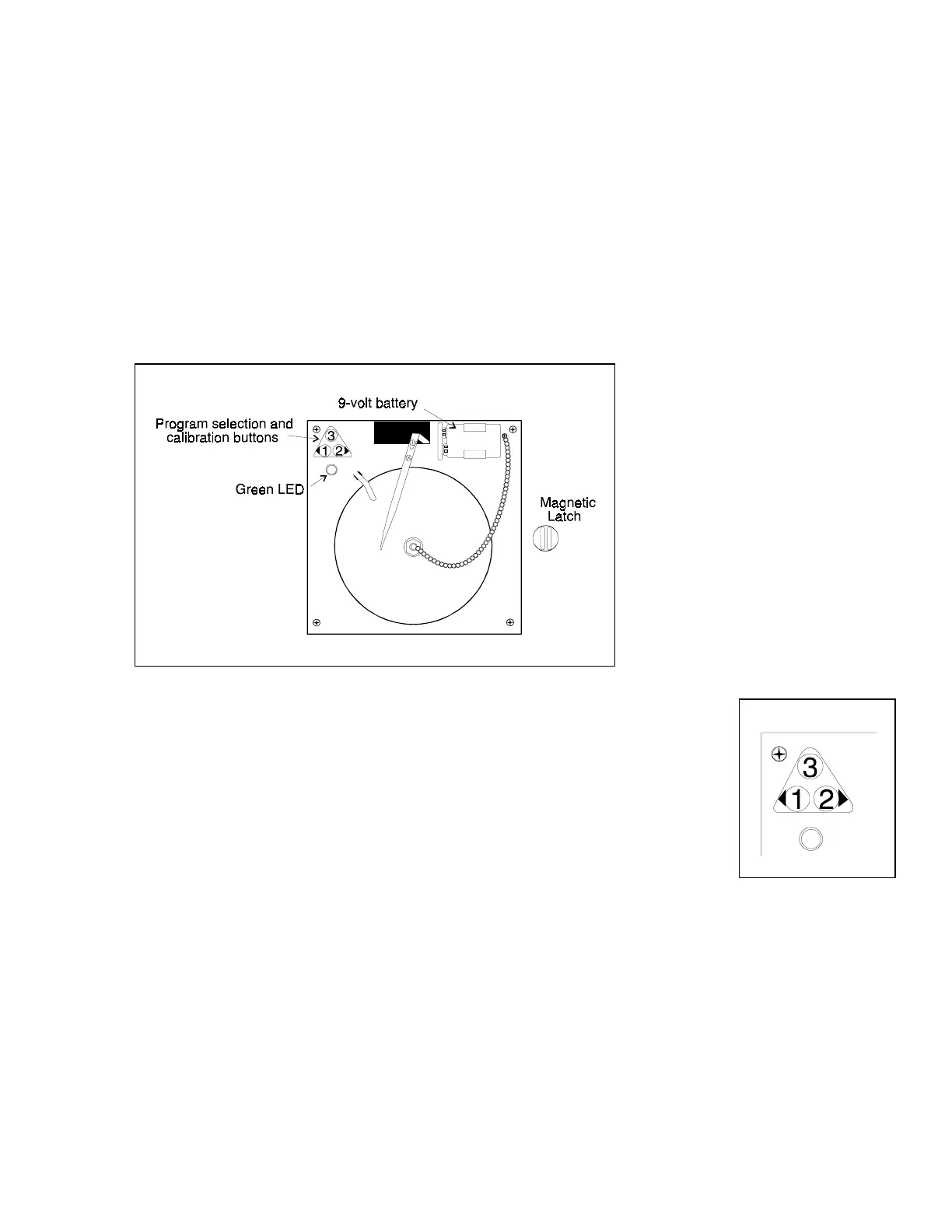
To prepare the recorder for operation, open the glass door and snap the connector
onto the 9-volt battery as shown in Figure 4-1. If the freezer is operating, the green LED will
show a steady light. If the freezer is not turned on, the LED will flash.
If the battery is weak or not connected, the green LED will flash. If power is lost to
the cabinet, the LED will also flash as the Alarm/Monitor goes into the alarm state. When
replacing the 9-volt battery, replace with the same style battery.
b. Installing the chart paper
(Refer to Figure 4-2) Press and hold button #3 for about one second
until the pen begins to move to the left. Unscrew the knob at the center of the
chart and install the paper, positioning the chart so the correct time line
coincides with the time line grove on the chart plate. Replace the knob and
press the #3 button until the pen begins to move to the right.
Figure 4-2
c. Changing the recorder range
The chart recorder contains eight temperature ranges and is factory-programmed for
the freezer.
1. Press and hold button #3 for one second, then let the pen move off of the chart
paper.
Figure 4-1



 To Next Page