EasyManua.ls Logo

Foscam FI8909 - Date & Time Settings; User Settings

Foscam FI8909
58 pages
Print Icon
To Next Page IconTo Next Page
To Previous Page IconTo Previous Page
Loading...
w
w
ww.foscam.co
ww.foscam.co
m
m
Shenzhen
Shenzhen
Foscam
Foscam
Intelligent
Intelligent
Technology
Technology
Co.,
Co.,
Limited
Limited
Tel:
Tel:
86
86
755
755
2674
2674
5668
5668
Fax:
Fax:
86
86
755
755
2674
2674
5168
5168
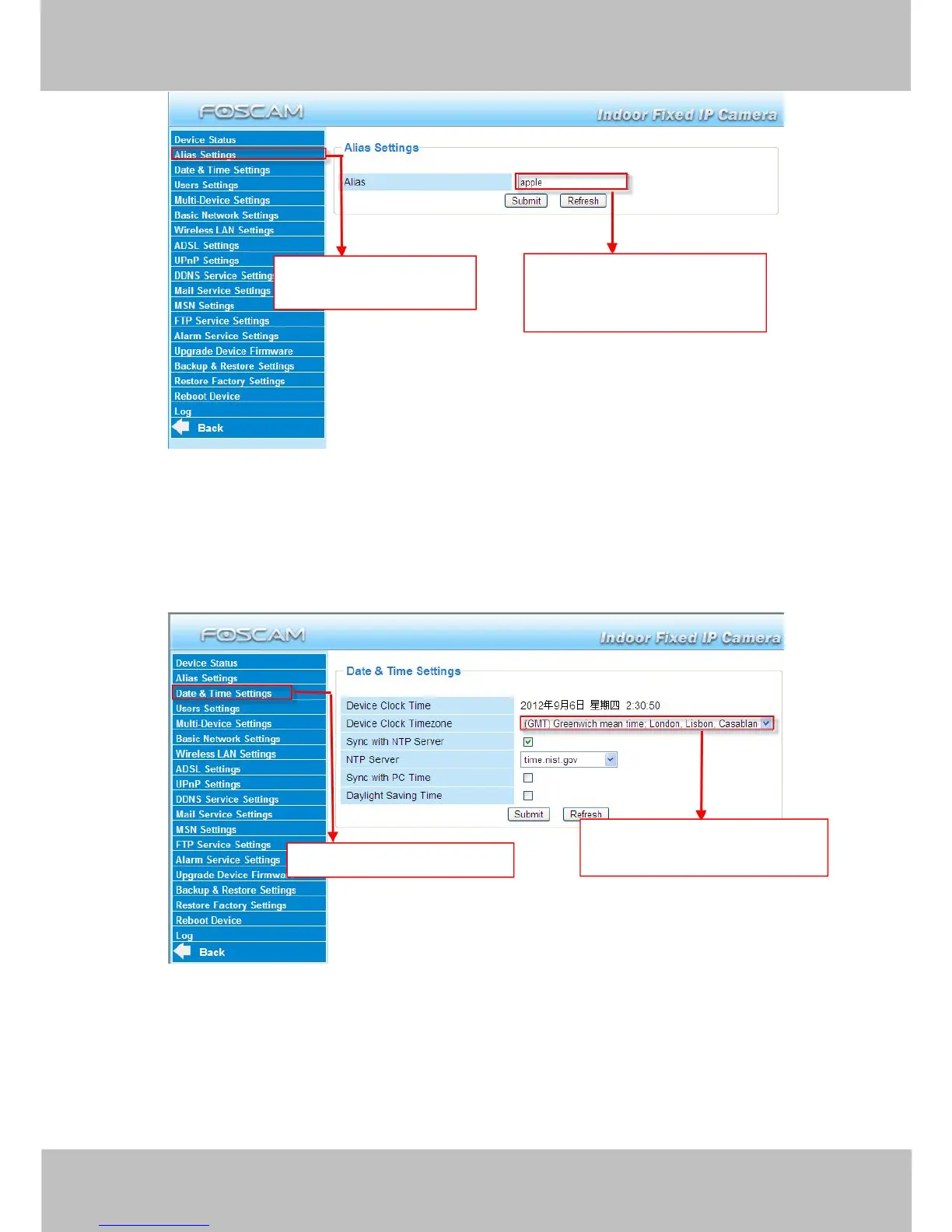
Figure 3.4
3.3 Date & Time Settings
Choose the time zone of your country. You can choose Sync with NTP Server or Sync with PC
Time. If your country implements the Daylight Saving Time, that option can also be selected.
Figure 3.5
3.4 User Settings
Here you can create users and set permission levels, visitor, operator or administrator.
Click Submit to save these settings. The camera will reboot.

Click the option here to
modify the device name.
Enter the device name as you
like. Use different names to
identify multi-cameras.
Go to Data &Time Settings.
Select the time zone belong to
your region.

Other manuals for Foscam FI8909

Related product manuals