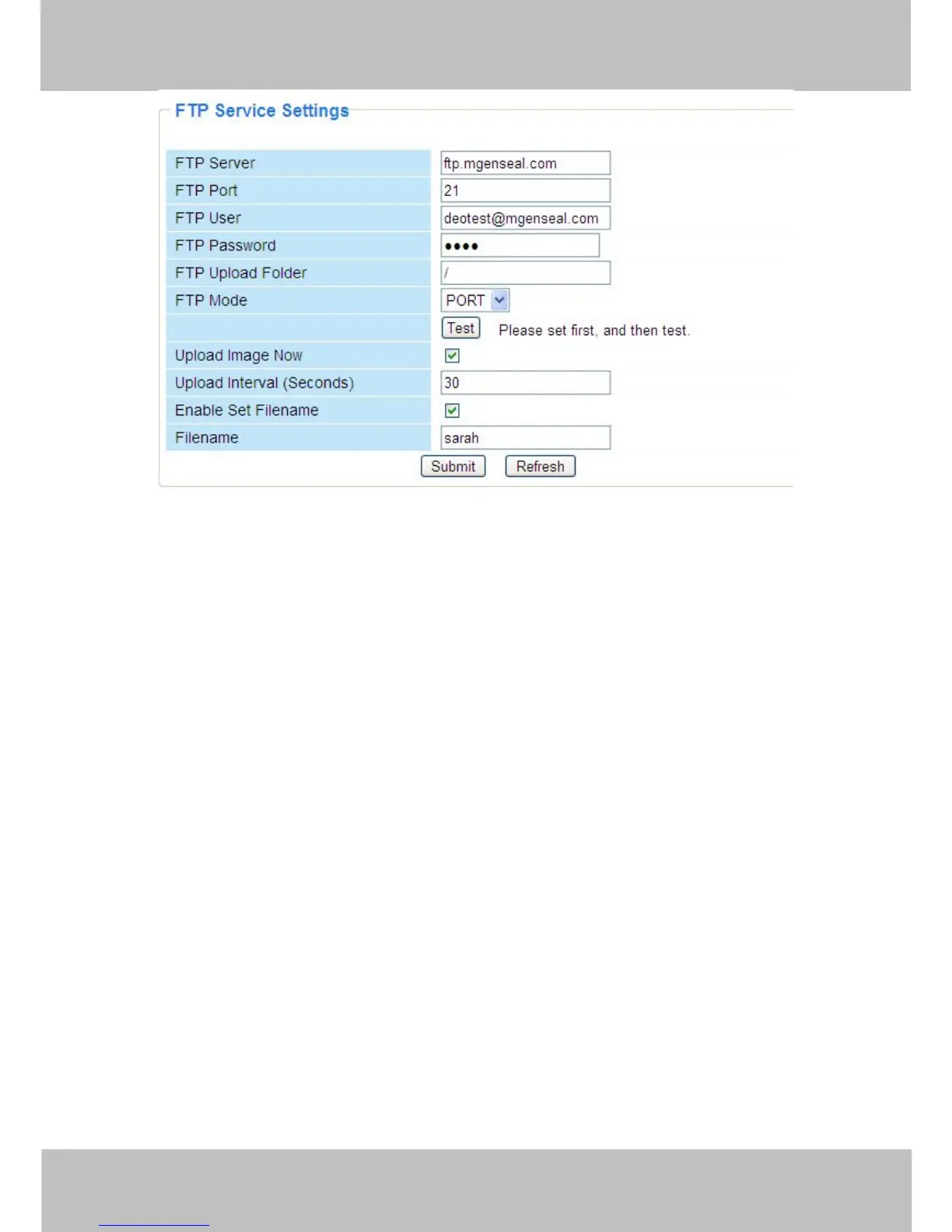
Figure 3.37
FTP server: If your FTP server is located on the LAN, you can set as Figure 3.36.
If you have an FTP server which you can access on the internet, you can set as Figure 3.37.
FTP Port: Usually the port is 21.
FTP Upload Folder: Make sure that the folder you plan to store images exists as the camera
can’t create the folder itself. Also, the folder must be read/writable.
FTP Mode: The camera supports standard (POST) mode and passive (PASV) mode
Upload Image Now: This option will upload images continuously when you enable the checkbox
Enable Set Filename: When you enable this option the uploaded image will be named
according to the filename you enter. The next image will overwrite the filename of the previous
image. Hence there will only be one image, the last uploaded.
Filename: See the above option.
Note: You cannot change the name of the alarm image.
Upload Interval refers to the time between the current image and the next image being
uploaded.



 To Next Page