EasyManua.ls Logo

Foscam FI8909 - Page 44

Foscam FI8909
58 pages
Print Icon
To Next Page IconTo Next Page
To Previous Page IconTo Previous Page
Loading...
w
w
ww.foscam.co
ww.foscam.co
m
m
Shenzhen
Shenzhen
Foscam
Foscam
Intelligent
Intelligent
Technology
Technology
Co.,
Co.,
Limited
Limited
Tel:
Tel:
86
86
755
755
2674
2674
5668
5668
Fax:
Fax:
86
86
755
755
2674
2674
5168
5168
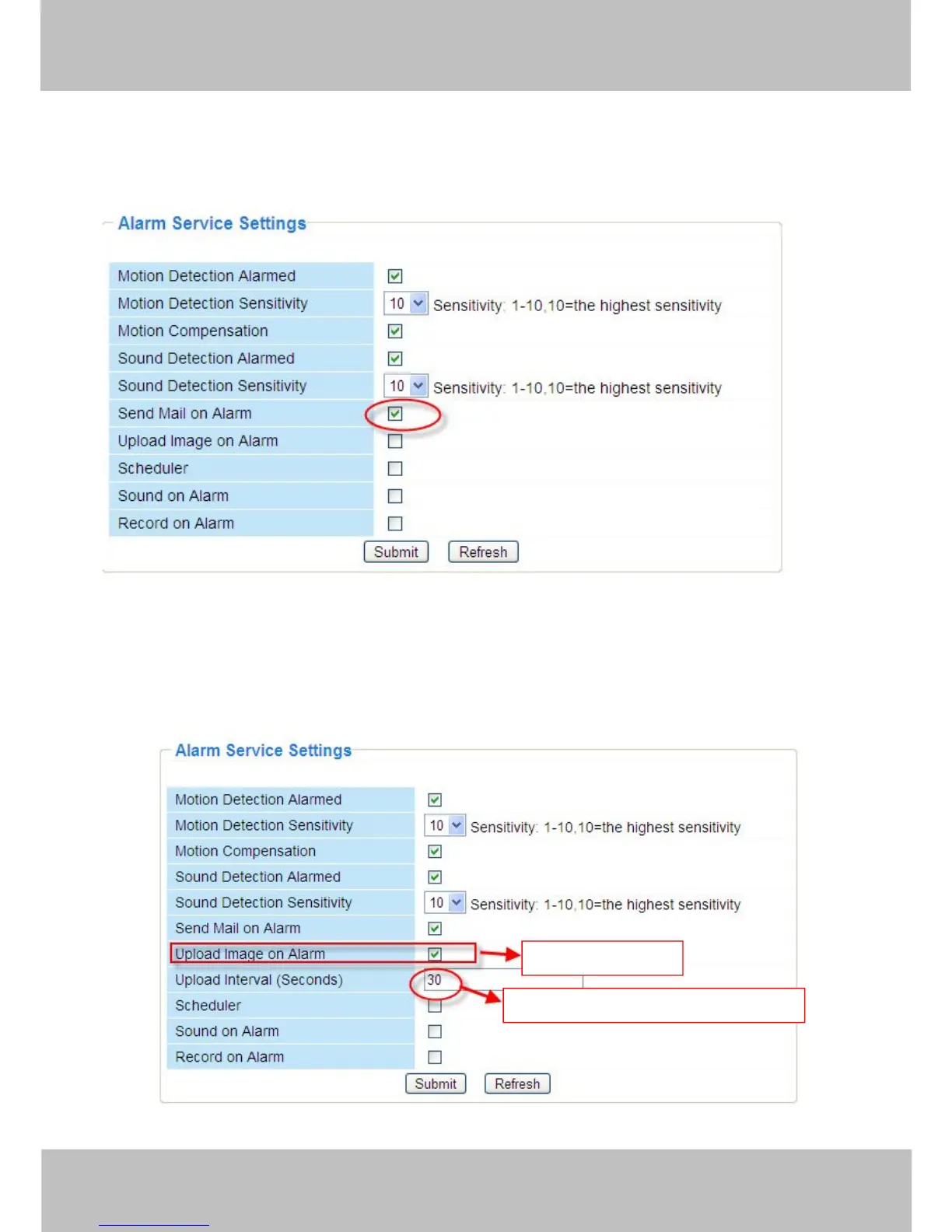
There are four alarm indicators:
1) Camera will send emails when motion/sound is activated.
If you want to receive images when motion is detected, you must set Mail Service Settings first.
(Figure 3.31) Then set motion alarm as follows:
Figure 3.41
2) Upload images via FTP server when motion/sound trigger.
To upload images to an FTP server when motion/sound is detected, you must set FTP Service
Settings(Figure 3.36/3.37) first and then set motion/sound alarm as pictured below
Figure 3.42
Select this option.
Set an interval for images to upload.

Other manuals for Foscam FI8909

Related product manuals