w
w
w
w
w
w
w
w
.
.
f
f
o
o
s
s
c
c
a
a
m
m
.
.
c
c
o
o
m
m
S
S
h
h
e
e
n
n
z
z
h
h
e
e
n
n
F
F
o
o
s
s
c
c
a
a
m
m
I
I
n
n
t
t
e
e
l
l
l
l
i
i
g
g
e
e
n
n
t
t
T
T
e
e
c
c
h
h
n
n
o
o
l
l
o
o
g
g
y
y
C
C
o
o
.
.
,
,
L
L
i
i
m
m
i
i
t
t
e
e
d
d
T
T
e
e
l
l
:
:
8
8
6
6
7
7
5
5
5
5
2
2
6
6
7
7
4
4
5
5
6
6
6
6
8
8
F
F
a
a
x
x
:
:
8
8
6
6
7
7
5
5
5
5
2
2
6
6
7
7
4
4
5
5
1
1
6
6
8
8
6
2
2
S
S
u
u
r
r
v
v
e
e
i
i
l
l
l
l
a
a
n
n
c
c
e
e
S
S
o
o
f
f
t
t
w
w
a
a
r
r
e
e
G
G
U
U
I
I
Please refer to the Quick Installation Guide if you install the camera at first time. After finishing
quick installation, you can take time to learn the operation of the software.
2
2
.
.
1
1
L
L
o
o
g
g
i
i
n
n
W
W
i
i
n
n
d
d
o
o
w
w
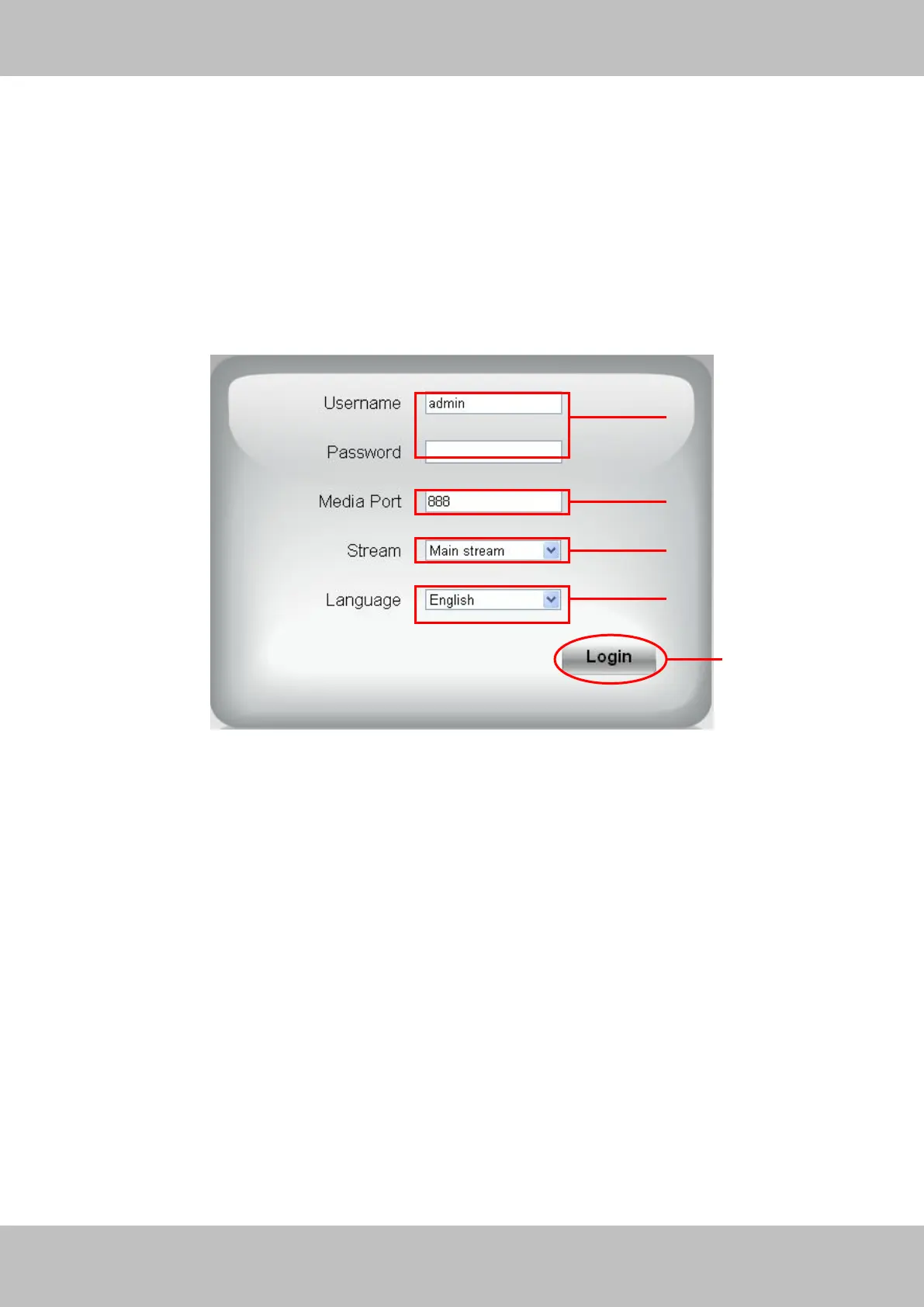
Figure 2.1
Please check the login window above, it was divided to 5 sections from no. 1 to 5.
Section1 Enter the User name and password
The default administrator username is admin with no password, please reset the password at
first using and prevent unauthorized users login the camera (read chapter 3.2.4 about how to
change).
Section2 Media port
The Media port is used to transfer video stream, and the default port no. is 888, you can reset the
port no. between 1 ~65535 on the Settings-NetworkPort page. The camera will obtain the
port no. automatically, you need not to fill it manually.
Section3 Stream



 To Next Page