w
w
www
www
.foscam.
.foscam.
us
us
Foscam Digital Technologies LLC
Telephone: 1-800-930-0949
NOTE:
If the camera cannot be accessed, please make sure the port forwarding is succeed.
HTTPS port: The default port is 443. You can use the url to access the camera: https:// IP + HTTPS port.
ONVIF port: By default, the ONVIF port is set to 888. Also, they can be assigned with another port number
between 1 and 65535(except 0 and 65534). But make sure they can not be conflict with other existing ports.
4.4.7 Mail Settings
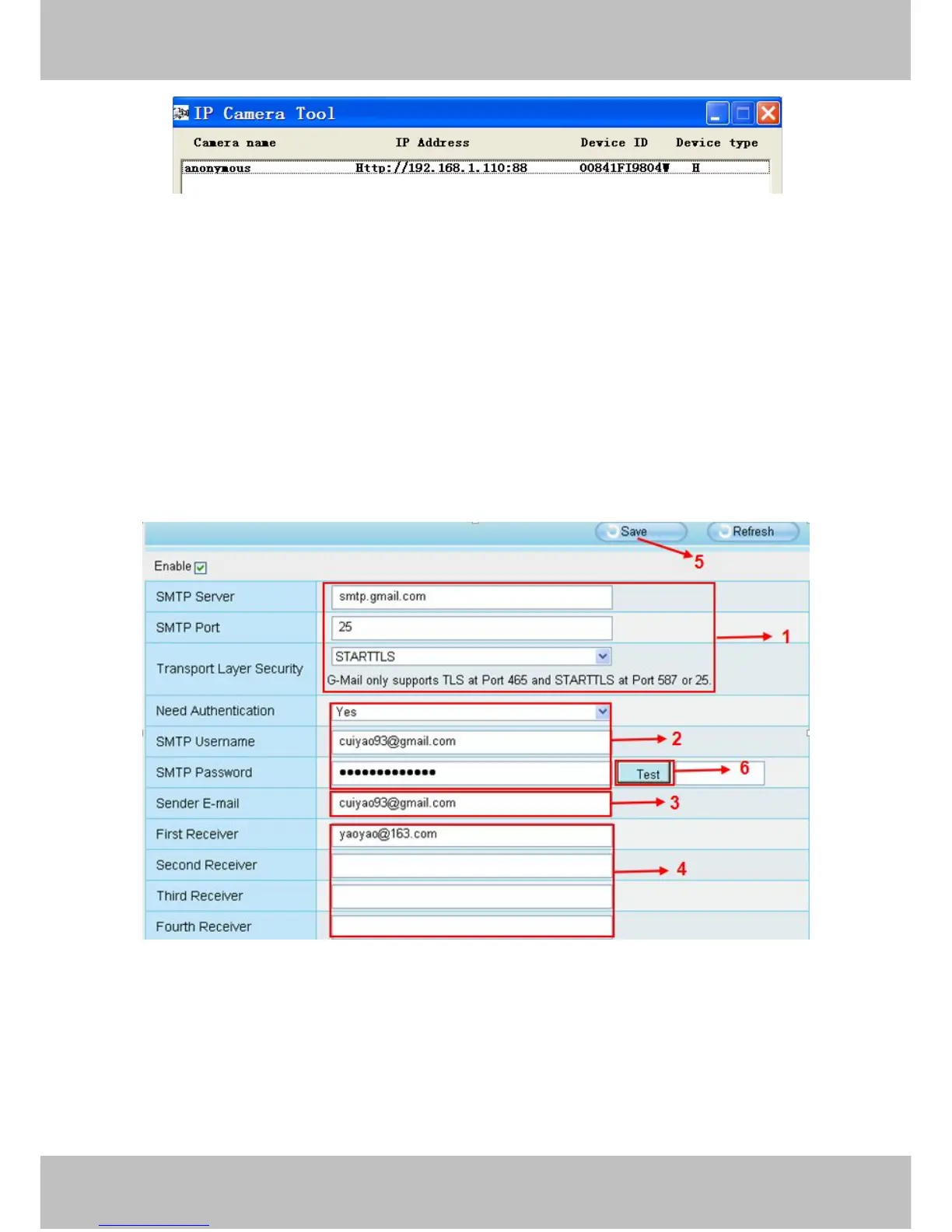
If you want the camera to send emails when motion has been detected, here Mail will need to be configured.
1-----SMTP Server/ Port /Transport Layer Security Enter SMTP server for sender. SMTP port is usually
set as 25. Some SMTP servers have their own port, such as 587 or 465, and Transport Layer Security usually
is None. If you use Gmail, Transport Layer Security must be set to TLS or STARTTLS and SMTP Port must be
set to 465 or 25 or 587, which port you choose should be decided by which Transport Layer Security you



 To Next Page