w
w
www
www
.foscam.
.foscam.
us
us
Foscam Digital Technologies LLC
Telephone: 1-800-930-0949
4.3 Basic Settings
This section allows you to configure your Camera Name, Camera Time, Mail, User Accounts and Multi-Device.
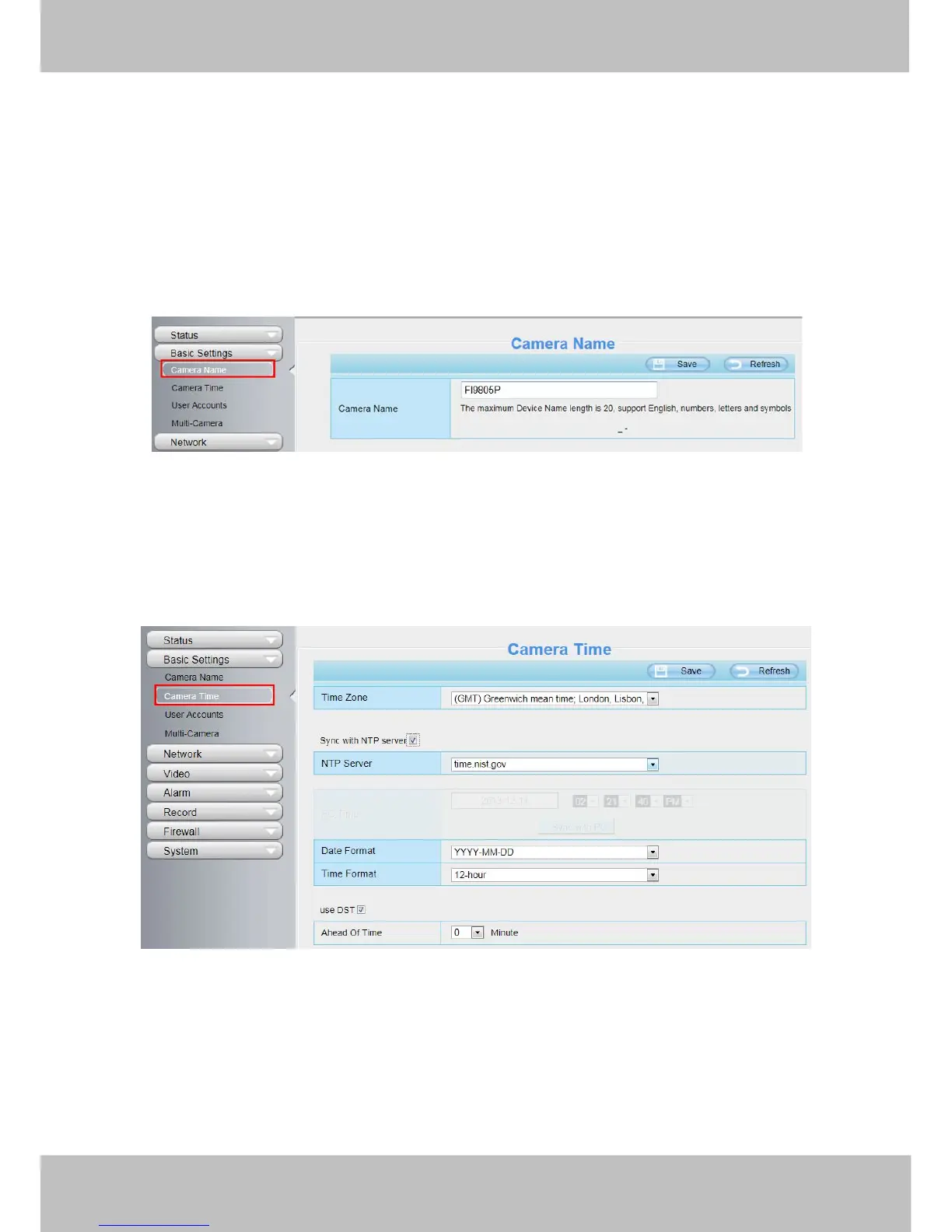
4.3.1 Camera Name
You can define a name for your camera here such as apple. Click Save to save your changes. The alias name
cannot contain special characters.
4.3.2 Camera Time
This section allows you to configure the settings of the internal system clocks for your camera.
Time Zone: Select the time zone for your region from the drop-down menu.
Sync with NTP server: Network Time Protocol will synchronize your camera with an Internet time server.
Choose the one that is closest to your camera.
Sync with PC: Select this option to synchronize the date and time of the Network Camera with your computer.
Manually: The administrator can enter the date and time manually. Please select the date and time format.
use DST: Select the use DST, then select the daylight saving time from the drop-down menu.



 To Next Page