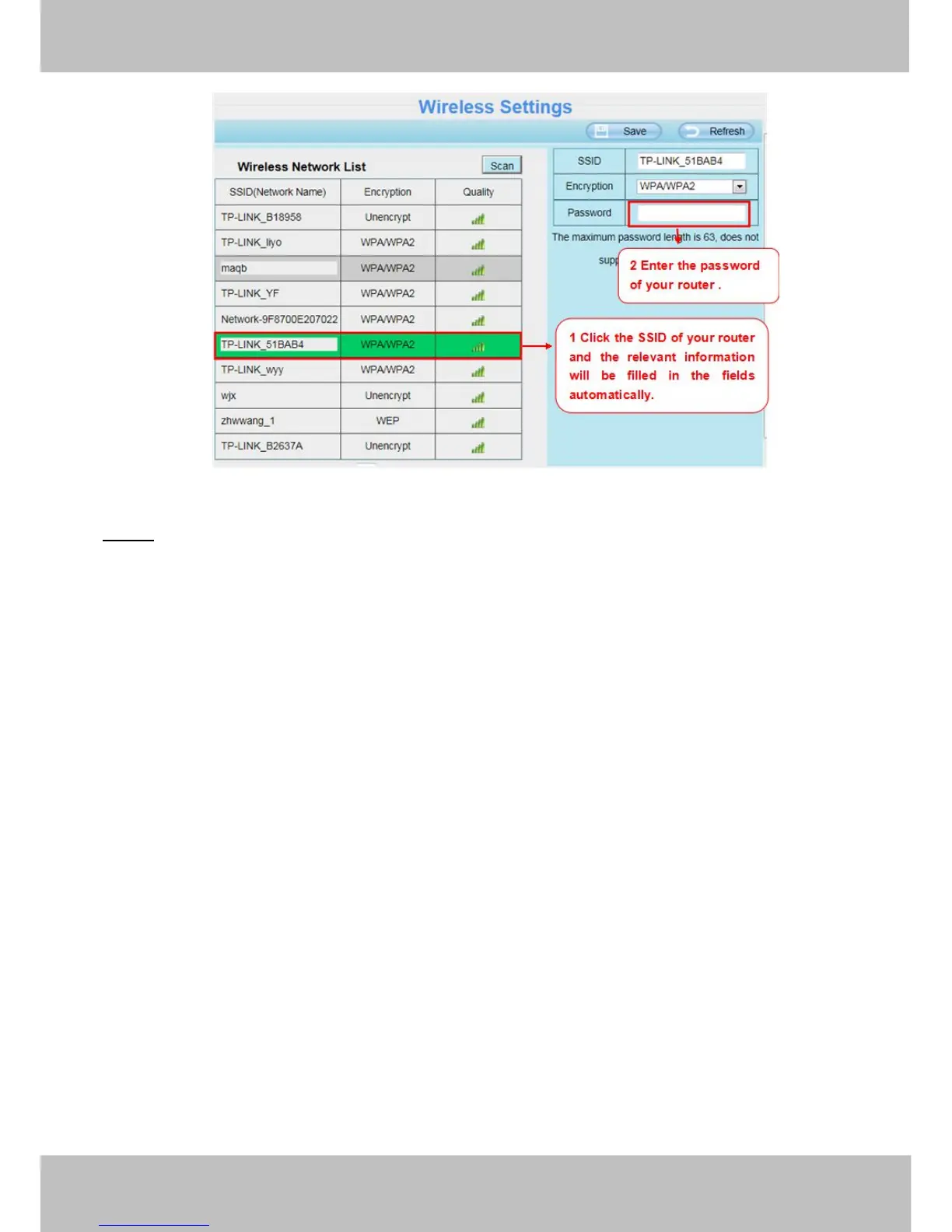
Step 3: Please click on the Save button after all settings have been entered and disconnect the network cable.
Never shut down the power of the camera until the IP camera is able to connect to the wireless network.
The LAN IP address will disappear on the window of IP Camera Tool when the camera is configuring a
wireless connection. Wait about 1 minute, the camera should obtain a wireless connection, and the LAN IP of
the camera will show again on the window of the IP Camera Tool. The IP address may have changed after the
camera receives a wireless connection; we recommend setting a static local IP address if this IP address
changes by right clicking the camera in IP Camera Tools, setting a static IP, and pushing OK (see
Figure3.35/3.36).
Congratulations! You have set up the wireless connection of the camera successfully.
NOTE:
If you fail to make a wireless connection, please refer to your seller or contact us directly for assistance.
4.4.3 PPPoE
If you are using a PPPoE connection, enable it and enter the User Name and Password for your PPPoE
account.



 To Next Page