w
w
www
www
.foscam.
.foscam.
us
us
Foscam Digital Technologies LLC
Telephone: 1-800-930-0949
FTP Mode: Here supports two modes: PORT and PASV.
Username/password: The FTP account and password.
Click Save to take effect.
Click Test to see if FTP has been successfully configured.
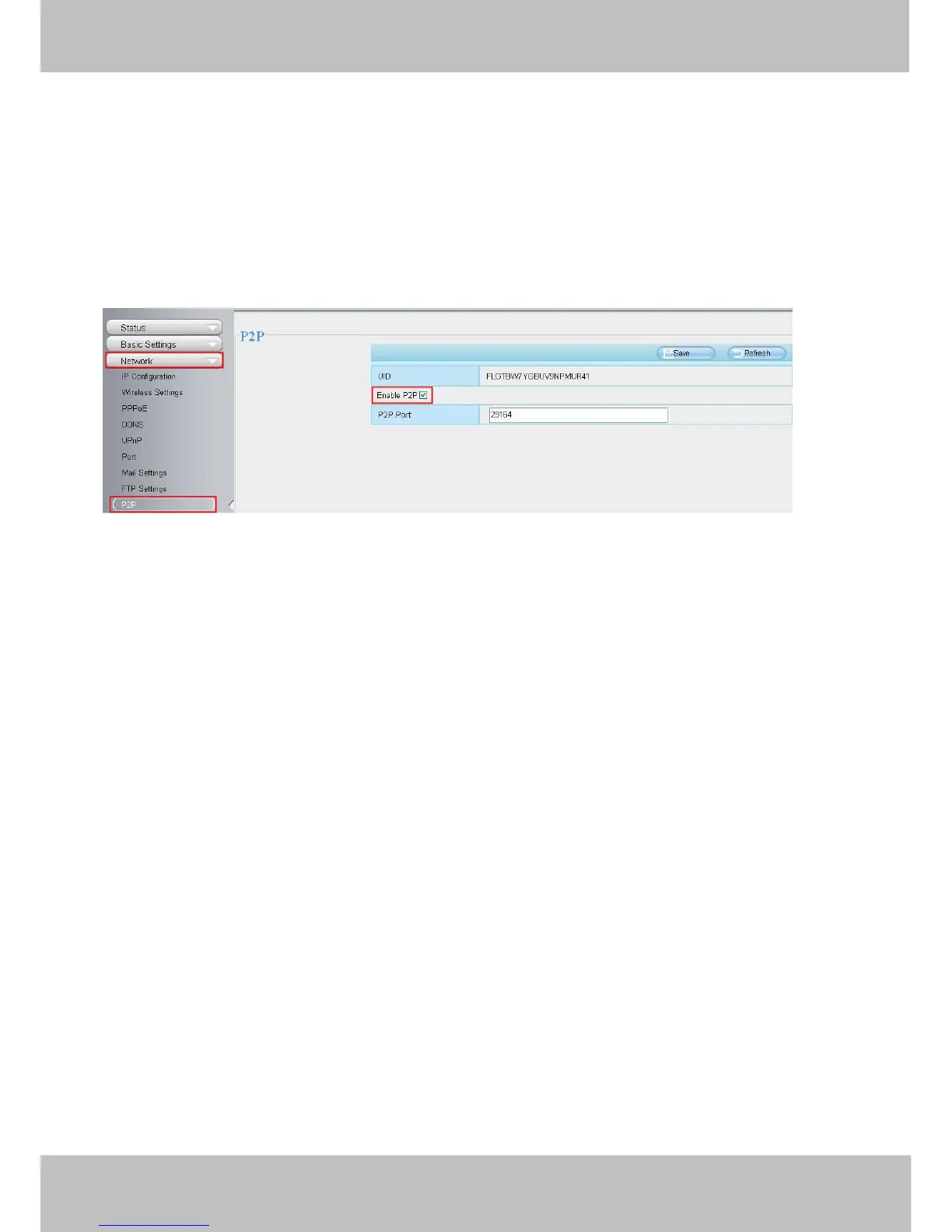
4.4.9 P2P
Access the camera by smart phone (Android or iOS operating system)
First of all, you need to open the P2P function of the camera at “Settings-->Network-->P2P.”
Search and install Foscam Viewer on Google Play and App Store for for Android and iOS devices.
If you want to know more details of the iOS APP or Android APP, see the iOS App User Manual or Android App
User Manual.
4.5 Video
This section allows you to configure Video stream settings, On screen display and Snapshot settings.
This section allows you to configure Video stream settings, On screen display and Snapshot settings.
4.5.1 Video Settings
There are two ways to set the stream video settings. They are main stream video settings and sub stream video settings.



 To Next Page