www.foscam.com
Shenzhen Foscam Intelligent Technology Co., Limited
Tel: 86 755 2674 5668 Fax: 86 755 2674 5168
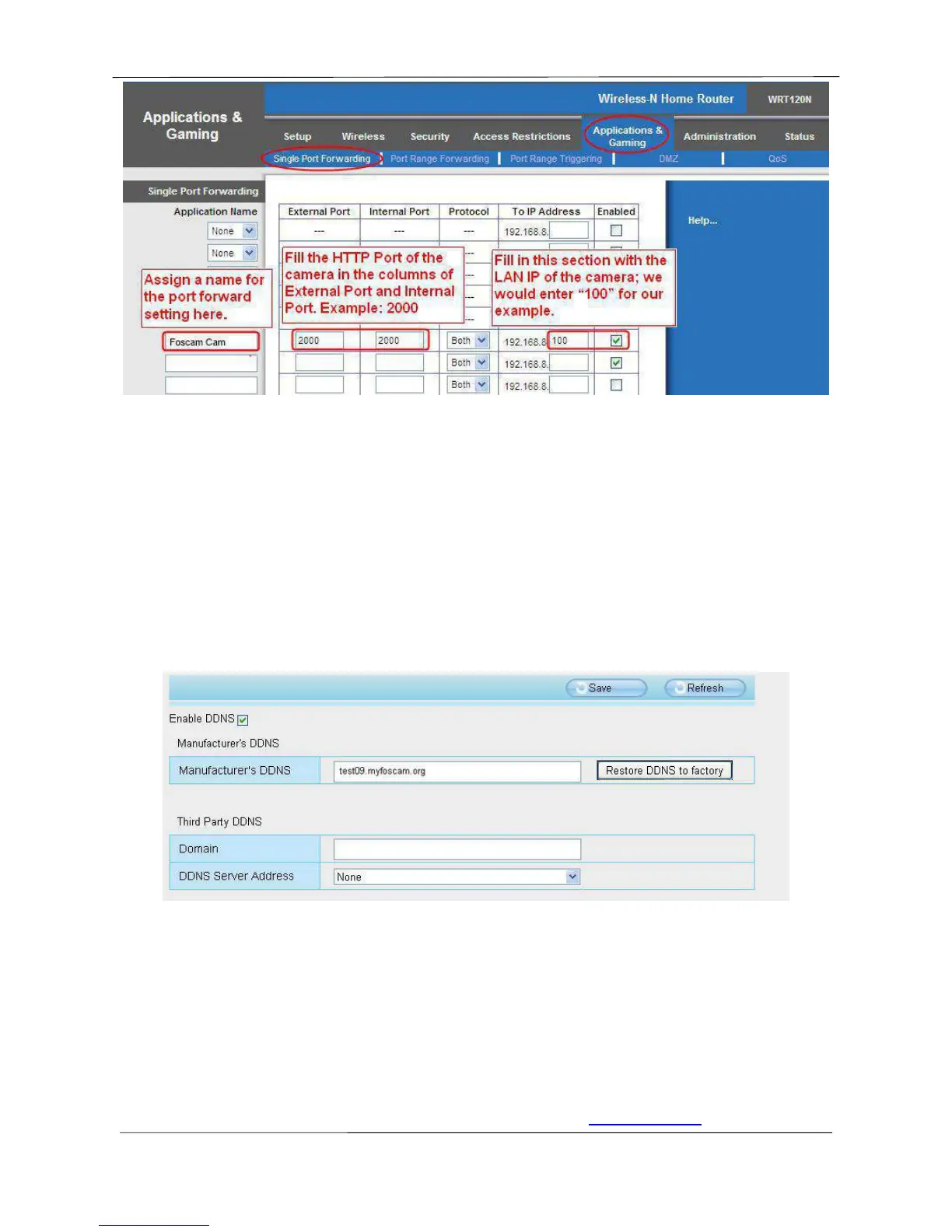
Figure 2.12
First method :
Use the embedded DDNS to access the camera via the Internet
Each Foscam camera has an embedded unique DDNS domain name, the format of this domain name is
xxxxxx.myfoscam.org. On the bottom of the camera, you can see the domain name sticker with this
information on it.
For example, we can use test09.myfoscam.org. In the camera, click Settings at the top, click “Network”
on the left, then click “DDNS” to get to the DDNS settings page. Here you can see the unique domain
name of your camera.
Figure 2.13
Now you can use “http://Domain name + HTTP Port” to access the camera via the Internet.
Take hostname test09.myfoscam.org and HTTP Port of 2000 for example, the URL link to access the
camera via the Internet would be http:// test09.myfoscam.org:2000.
Second method :
Use the Third party DDNS to access the camera via the Internet
Step 1 Please go to the third party DDNS website(such as www.no-ip.com) to create a free



 To Next Page