www.foscam.com
Shenzhen Foscam Intelligent Technology Co., Limited
Tel: 86 755 2674 5668 Fax: 86 755 2674 5168
4.7.5 SD Card Management
This camera supports SD Card and the max size of SD card must be under 32G.
When you plug in the SD card during the camera work process, please reboot the camera again, or else
the SD Card may be cannot work well.
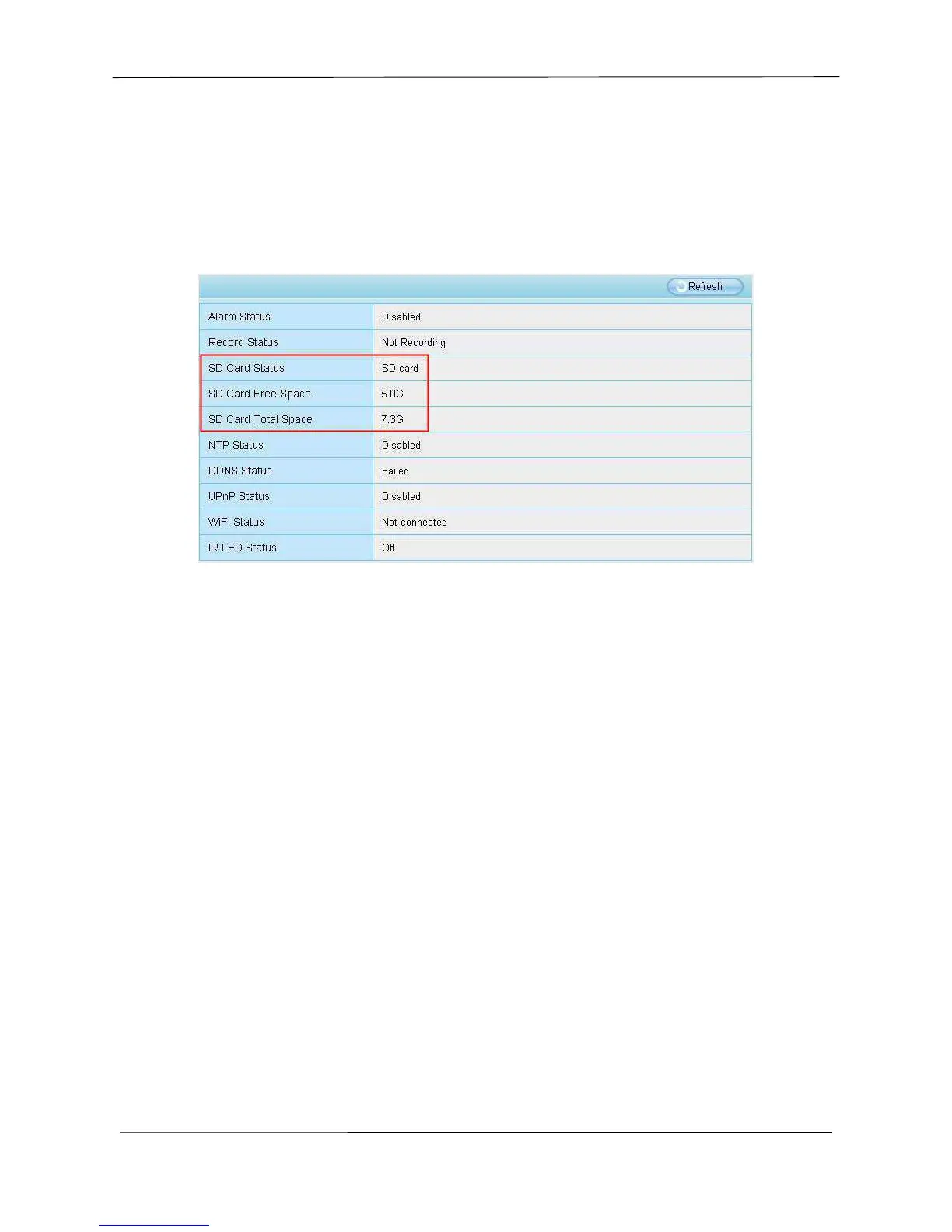
Go to the SettingsStatusDevice Status page, you can see the SD card status.
The default storage path of alarm record files is SD card, when the available size of SD card is less than
256M, the old record files will be deleted automatically.
NOTE: FI9818W does not support SD card.
4.8 PTZ
This page will allow you to change the pan/tilt speed and do cruise tracks settings.
4.8.1 Pan & Tilt Speed
There are five Pt speed types: very fast, fast, normal, slow and very slowly. Select the desired PTZ
speed type and click save button.
There are three zoom speed types: fast, normal, slow.
NOTE: only FI9826W and FI9826P have zoom function.



 To Next Page