www.foscam.com
Shenzhen Foscam Intelligent Technology Co., Limited
Tel: 86 755 2674 5668 Fax: 86 755 2674 5168
IE browserToolInternet PropertiesSecurityTrusted sitesSitesAdd
(2) Open IE browser, then right click, select “Run as administrator”
5.1.6 Subnet doesn’t match
Check whether your ipcamera in the same subnet of your computer. The step is Control Panel(Network
Connections (Dbclick Local Area Connections (Choose General(Properties. Check subnet mask, IP address
and gateways. When you set IP address please make sure they are in the same subnet. Otherwise you can't
access camera.
5.1.7 No Pictures Problems
The video streaming is transmitted by the ActiveX controller. If ActiveX controller isn’t installed correctly you
will see no video image. You can resolve this problem by this way:
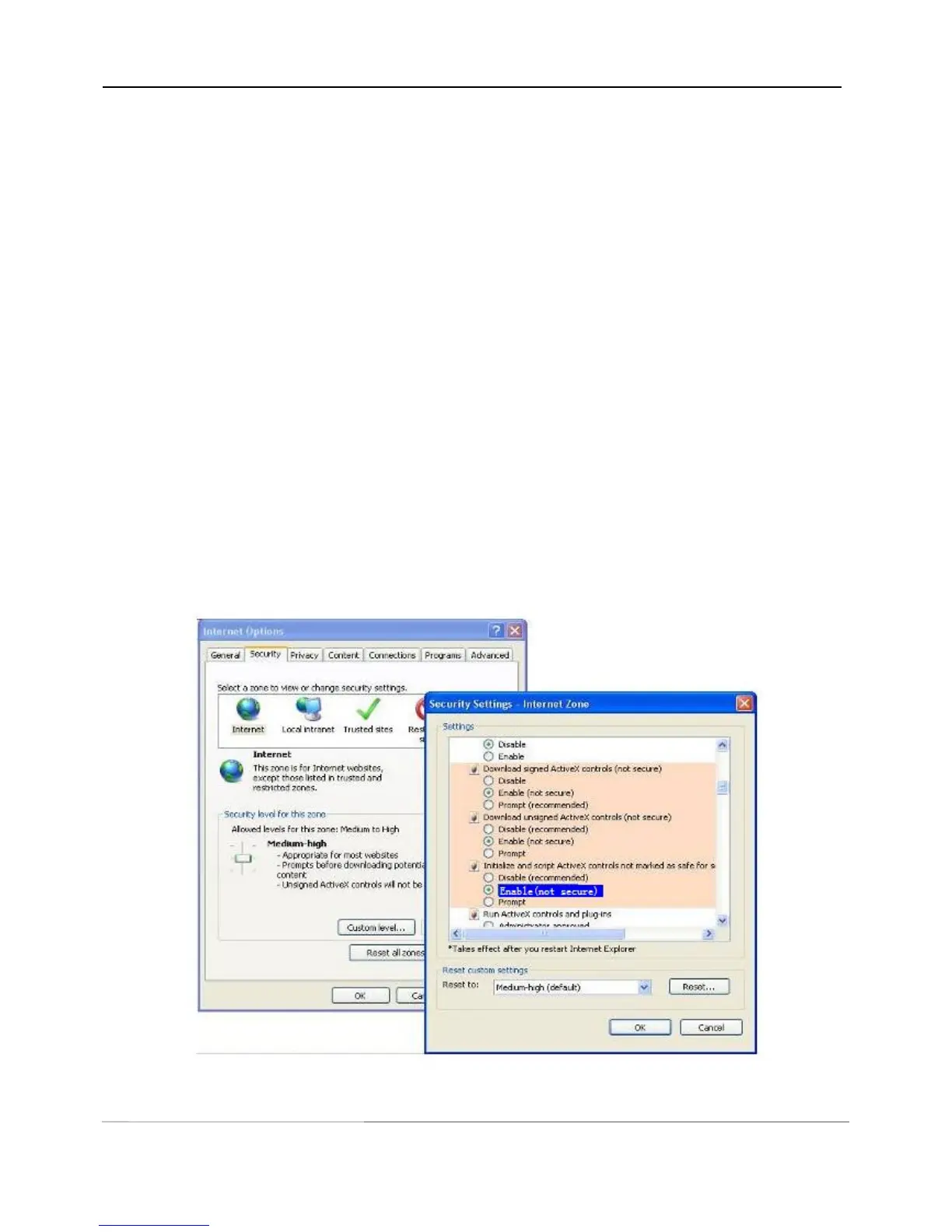
Download ActiveX controller and set the safety property of IE in the PC when you view it first time: IE
browser Tool Internet Proper Security Custom LevelActiveX control and Plug-ins. Three options of
front should be set to be “Enable”, The ActiveX programs read by the computer will be stored. As follows:
Enable: Download unsigned ActiveX controls
Enable: Initialize and script ActiveX controls not marked as safe
Enable: Run ActiveX controls and plug-ins
Figure 5.10



 To Next Page