4.2 Basic Settings
This section allows you to configure your Camera Name, Camera Time, Mail, User Accounts and
Multi-Camera.
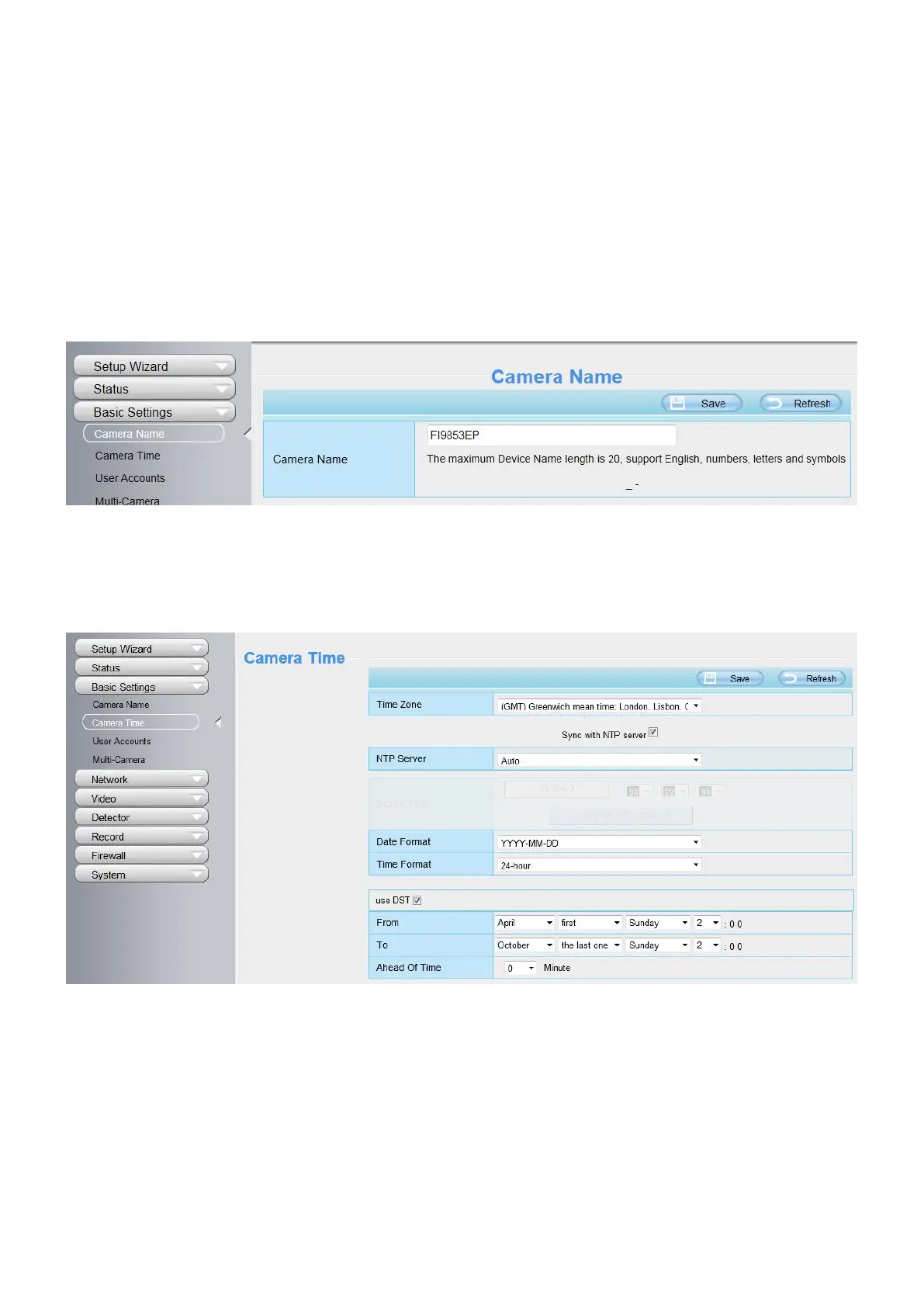
4.2.1 Camera Name
Default alias is anonymous. You can define a name for your camera here such as apple. Click Save to save
your changes. The alias name cannot contain special characters.
4.2.2 Camera Time
This section allows you to configure the settings of the internal system clocks for your camera.
Time Zone: Select the time zone for your region from the dropdown menu.
Sync with NTP server: Network Time Protocol will synchronize your camera with an Internet time server.
Choose the one that is closest to your camera.
Sync with PC: Select this option to synchronize the date and time of the Network Camera with your computer.
Manually: The administrator can enter the date and time manually. Note select the date and time format.
Use DST: Select the use DST (Daylight Saving Time, to set the clock ahead of the real-time), then set the start
time and end time of the DST, select the daylight saving time from the drop-down menu at last.


 To Next Page