EN
15
11 - Starting your Oven
Switching the oven on and offf
IMPORTANT
• The key does not stop the function.
• After switching off the oven, the cooling fan could continue
to operate until the inner parts of the oven have cooled
down.
Press
to switch the oven on and press again to switch it off.
The oven returns to standby mode.
Selecting the cooking mode
IMPORTANT
• Do not leave the door open for a long time during cooking.
• The door must be kept closed during the BROIL functions.
• Position the grill or grills on an appropriate level.
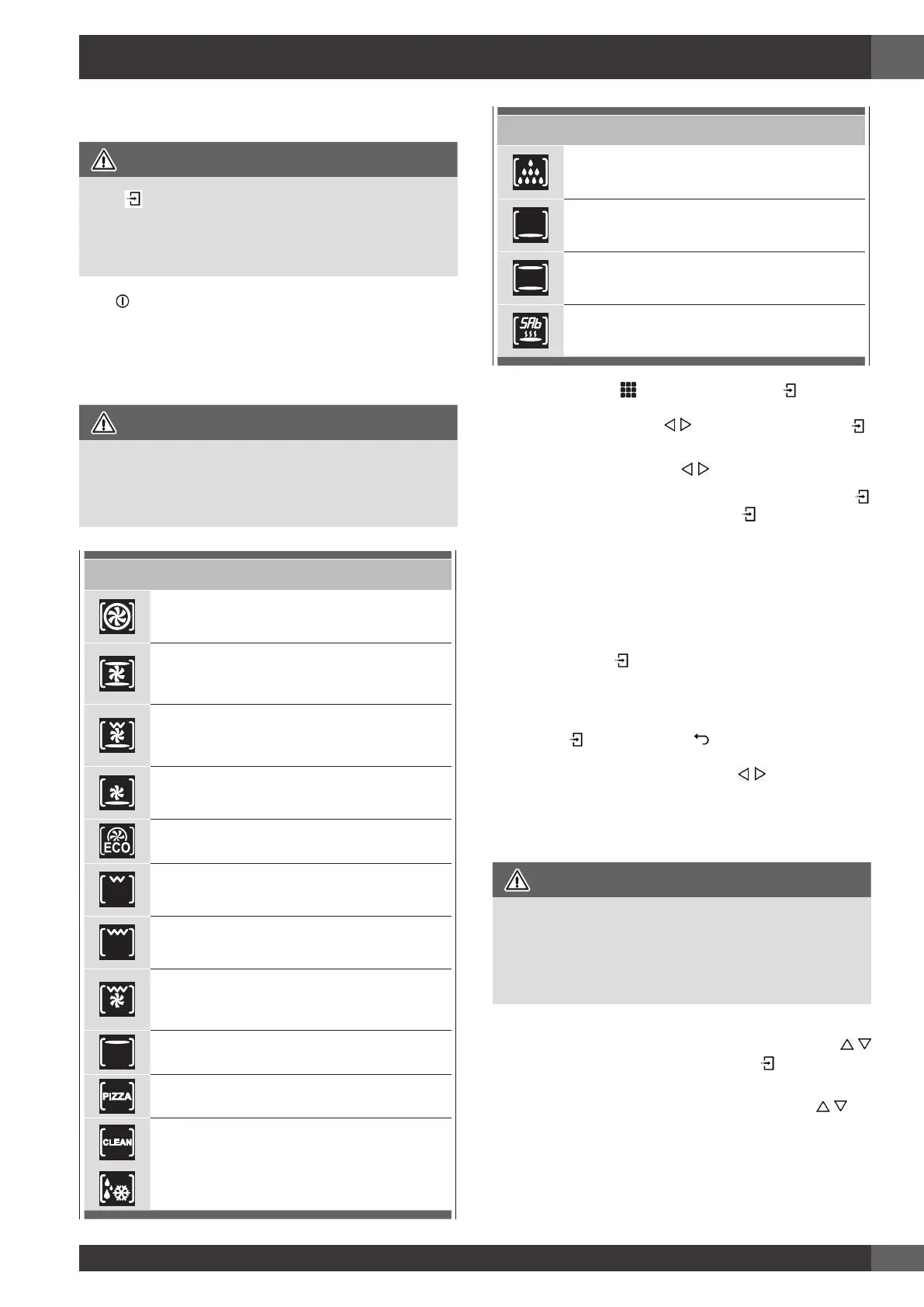
OVEN 60 cm
TRUE CONVECTION
(FAN HEAT)
CONVECTION ROAST
(TURBO CONVENTIONAL HEAT)
CONVECTION GRILL
(TURBO GRILL & BASE HEAT)
CONVECTION BAKE
(TURBO BASE HEAT)
ECO BAKING
BROIL
(ECO GRILL)
DOUBLE GRILL
(FULL GRILL)
DOUBLE CONVECTION GRILL
(TURBO GRILL)
UPPER BAKING
PIZZA
CLEAN
DEFROST
OVEN 60 cm
DEHYDRATE
BAKE
(BASE HEAT)
ROAST
(CONVENTIONAL HEAT)
SABBATH
On some models
1. Select the icon
and press the key Select the
appropriate cooking mode according to the food to be
cooked using the arrows
and confirm with the key .
2. On this display page, it is still possible to change the
cooking mode by using the
keys.
3. If the proposed temperature is correct, confirm with the
key to start cooking, otherwise, if the key is not pressed
within 10 seconds, the oven switches to automatic mode
and the cooking mode icon becomes animated.
Changing the cooking mode
1. During untimed cooking, a cooking pause can be set
by pressing the key. All the settings of the suspended
cooking operation remain stored and can be reactivated by
pressing the same key again.
2. To change the cooking mode while the oven is working,
press the
key and then the , key. At this point, another
cooking mode can be selected from among those available
in the group by means of the arrows .
Changing temperature
IMPORTANT
• In all the cooking modes where the temperature is fixed,
this is not shown on the screen.
• At the end of a function, the display screen shows the
residual compartment heat temperature from the standby
page.
1. From the cooking mode preview display page, the
temperature can be changed by means of the arrows
subsequently confirming by means of the key.
2. Once cooking has started, the temperature can in any case
be changed, at any time, by means of the arrows
.


 To Next Page