EasyManua.ls Logo

Fostex 280 - Punch-In;Out Recording Techniques; What is Punch-In;Out?; Manual Punch-In;Out Recording Methods

Fostex 280
28 pages
Print Icon
To Next Page IconTo Next Page
To Previous Page IconTo Previous Page
Loading...
<THE
AUTO
PUNCH-IN/OUT
FUNCTION
>
WHAT
IS
PUNCH-IN/OUT?
It
is
the
process
of
re-recording
over
a
portion
of
a
pre¬
recorded
track.
The
typical
example
is
to
fix
a
bad
note
in
an
otherwise
acceptable
performance.
Rather
than
record
the
entire
performance
all
over
again,
it's
often
easier
to
fix
the
mistakes).
Other
uses
of
this
technique
are
to
correct
minor
timing
errors
(someone
starts
too
soon
or
too
late)
or
to
eliminate
unpleasant
sounds
from
an
open
mic
(a
cough
or
a
breath
intake).
You
can
also
use
this
technique
to
take
advantage
of
unused
portions
of
a
track.
For
example,
let’s
say
the
lead
guitar
part
does
not
play
continuously
from
the
beginning
to
the
end
of
the
song.
You
might
want
to
add
some
percussion
effects
in
the
sections
where
the
lead
guitar
is
silent.
The
punch-in/out
recording
process
is
just
the
way
to
do
this.
The
process
can
be
made
much
easier
with
the
280's
auto¬
matic
functions,
but
whether
you
employ
this
technique
manually
or
automatically,
you
must
be
very
careful
that
your
timing
is
pin-point
accurate
METHODS
OF
MANUAL
PUNCH-IN/OUT
RECORDING
NOTE:
Be
sure
that
the
AUTO
REC
command
key
is
disen¬
gaged
(LED
is
off).
In
the
following
examples,
track
1
is
used
for
the
punch-in
out
process.
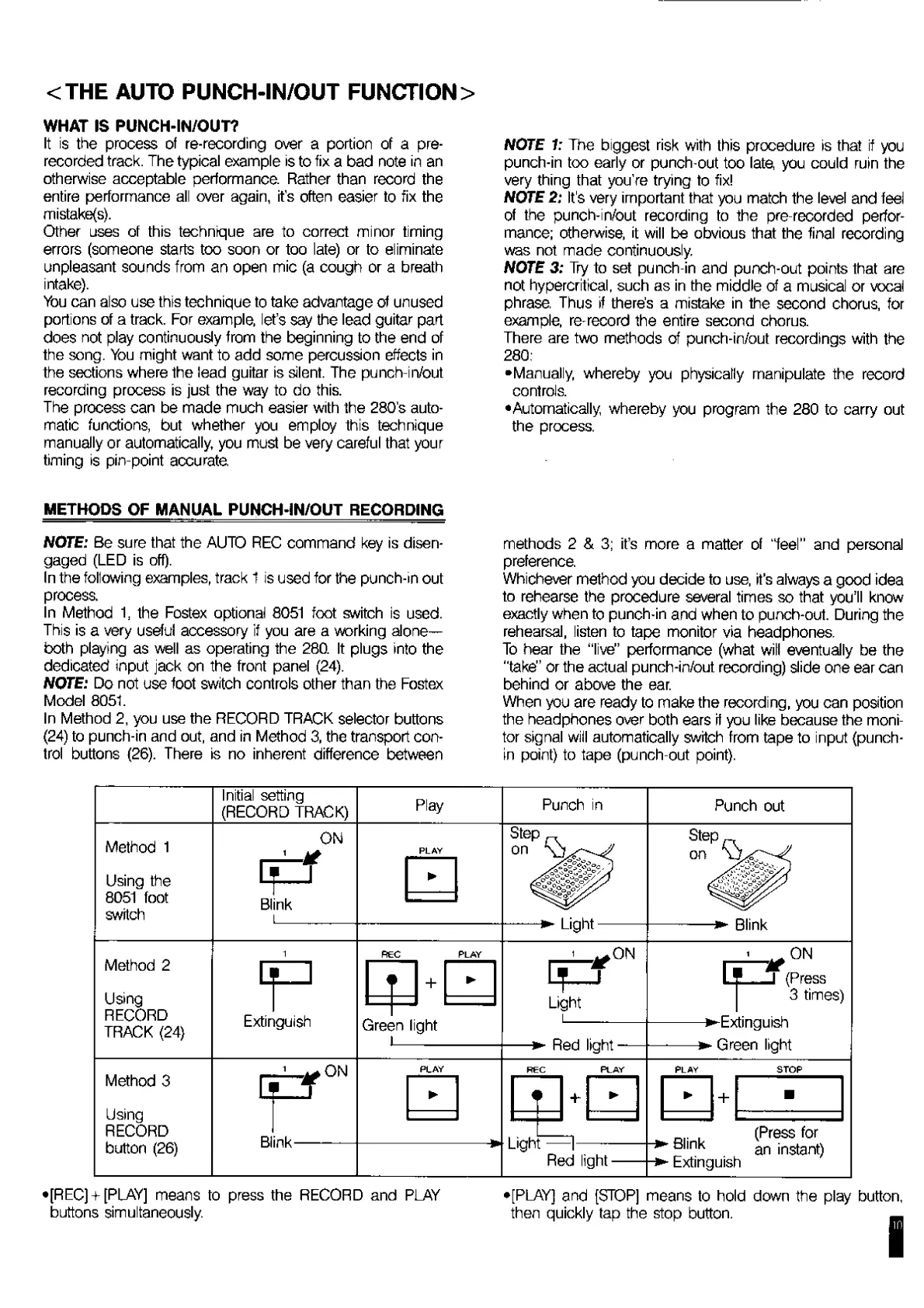
In
Method
1,
the
Fostex
optional
8051
foot
switch
is
used.
This
is
a
very
useful
accessory
if
you
are
a
working
alone—
both
playing
as
well
as
operating
the
280.
It
plugs
into
the
dedicated
input
jack
on
the
front
panel
(24).
NOTE:
Do
not
use
foot
switch
controls
other
than
the
Fostex
Model
8051.
In
Method
2,
you
use
the
RECORD
TRACK
selector
buttons
(24)
to
punch-in
and
out,
and
in
Method
3,
the
transport
con¬
trol
buttons
(26).
There
is
no
inherent
difference
between
NOTE
1:
The
biggest
risk
with
this
procedure
is
that
if
you
punch-in
too
early
or
punch-out
too
late
you
could
ruin
the
very
thing
that
you're
trying
to
fix!
NOTE
2:
It's
very
important
that
you
match
the
level
and
feel
of
the
punch-in/out
recording
to
the
pre-recorded
perfor¬
mance;
otherwise,
it
will
be
obvious
that
the
final
recording
was
not
made
continuously.
NOTE
3:
Try
to
set
punch-in
and
punch-out
points
that
are
not
hypercritical,
such
as
in
the
middle
of
a
musical
or
vocal
phrase.
Thus
if
there’s
a
mistake
in
the
second
chorus,
for
example,
re-record
the
entire
second
chorus.
There
are
two
methods
of
punch-in/out
recordings
with
the
280:
•Manually,
whereby
you
physically
manipulate
the
record
controls.
•Automatically,
whereby
you
program
the
280
to
carry
out
the
process.
methods
2
&
3;
it’s
more
a
matter
of
“feel’’
and
personal
preference.
Whichever
method
you
decide
to
use,
it’s
always
a
good
idea
to
rehearse
the
procedure
several
times
so
that
you’ll
know
exactly
when
to
punch-in
and
when
to
punch-out.
During
the
rehearsal,
listen
to
tape
monitor
via
headphones.
To
hear
the
“live"
performance
(what
will
eventually
be
the
"take"
or
the
actual
punch-in/out
recording)
slide
one
ear
can
behind
or
above
the
ear.
When
you
are
ready
to
make
the
recording,
you
can
postion
the
headphones
over
both
ears
if
you
like
because
the
moni¬
tor
signal
will
automatically
switch
from
tape
to
input
(punch-
in
point)
to
tape
(punch-out
point).
•[REC]
+
[PLAY]
means
to
press
the
RECORD
and
PLAY
buttons
simultaneously.
•[PLAY]
and
[STOP]
means
to
hold
down
the
play
button,
then
quickly
tap
the
stop
button.
_
in

Related product manuals