EasyManua.ls Logo

Fostex 280 - Automatic Punch-In;Out Recording

Fostex 280
28 pages
Print Icon
To Next Page IconTo Next Page
To Previous Page IconTo Previous Page
Loading...
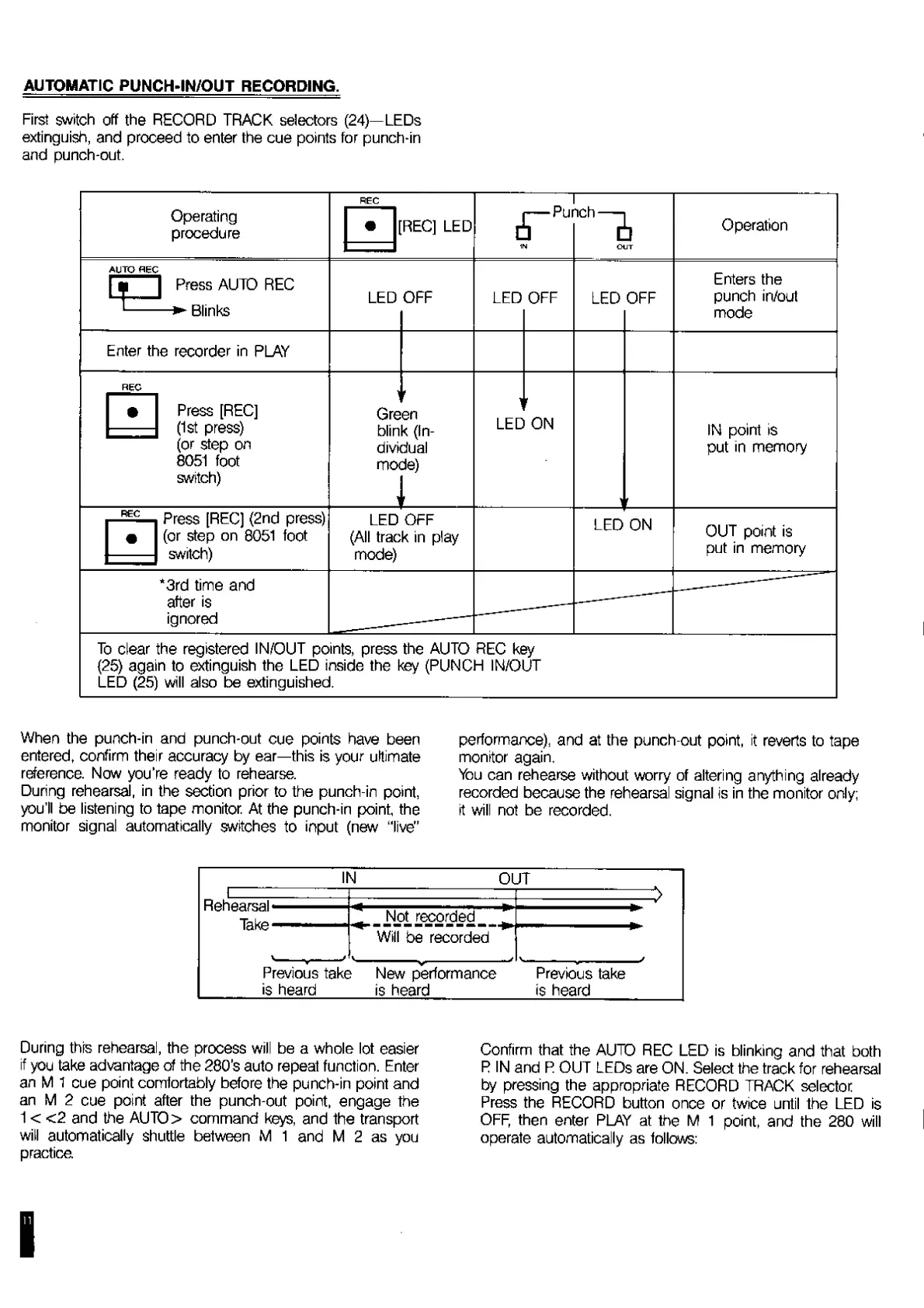
AUTOMATIC
PUNCH-IN/OUT
RECORDING.
First
switch
off
the
RECORD
TRACK
selectors
(24)—LEDs
extinguish,
and
proceed
to
enter
the
cue
points
for
punch-in
and
punch-out.
Operating
procedure
|n
Out
Operation
AUTO
REC
["i
|
Press
AUTO
REC
’-—
Blinks
LED
OFF
LED
OFF
LED
OFF
_
Enters
the
punch
in/out
mode
Enter
the
recorder
in
PLAY
g
g
Press
[REC]
(1st
press)
(or
step
on
8051
foot
switch)
Gre
blin
divi
mo
1
sen
k
(In¬
dual
de)
_
LED
r
ON
r
IN
point
is
put
in
memory
REC
Press
[REC]
(2nd
press)
(or
step
on
8051
foot
switch)
LED
OFF
(All
track
in
play
mode)
LED
ON
OUT
point
is
put
in
memory
‘3rd
time
and
after
is
ignored
________
-
To
clear
the
registered
IN/OUT
points,
press
the
AUTO
REC
key
(25)
again
to
extinguish
the
LED
inside
the
key
(PUNCH
IN/OUT
LED
(25)
will
also
be
extinguished.
When
the
punch-in
and
punch-out
cue
points
have
been
entered,
confirm
their
accuracy
by
ear—this
is
your
ultimate
reference.
Now
you’re
ready
to
rehearse.
During
rehearsal,
in
the
section
prior
to
the
punch-in
point,
you'll
be
listening
to
tape
monitor.
At
the
punch-in
point,
the
monitor
signal
automatically
switches
to
input
(new
‘‘live’’
performance),
and
at
the
punch-out
point,
it
reverts
to
tape
monitor
again.
You
can
rehearse
without
worry
of
altering
anything
already
recorded
because
the
rehearsal
signal
is
in
the
monitor
only;
it
will
not
be
recorded.
II
4
OUT
'
|
1
.
-2
*
Not
recorded
*
\
_
*
Will
be
recorded
V__
J
V
__
J
Previous
take
New
performance
Previous
take
is
heard
is
heard
is
heard
During
this
rehearsal,
the
process
will
be
a
whole
lot
easier
if
you
take
advantage
of
the
280’s
auto
repeal
function.
Enter
an
M
1
cue
point
comfortably
before
the
punch-in
point
and
an
M
2
cue
point
after
the
punch-out
point,
engage
the
1
<
<2
and
the
AUTO>
command
keys,
and
the
transport
will
automatically
shuttle
between
M
1
and
M
2
as
you
practice
Confirm
that
the
AUTO
REC
LED
is
blinking
and
that
both
R
IN
and
R
OUT
LEDs
are
ON.
Select
the
track
for
rehearsal
by
pressing
the
appropriate
RECORD
TRACK
selector
Press
the
RECORD
button
once
or
twice
until
the
LED
is
OFF,
then
enter
PLAY
at
the
M
1
point,
and
the
280
will
operate
automatically
as
follows:

Related product manuals