EasyManua.ls Logo

Fostex 280 - Page 13

Fostex 280
28 pages
Print Icon
To Next Page IconTo Next Page
To Previous Page IconTo Previous Page
Loading...
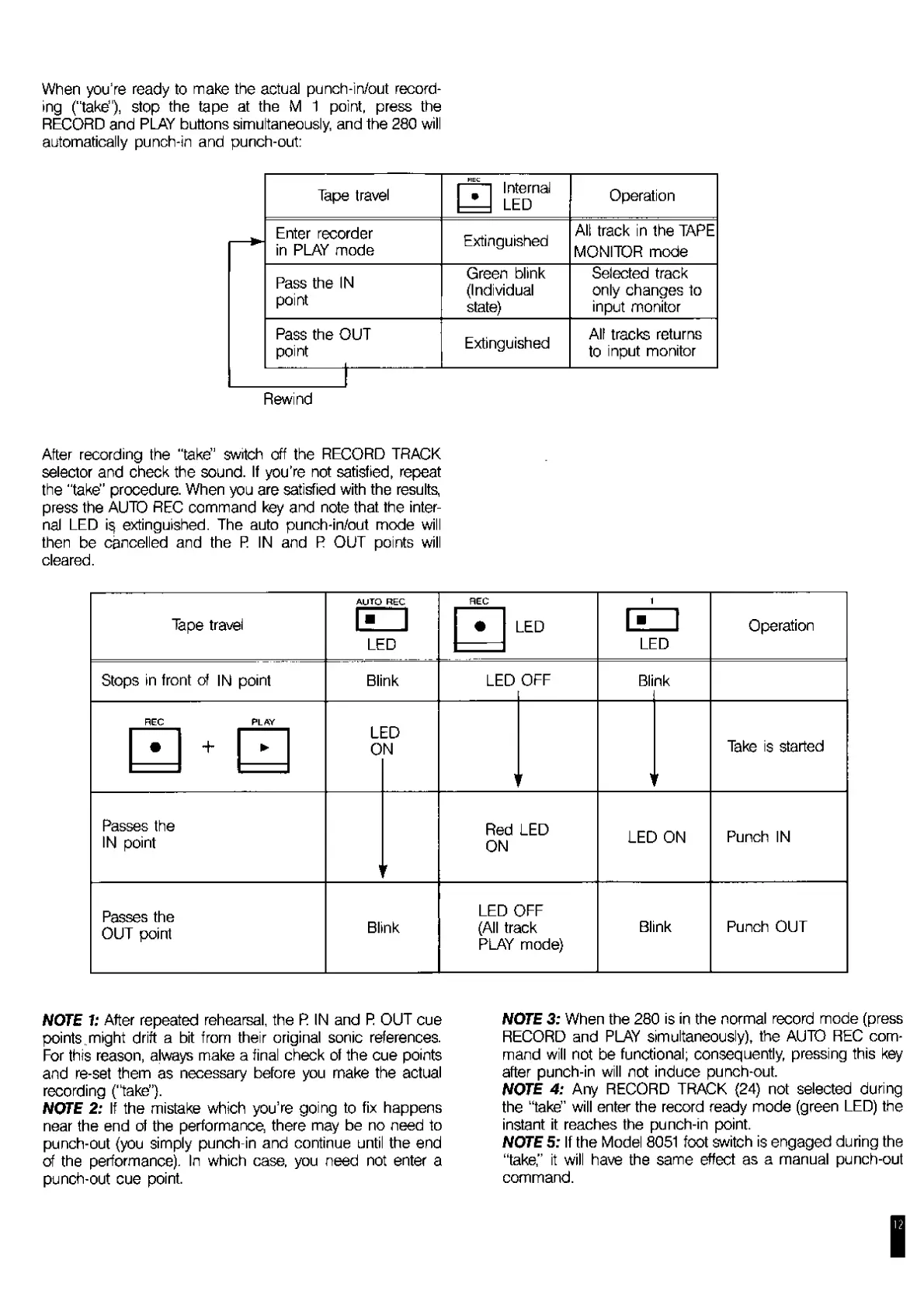
When
you’re
ready
to
make
the
actual
punch-in/out
record¬
ing
(“take”),
stop
the
tape
at
the
M
1
point,
press
the
RECORD
and
PLAY
buttons
simultaneously,
and
the
280
will
automatically
punch-in
and
punch-out:
Tape
travel
HEC
|
_
|
Internal
1—1
LED
Operation
Enter
recorder
in
PLAY
mode
Extinguished
All
track
in
the
TAPE
MONITOR
mode
Pass
the
IN
point
Green
blink
(Individual
state)
Selected
track
only
changes
to
input
monitor
Pass
the
OUT
point
___
J-
Extinguished
All
tracks
returns
to
input
monitor
Rewind
After
recording
the
"take”
switch
off
the
RECORD
TRACK
selector
and
check
the
sound.
If
you’re
not
satisfied,
repeat
the
"take"
procedure.
When
you
are
satisfied
with
the
results,
press
the
AUTO
REC
command
key
and
note
that
the
inter¬
nal
LED
extinguished.
The
auto
punch-in/out
mode
will
then
be
cancelled
and
the
R
IN
and
R
OUT
points
will
cleared.
Tape
travel
AUTO
REC
im
LED
REC
LED
ezi
LED
Operation
Stops
in
front
of
IN
point
Blink
LED
OFF
Bli
nk
REC
PLAY
1
r
1
r
Take
is
started
+
Lt
0
zU
Nl
Passes
the
IN
point
1
Red
LED
ON
LED
ON
Punch
IN
Passes
the
OUT
point
Blink
LED
OFF
(All
track
PLAY
mode)
Blink
Punch
OUT
WOTiE
1:
After
repeated
rehearsal,
the
R
IN
and
R
OUT
cue
points
..might
drift
a
bit
from
their
original
sonic
references.
For
this
reason,
always
make
a
final
check
of
the
cue
points
and
re-set
them
as
necessary
before
you
make
the
actual
recording
('lake”}.
NOTE
2:
If
the
mistake
which
you’re
going
to
fix
happens
near
the
end
of
the
performance,
there
may
be
no
need
to
punch-out
(you
simply
punch-in
and
continue
until
the
end
of
the
performance).
In
which
case,
you
need
not
enter
a
punch-out
cue
point.
wore
3:
When
the
280
is
in
the
normal
record
mode
(press
RECORD
and
PLAY
simultaneously),
the
AUTO
REC
com¬
mand
will
not
be
functional;
consequently,
pressing
this
key
after
punch-in
will
not
induce
punch-out.
Wore
4:
Any
RECORD
TRACK
(24)
not
selected
during
the
“take”
will
enter
the
record
ready
mode
(green
LED)
the
instant
it
reaches
the
punch-in
point.
WOTE
5:
If
the
Model
8051
foot
switch
is
engaged
during
the
“take,"
it
will
have
the
same
effect
as
a
manual
punch-out
command.

Related product manuals