EasyManua.ls Logo

Fostex 350 - MIXDOWN

Fostex 350
18 pages
Print Icon
To Next Page IconTo Next Page
To Previous Page IconTo Previous Page
Loading...
The
AUX
buss
of
the
mixer
is
used
for
this
purpose.
The
technique
employed
is
similar
to
that
used
in
much
larger
consoles,
and
it's
use
should
be
clearly
understood.
During
overdub,
the
stereo
Aux
buss
is
used
for
multichannel
monitoring.
A.
Select
"Aux
buss
L/R”
only
on
the
monitor
select
buttons
(11)
and
use
the
monitor
output
to
drive
an
external
power
amplifier
or
listen
using
the
headphone
amplifier.
B.
Move
the
"Aux
Buss"
input
selector
(5)
to
the
"TAPE"
position,
on
channels
1
to
4
for
four
track
or
on
all
channels
1
to
8
for
eight
track
monitoring.
You
can
now
use
the
aux
buss
and
the
eight
associated
gain
and
pan-pots
as
a
"monitor
Mix”
section.
C.
This
method
of
operation
relies
on
the
fact
that
most
tape
machines
that
are
likely
to
be
operated
with
the
Model
350
(including
Fostex
Recorders)
offer
an
automatic
monitor
facil¬
ity.
This
switches
the
signal
at
the
recorder
output
jacks,
depending
on
the
running
mode
of
that
tape
recorder
track
as
follows:
(i)
Input
signal
applied:
If
the
track
is
switched
to
record.
(ii)
Sync
playback
signal:
If
the
tape
recorder
is
running
and
any
other
track
is
switched
to
record,
(iii)
Playback
signal:
If
the
tape
recorder
is
set
to
play,
and
no
tracks
are
set
to
record.
If
this
automatic
monitor
facility
is
not
available,
it
may
be
necessary
to
switch
the
"monitor
select"
on
the
tape
recorder
to
apply
the
correct
signal
to
the
corresponding
tape
recorder
output.
D.
This
arrangement
now
provides
the
correct
signal
whether
live
or
recorded
at
the
appropriate
aux
"gain"
pot
(6)
on
each
channel.
Using
the
corresponding
pan-pots
you
can
create
a
stereo
"monitor
mix"
of
both
what
is
already
recorded
and
what
you
are
recording.
IMPORTANT:
While
this
created
"monitor
mix"
section
is
located
within
similarly
numbered
input
channels,
it
is,
in
this
mode,
entirely
separate
from
those
input
channels
(see
block
diagram).
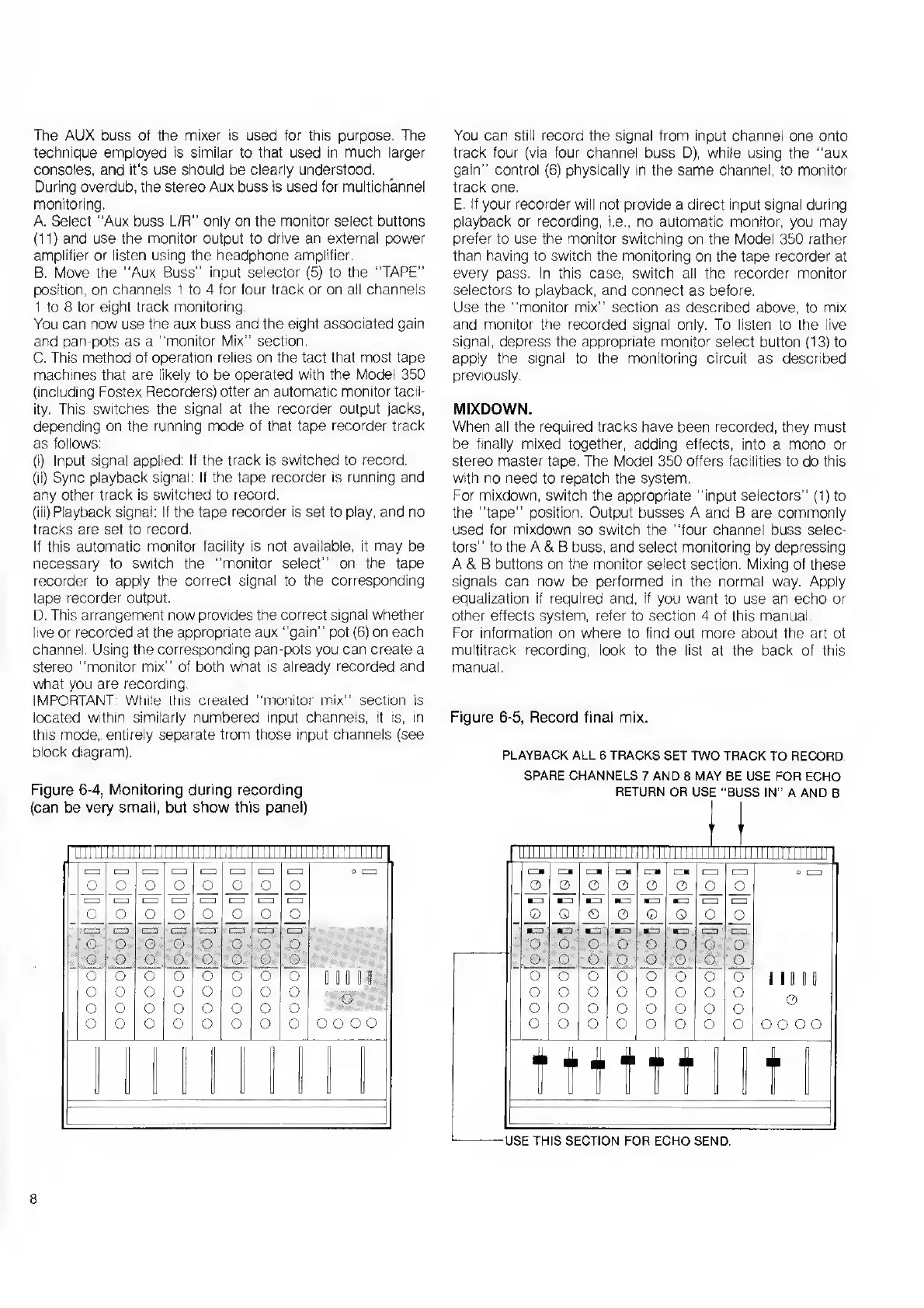
Figure
6-4,
Monitoring
during
recording
(can
be
very
small,
but
show
this
panel)
TILL
im
1111
mu
mn
HH
1111111111111
1-
1
1=1
1
1
r—i
mm
mm
mm
mm
o
c=
O
o
0
0
o
o
0
o
cm
mm
mm
mm
cm
mm
mm
0
o
o
0
o
o
o
o
cm
cm
cm
mm
r—i
mm
Lm
mm
0
O
o
O
O
o
O
o
Y
o
O
o
O
o
o
O
o
$
•«•
j
S
*
*
o
o
o
o
o
o
O
0
D
D
0
D
0
o
o
o
o
o
o
o
o
o
o
o
o
o
o
o
o
o
o
o
o
o
o
o
o
O
O
0.0
You
can
still
record
the
signal
from
input
channel
one
onto
track
four
(via
four
channel
buss
D),
while
using
the
"aux
gain"
control
(6)
physically
in
the
same
channel,
to
monitor
track
one.
E.
I
f
your
recorder
will
not
provide
a
direct
input
signal
during
playback
or
recording,
i.e.,
no
automatic
monitor,
you
may
prefer
to
use
the
monitor
switching
on
the
Model
350
rather
than
having
to
switch
the
monitoring
on
the
tape
recorder
at
every
pass.
In
this
case,
switch
all
the
recorder
monitor
selectors
to
playback,
and
connect
as
before.
Use
the
"monitor
mix"
section
as
described
above,
to
mix
and
monitor
the
recorded
signal
only.
To
listen
to
the
live
signal,
depress
the
appropriate
monitor
select
button
(13)
to
apply
the
signal
to
the
monitoring
circuit
as
described
previously.
MIXDOWN.
When
all
the
required
tracks
have
been
recorded,
they
must
be
finally
mixed
together,
adding
effects,
into
a
mono
or
stereo
master
tape.
The
Model
350
offers
facilities
to
do
this
with
no
need
to
repatch
the
system.
For
mixdown,
switch
the
appropriate
"input
selectors”
(1)
to
the
"tape"
position.
Output
busses
A
and
B
are
commonly
used
for
mixdown
so
switch
the
"four
channel
buss
selec¬
tors"
to
the
A
&
B
buss,
and
select
monitoring
by
depressing
A
&
B
buttons
on
the
monitor
select
section.
Mixing
of
these
signals
can
now
be
performed
in
the
normal
way.
Apply
equalization
if
required
and,
if
you
want
to
use
an
echo
or
other
effects
system,
refer
to
section
4
of
this
manual.
For
information
on
where
to
find
out
more
about
the
art
of
multitrack
recording,
look
to
the
list
at
the
back
of
this
manual.
Figure
6-5,
Record
final
mix.
PLAYBACK
ALL
6
TRACKS
SET
TWO
TRACK
TO
RECORD.
SPARE
CHANNELS
7
AND
8
MAY
BE
USE
FOR
ECHO
RETURN
OR
USE
"BUSS
IN"
A
AND
B
n
hi
11
ii
ii
i
llll
III!
II
llll
11
ill
iLLLLil
LLJILLLIlill
1
ecu
HZ*
[=
ca
emi
cmi
mm
mm
o
cm
o
0
0
0
0
0
0
o
m
m
m
m
m
m
mm
mm
0
Q
0
0
0
Q
o
o
*m
m
m
m
m
*m
[—1
mm
o
o
o
o
o
0
o
o
o
o
o
o
o
o
o
o
0
o
o
o
o
o
o
o
i
mo
o
o
o
o
o
o
o
o
o
o
o
o
o
o
o
o
o
o
o
o
o
o
o
o
o
o
o
o
ttttt
-USE
THIS
SECTION
FOR
ECHO
SEND.
8

Related product manuals