EasyManua.ls Logo

Fostex 350 - AV PRODUCTION;DISCO APPLICATIONS

Fostex 350
18 pages
Print Icon
To Next Page IconTo Next Page
To Previous Page IconTo Previous Page
Loading...
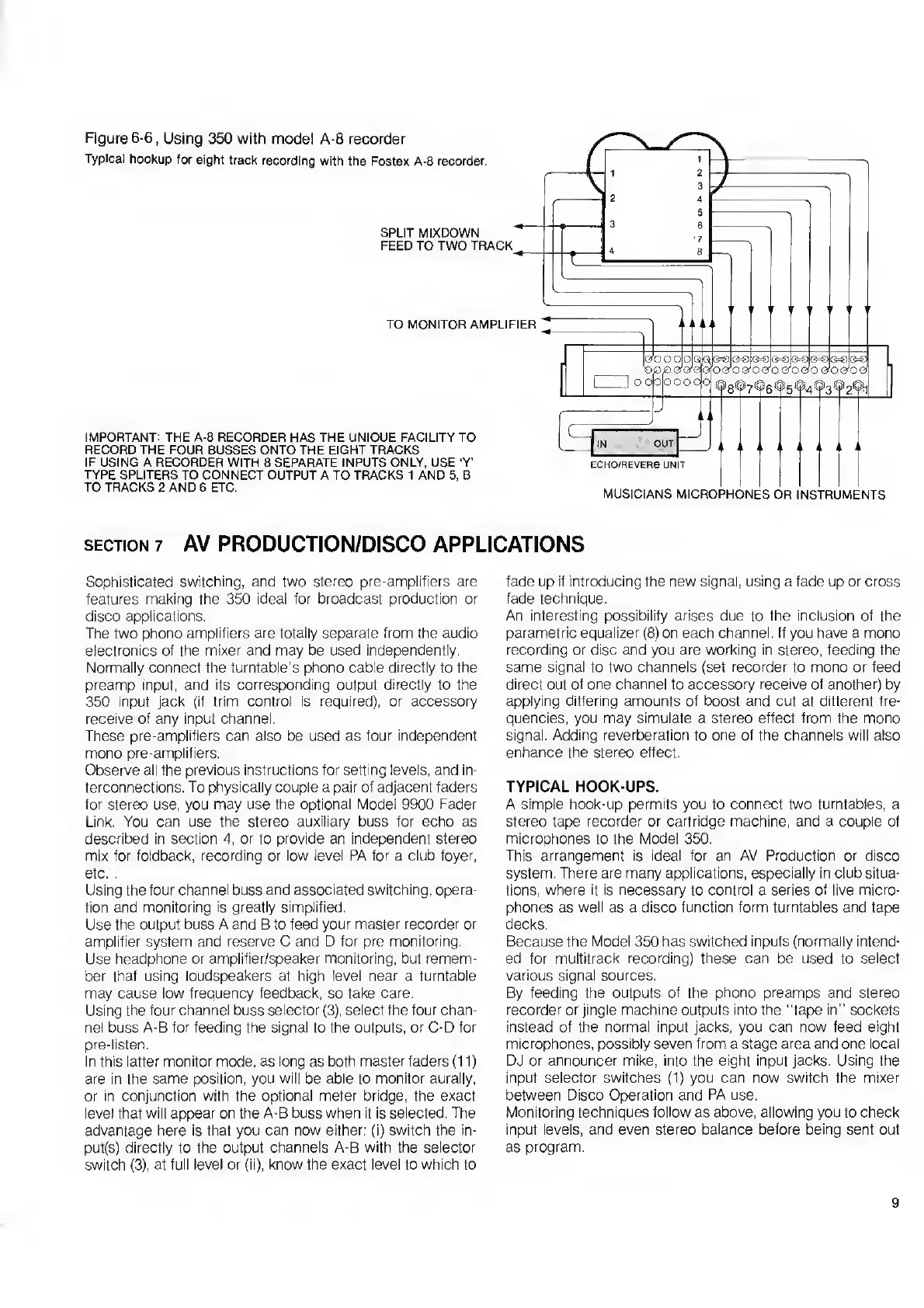
Figure
6-6,
Using
350
with
model
A-8
recorder
Typical
hookup
for
eight
track
recording
with
the
Fostex
A-8
recorder.
SPLIT
MIXDOWN
FEED
TO
TWO
TRACK
TO
MONITOR
AMPLIFIER
IMPORTANT:
THE
A-8
RECORDER
HAS
THE
UNIQUE
FACILITY
TO
RECORD
THE
FOUR
BUSSES
ONTO
THE
EIGHT
TRACKS
IF
USING
A
RECORDER
WITH
8
SEPARATE
INPUTS
ONLY,
USE
‘Y’
TYPE
SPLITERS
TO
CONNECT
OUTPUT
A
TO
TRACKS
1
AND
5,
B
TO
TRACKS
2
AND
6
ETC.
\0O
O
op
QRpSp®
«=8®=©
<3=3j
G=q
'oq
£>
o'cyqofo
ero
ijoao
00
00
00
00
0
o
o
pooqq
IN
OUT
ECHO/REVERB
UNIT
MUSICIANS
MICROPHONES
OR
INSTRUMENTS
section
7
AV
PRODUCTION/DISCO
APPLICATIONS
Sophisticated
switching,
and
two
stereo
pre-amplifiers
are
features
making
the
350
ideal
for
broadcast
production
or
disco
applications.
The
two
phono
amplifiers
are
totally
separate
from
the
audio
electronics
of
the
mixer
and
may
be
used
independently.
Normally
connect
the
turntable’s
phono
cable
directly
to
the
preamp
input,
and
its
corresponding
output
directly
to
the
350
input
jack
(if
trim
control
is
required),
or
accessory
receive
of
any
input
channel.
These
pre-amplifiers
can
also
be
used
as
four
independent
mono
pre-amplifiers.
Observe
all
the
previous
instructions
for
setting
levels,
and
in¬
terconnections.
To
physically
couple
a
pair
of
adjacent
faders
for
stereo
use,
you
may
use
the
optional
Model
9900
Fader
Link.
You
can
use
the
stereo
auxiliary
buss
for
echo
as
described
in
section
4,
or
to
provide
an
independent
stereo
mix
for
foldback,
recording
or
low
level
PA
for
a
club
foyer,
etc.
.
Using
the
four
channel
buss
and
associated
switching,
opera¬
tion
and
monitoring
is
greatly
simplified.
Use
the
output
buss
A
and
B
to
feed
your
master
recorder
or
amplifier
system
and
reserve
C
and
D
for
pre
monitoring.
Use
headphone
or
amplifier/speaker
monitoring,
but
remem¬
ber
that
using
loudspeakers
at
high
level
near
a
turntable
may
cause
low
frequency
feedback,
so
take
care.
Using
the
four
channel
buss
selector
(3),
select
the
four
chan¬
nel
buss
A-B
for
feeding
the
signal
to
the
outputs,
or
C-D
for
pre-listen.
In
this
latter
monitor
mode,
as
long
as
both
master
faders
(11)
are
in
the
same
position,
you
will
be
able
to
monitor
aurally,
or
in
conjunction
with
the
optional
meter
bridge,
the
exact
level
that
will
appear
on
the
A-B
buss
when
it
is
selected.
The
advantage
here
is
that
you
can
now
either:
(i)
switch
the
in¬
puts)
directly
to
the
output
channels
A-B
with
the
selector
switch
(3),
at
full
level
or
(ii),
know
the
exact
level
to
which
to
fade
up
if
introducing
the
new
signal,
using
a
fade
up
or
cross
fade
technique.
An
interesting
possibility
arises
due
to
the
inclusion
of
the
parametric
equalizer
(8)
on
each
channel.
If
you
have
a
mono
recording
or
disc
and
you
are
working
in
stereo,
feeding
the
same
signal
to
two
channels
(set
recorder
to
mono
or
feed
direct
out
of
one
channel
to
accessory
receive
of
another)
by
applying
differing
amounts
of
boost
and
cut
at
different
fre¬
quencies,
you
may
simulate
a
stereo
effect
from
the
mono
signal.
Adding
reverberation
to
one
of
the
channels
will
also
enhance
the
stereo
effect.
TYPICAL
HOOK-UPS.
A
simple
hook-up
permits
you
to
connect
two
turntables,
a
stereo
tape
recorder
or
cartridge
machine,
and
a
couple
of
microphones
to
the
Model
350.
This
arrangement
is
ideal
for
an
AV
Production
or
disco
system.
There
are
many
applications,
especially
in
club
situa¬
tions,
where
it
is
necessary
to
control
a
series
of
live
micro¬
phones
as
well
as
a
disco
function
form
turntables
and
tape
decks.
Because
the
Model
350
has
switched
inputs
(normally
intend¬
ed
for
multitrack
recording)
these
can
be
used
to
select
various
signal
sources.
By
feeding
the
outputs
of
the
phono
preamps
and
stereo
recorder
or
jingle
machine
outputs
into
the
“tape
in”
sockets
instead
of
the
normal
input
jacks,
you
can
now
feed
eight
microphones,
possibly
seven
from
a
stage
area
and
one
local
DJ
or
announcer
mike,
into
the
eight
input
jacks.
Using
the
input
selector
switches
(1)
you
can
now
switch
the
mixer
between
Disco
Operation
and
PA
use.
Monitoring
techniques
follow
as
above,
allowing
you
to
check
input
levels,
and
even
stereo
balance
before
being
sent
out
as
program.
9

Related product manuals