EasyManua.ls Logo

Fostex 350 - EXTERNAL EFFECTS AND PROCESSING; SIGNAL PROCESSING ON INDIVIDUAL CHANNELS

Fostex 350
18 pages
Print Icon
To Next Page IconTo Next Page
To Previous Page IconTo Previous Page
Loading...
If
using
the
optional
meter
bridge,
connect
an
audio
oscillator
to
the
input
of
one
of
the
channels,
set
the
trim,
level
and
routing
controls
so
that
you
obtain
“zero”
level
on
the
VU
meter.
Now
adjust
the
input
level
control
on
the
following
equipment
to
give
the
same
“zero”
reading
on
its
meter.
If
you
are
not
using
the
optional
meter
bridge,
adjust
the
input
trim
control
just
below
the
setting
where
the
input
overload
LED
flashes,
set
the
4
channel
buss
pan
pot
to
center
and
the
input
and
master
faders
to
the
normal
operation
area
(be¬
tween
7
&
8).
The
output
level
from
the
mixer
“buss
out”
will
be
approximately
-lOdBV,
when
the
overload
LED
just
starts
to
ignite.
If
an
audio
oscillator
is
not
available,
you
can
improvise
by
connecting
a
microphone
and
playing
a
single
note
on
an
organ
or
other
keyboard
or
by
vocally
sustaining
a
note.
Setting
correct
levels
is
a
prime
factor
in
attaining
the
maximum
dynamic
range
performance
from
any
professio¬
nal
audio
system.
While
presetting
inputs
to
external
equip¬
ment
need
only
be
done
once,
individual
input
channel
levels
must
be
trimmed
when
mixing
various
sources
via
various
microphones.
SECTION
4
EXTERNAL
EFFECTS
AND
PROCESSING
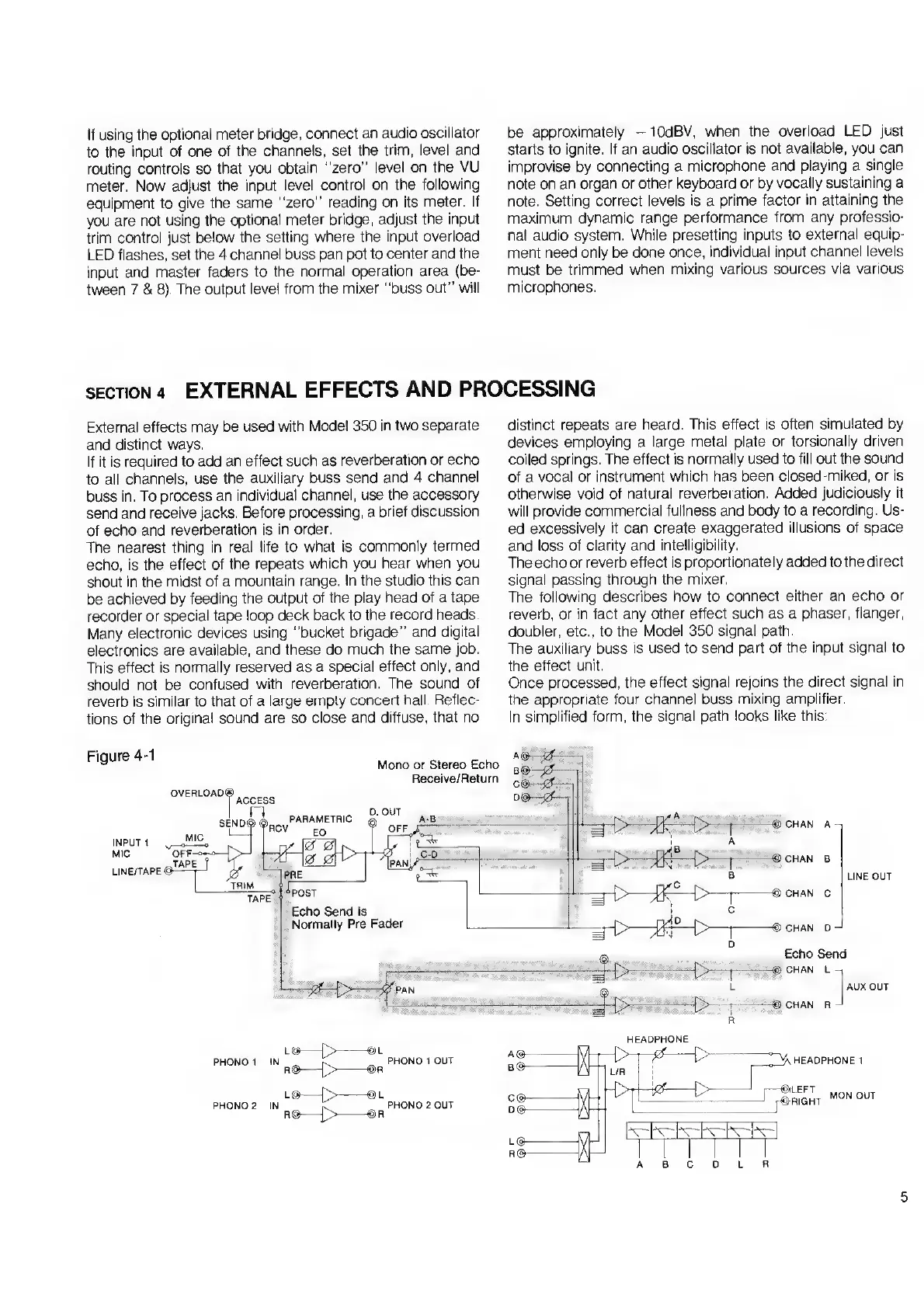
External
effects
may
be
used
with
Model
350
in
two
separate
and
distinct
ways.
If
it
is
required
to
add
an
effect
such
as
reverberation
or
echo
to
all
channels,
use
the
auxiliary
buss
send
and
4
channel
buss
in.
To
process
an
individual
channel,
use
the
accessory
send
and
receive
jacks.
Before
processing,
a
brief
discussion
of
echo
and
reverberation
is
in
order.
The
nearest
thing
in
real
life
to
what
is
commonly
termed
echo,
is
the
effect
of
the
repeats
which
you
hear
when
you
shout
in
the
midst
of
a
mountain
range.
In
the
studio
this
can
be
achieved
by
feeding
the
output
of
the
play
head
of
a
tape
recorder
or
special
tape
loop
deck
back
to
the
record
heads.
Many
electronic
devices
using
“bucket
brigade”
and
digital
electronics
are
available,
and
these
do
much
the
same
job.
This
effect
is
normally
reserved
as
a
special
effect
only,
and
should
not
be
confused
with
reverberation.
The
sound
of
reverb
is
similar
to
that
of
a
large
empty
concert
hall.
Reflec¬
tions
of
the
original
sound
are
so
close
and
diffuse,
that
no
distinct
repeats
are
heard.
This
effect
is
often
simulated
by
devices
employing
a
large
metal
plate
or
torsionally
driven
coiled
springs.
The
effect
is
normally
used
to
fill
out
the
sound
of
a
vocal
or
instrument
which
has
been
closed-miked,
or
is
otherwise
void
of
natural
reverberation.
Added
judiciously
it
will
provide
commercial
fullness
and
body
to
a
recording.
Us¬
ed
excessively
it
can
create
exaggerated
illusions
of
space
and
loss
of
clarity
and
intelligibility.
The
echo
or
reverb
effect
is
proportionately
added
to
the
direct
signal
passing
through
the
mixer.
The
following
describes
how
to
connect
either
an
echo
or
reverb,
or
in
fact
any
other
effect
such
as
a
phaser,
flanger,
doubler,
etc.,
to
the
Model
350
signal
path.
The
auxiliary
buss
is
used
to
send
part
of
the
input
signal
to
the
effect
unit.
Once
processed,
the
effect
signal
rejoins
the
direct
signal
in
the
appropriate
four
channel
buss
mixing
amplifier.
In
simplified
form,
the
signal
path
looks
like
this:
5

Related product manuals