EasyManua.ls Logo

Fostex 350 - USING THE PARAMETRIC EQUALIZER

Fostex 350
18 pages
Print Icon
To Next Page IconTo Next Page
To Previous Page IconTo Previous Page
Loading...
Connect
that
input
to
the
effect
unit
from
the
AUX
Buss
Out¬
put
(24).
If
your
device
is
stereo,
use
both
left
and
right
signals.
If
it
is
mono,
use
the
left
or
right
buss
only,
and
direct
the
aux
signal
to
that
output
by
use
of
the
channel
"aux
pan
pot”
(7).
If
working
in
mono,
you
can
of
course
use
the
free
aux
buss
output
as
a
separate,
independent
mix,
using
the
‘‘aux
buss
pan
pot”
for
routing.
Connect
the
output
of
the
effect
unit
to
any
one
of
the
‘‘4
channel
buss
in”
connectors
(21).
If
you
require
a
mono
ef¬
fect
return
to
feed
two
inputs
simultaneously,
use
a
“Y”
adaptor
to
split
the
signal
to
feed
two
inputs.
Make
sure
that
levels
are
compatible
in
accordance
with
the
specifications
of
both
the
Model
350
and
the
effect
unit.
Also
make
sure
that
there
is
no
direct
path
in
the
effect
unit
such
as
a
“dry”
con¬
trol
or
switch.
If
this
is
present
it
may
add
more
of
the
original
signal
back
to
itself
and
could
cause
various
cancellation
and
degradation
problems.
If
such
a
direct
path
exists,
switch
it
out.
When
operating,
use
the
“aux
buss
select”
switch
(5)
on
any
channel
to
route
either
the
pre-fader
(effect
level
independent
of
input
fader
setting)
or
post-fader
(effect
level
is
controlled
by
input
fader
setting)
channel
signal
to
the
effect
unit.
Use
the
‘‘aux
buss
pan
pot”
(7)
for
further
routing
or
positioning.
Use
the
‘‘gain
pot”
(6)
to
adjust
the
level.
Adjust
the
appropriate
”4
channel
buss
input”
control
(12)
for
the
required
effect
return
level.
SIGNAL
PROCESSING
ON
INDIVIDUAL
CHANNELS
Devices
such
as
compressors,
flangers,
noise
gates
or
extra
equalizers
can
simply
be
connected
to
individual
channels
on
the
Model
350
by
way
of
the
corresponding
"accessory
send/
receive”
jacks
(19).
Ideally
there
should
be
no
nominal
gain
through
the
unit
and
it
should
be
compatible
in
terms
of
the
input
and
output
impedances
and
levels.
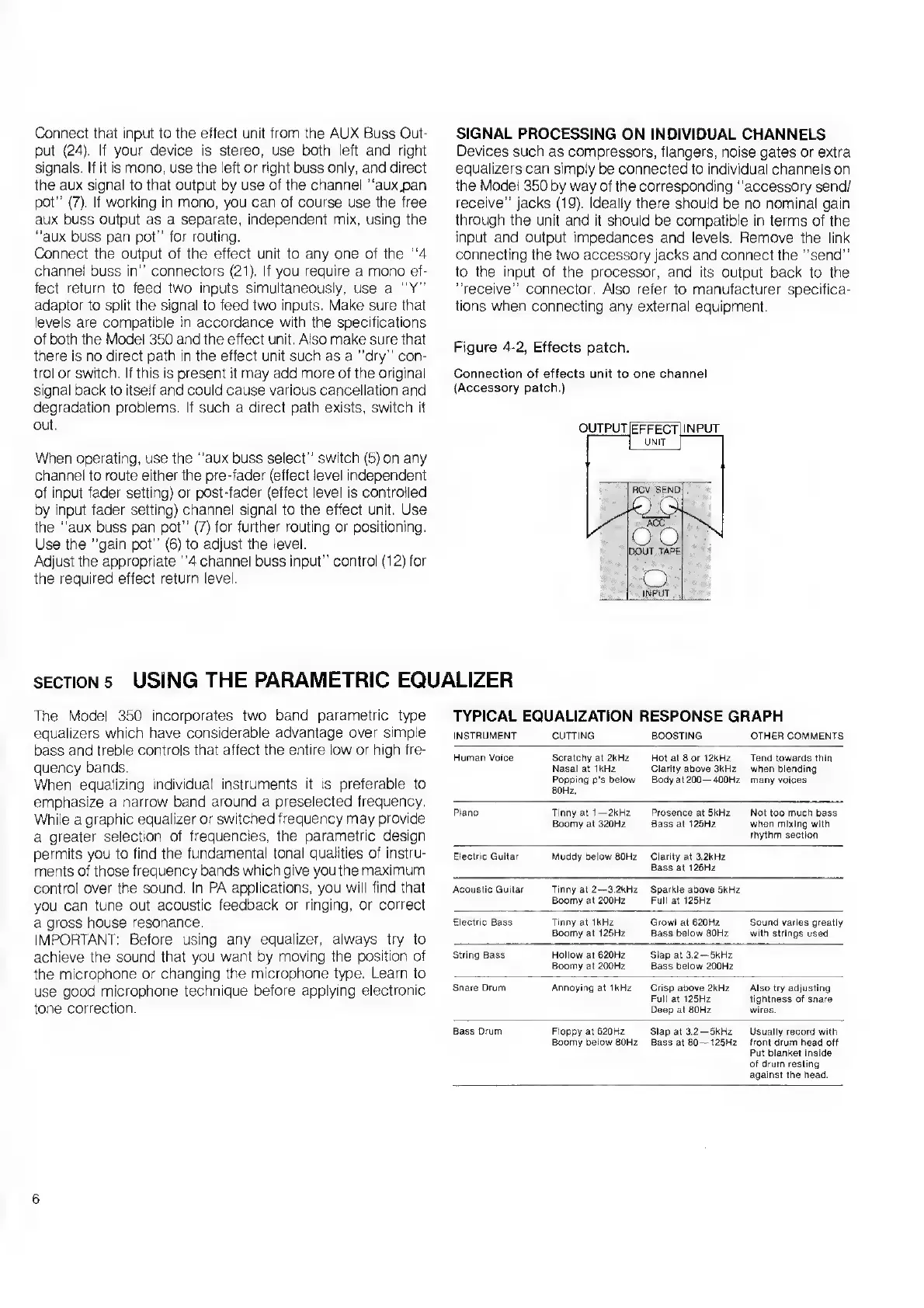
Remove
the
link
connecting
the
two
accessory
jacks
and
connect
the
"send”
to
the
input
of
the
processor,
and
its
output
back
to
the
"receive”
connector.
Also
refer
to
manufacturer
specifica¬
tions
when
connecting
any
external
equipment.
Figure
4-2,
Effects
patch.
Connection
of
effects
unit
to
one
channel
(Accessory
patch.)
SECTION
5
USING
THE
PARAMETRIC
EQUALIZER
The
Model
350
incorporates
two
band
parametric
type
equalizers
which
have
considerable
advantage
over
simple
bass
and
treble
controls
that
affect
the
entire
low
or
high
fre¬
quency
bands.
When
equalizing
individual
instruments
it
is
preferable
to
emphasize
a
narrow
band
around
a
preselected
frequency.
While
a
graphic
equalizer
or
switched
frequency
may
provide
a
greater
selection
of
frequencies,
the
parametric
design
permits
you
to
find
the
fundamental
tonal
qualities
of
instru¬
ments
of
those
frequency
bands
which
give
you
the
maximum
control
over
the
sound.
In
PA
applications,
you
will
find
that
you
can
tune
out
acoustic
feedback
or
ringing,
or
correct
a
gross
house
resonance.
IMPORTANT:
Before
using
any
equalizer,
always
try
to
achieve
the
sound
that
you
want
by
moving
the
position
of
the
microphone
or
changing
the
microphone
type.
Learn
to
use
good
microphone
technique
before
applying
electronic
tone
correction.
TYPICAL
EQUALIZATION
RESPONSE
GRAPH
INSTRUMENT
CUTTING
BOOSTING
OTHER
COMMENTS
Human
Voice
Scratchy
at
2kHz
Nasal
at
1kHz
Popping
p’s
below
80Hz.
Hot
at
8
or
12kHz
Clarity
above
3kHz
Bodyat200—400Hz
Tend
towards
thin
when
blending
many
voices
Piano
Tinny
at
1
—2kHz
Boomy
at
320Hz
Prosence
at
5kHz
Bass
at
125Hz
Not
too
much
bass
when
mixing
with
rhythm
section
Electric
Guitar
Muddy
below
80Hz
Clarity
at
3.2kHz
Bass
at
125Hz
Acoustic
Guitar
Tinny
at
2—3.2kHz
Boomy
at
200Hz
Sparkle
above
5kHz
Full
at
125Hz
Electric
Bass
Tinny
at
1kHz
Boomy
at
125Hz
Growl
at
620Hz
Bass
below
80Hz
Sound
varies
greatly
with
strings
used
String
Bass
Hollow
at
620Hz
Boomy
at
200Hz
Slap
at
3.2—5kHz
Bass
below
200Hz
Snare
Drum
Annoying
at
1kHz
Crisp
above
2kHz
Full
at
125Hz
Deep
at
80Hz
Also
try
adjusting
tightness
of
snare
wires.
Bass
Drum
Floppy
at
620Hz
Boomy
below
80Hz
Slap
at
3.2
5kHz
Bass
at
80—125Hz
Usually
record
with
front
drum
head
off
Put
blanket
inside
of
drum
resting
against
the
head.
6

Related product manuals