EasyManua.ls Logo

Fostex 350 - P.A. APPLICATIONS

Fostex 350
18 pages
Print Icon
To Next Page IconTo Next Page
To Previous Page IconTo Previous Page
Loading...
SECTION
8
P.A.
APPLICATIONS
Modern
PA
applications
require
more
than
a
simple
mixer
feeding
one
main
amplifier
and
speaker
system.
This
applies
both
to
musical
performances
and
theatrical
applications.
The
350
mixer
has
the
versatility
to
provide
these
extra-facili¬
ties.
Stereo
is
an
obvious
requirement,
though
the
effect
must
be
used
with
care.
A
recording
type
mix
of
signals,
with
half
the
instruments
coming
out
of
the
right
channel
only,
is
not
likely
to
please
the
part
of
the
audience
seated
in
front
of
the
stage
left
speaker!
You
can
use
the
Aux
buss
as
described
in
section
4
for
echo
purposes,
but
again
a
word
of
caution:
Auditorium
acoustics
usually
provide
an
adequate
degree
of
natural
reverberation
for
musicial
instruments,
therefore
the
special
repeat
echo
effect
should
be
reserved
for
use
with
vocal
signals.
It
may
be
coupled
directly
to
the
channel
“direct
out”
jack
(20)
or
used
in
the
accessory
send/receive
path
(19).
The
auxiliary
buss
can
alternatively
be
used
to
provide
a
monitor
mix
for
musicians
on
stage.
Being
stereo,
and
com¬
pletely
independent
of
actual
levels
in
the
main
mix
(by
selec¬
ting
“pre”
on
the
aux
buss
selector
switch
(5),
by
using
the
pan-pot
as
a
“differential”
routing
control
you
can
in
fact
pro¬
vide
two
separate
monitor
mixes,
giving
the
vocalist
more
of
the
rythm,
and
the
instrumentalists
more
of
the
vocals.
A
further
technique,
normally
associated
with
much
more
expensive
consoles,
is
to
use
the
four
buss
system
as
a
pair
of
stereo
busses
A-B
and
C-D
to
separate
control
of
the
vocal
and
instrumental
parts
of
the
performance,
and
so
have
a
more
refined
control
of
the
overall
mix.
To
employ
this
techni¬
que,
connect
the
main
stereo
PA
feed
to
the
monitor
output
(25).
Depress
all
four
buttons
A,
B,
C,
and
D
on
the
“monitor
select”
(13).
This
will
make
A
and
C
appear
on
the
left
monitor
output
and
B
and
D
appear
on
the
right.
You
can
now
freely
select
the
individual
channels
to
either
output
buss
A-B
for
vocal
or
C-D
for
instruments
using
4
channel
buss
selector
and
pan
pot
(3)
and
(4).
In
operation
you
have
complete
control
over
the
individual
levels
of
the
vocal
and
instrumental
“sub-groups”
as
they
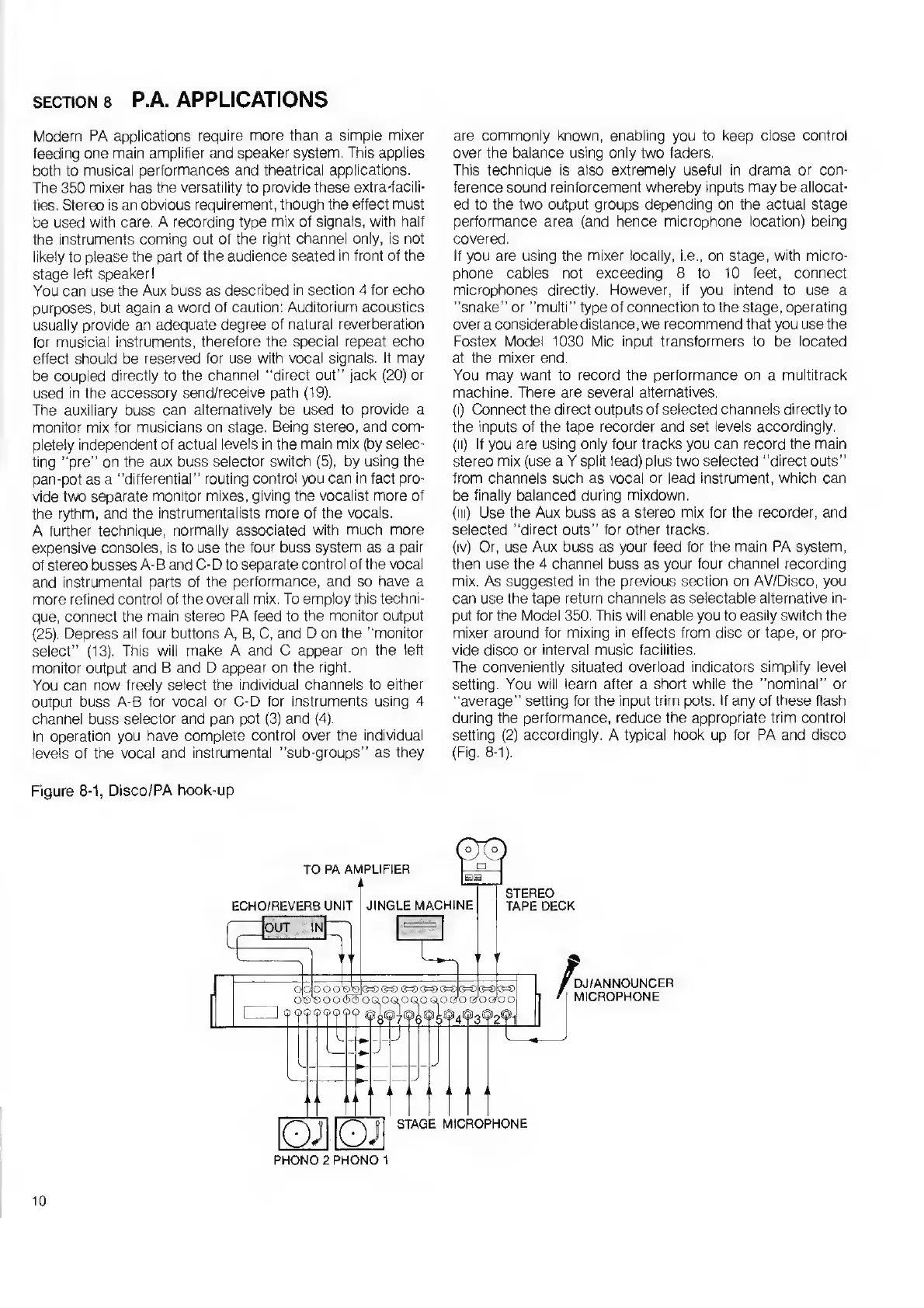
Figure
8-1,
Disco/PA
hook-up
are
commonly
known,
enabling
you
to
keep
close
control
over
the
balance
using
only
two
faders.
This
technique
is
also
extremely
useful
in
drama
or
con¬
ference
sound
reinforcement
whereby
inputs
may
be
allocat¬
ed
to
the
two
output
groups
depending
on
the
actual
stage
performance
area
(and
hence
microphone
location)
being
covered.
If
you
are
using
the
mixer
locally,
i.e.,
on
stage,
with
micro¬
phone
cables
not
exceeding
8
to
10
feet,
connect
microphones
directly.
However,
if
you
intend
to
use
a
“snake”
or
“multi”
type
of
connection
to
the
stage,
operating
over
a
considerable
distance,
we
recommend
that
you
use
the
Fostex
Model
1030
Mic
input
transformers
to
be
located
at
the
mixer
end.
You
may
want
to
record
the
performance
on
a
multitrack
machine.
There
are
several
alternatives.
(i)
Connect
the
direct
outputs
of
selected
channels
directly
to
the
inputs
of
the
tape
recorder
and
set
levels
accordingly.
(ii)
If
you
are
using
only
four
tracks
you
can
record
the
main
stereo
mix
(use
a
Y
split
lead)
plus
two
selected
“direct
outs”
from
channels
such
as
vocal
or
lead
instrument,
which
can
be
finally
balanced
during
mixdown.
(in)
Use
the
Aux
buss
as
a
stereo
mix
for
the
recorder,
and
selected
“direct
outs”
for
other
tracks.
(iv)
Or,
use
Aux
buss
as
your
feed
for
the
main
PA
system,
then
use
the
4
channel
buss
as
your
four
channel
recording
mix.
As
suggested
in
the
previous
section
on
AV/Disco,
you
can
use
the
tape
return
channels
as
selectable
alternative
in¬
put
for
the
Model
350.
This
will
enable
you
to
easily
switch
the
mixer
around
for
mixing
in
effects
from
disc
or
tape,
or
pro¬
vide
disco
or
interval
music
facilities.
The
conveniently
situated
overload
indicators
simplify
level
setting.
You
will
learn
after
a
short
while
the
“nominal”
or
“average”
setting
for
the
input
trim
pots.
If
any
of
these
flash
during
the
performance,
reduce
the
appropriate
trim
control
setting
(2)
accordingly.
A
typical
hook
up
for
PA
and
disco
(Fig.
8-1).
PHONO
2
PHONO
1
10

Related product manuals