12
Listening
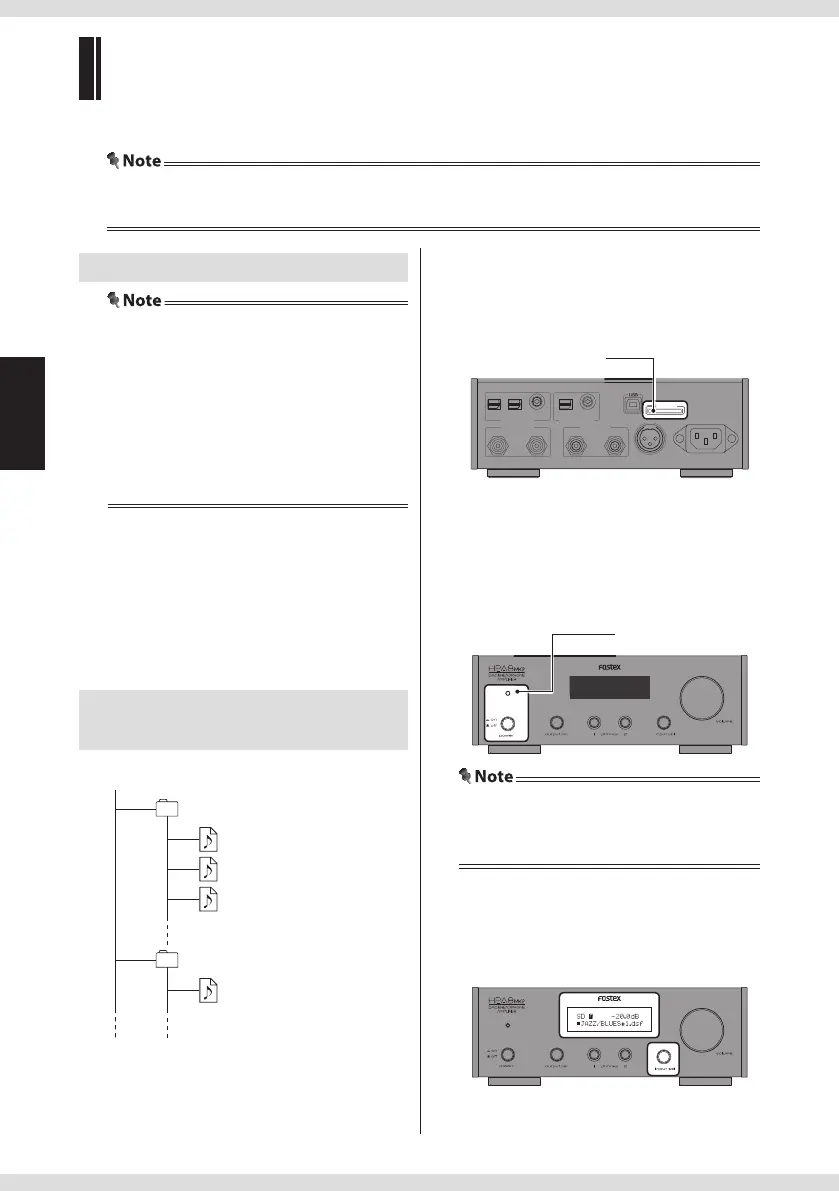
1 Insert an SD card.
Insert an SD (SDHC) card into the [SD
CARD] slot on the rear panel with the
label side facing upward.
IN
AC IN
SD CARD
AES/EBU
USB
RIGHT LEFTRIGHTLEFT
ANA LO G O UT ANA LO G I N
1 2
OPTICAL COAXIAL COAXIALOPTICAL
DIG ITA L IN DI GIT AL OU T
[SD CARD] slot
IN
AC IN
SD CARD
AES/EBU
USB
RIGHT LEFTRIGHTLEFT
ANA LO G O UT ANA LO G I N
1 2
OPTICAL COAXIAL COAXIALOPTICAL
DIG IT AL IN DI GIT AL OUT
2 Turn on the product.
Push in the power switch.
The power indicator lights in red when the
power is on.
Power indicator
• When an ampli er is connected, turn the
volume of the ampli er to the minimum
before turning on the product.
3 Select the input source.
Turn the input sel knob on the main unit, or
press the SD key on the remote controller to
select "SD".
Playable les
• Format the card in FAT32.
• The maximum number of folders you can
create on an SD card is 15.
• The maximum number of les you can copy in
each folder is 30.
• You can use up to 50 alphanumeric characters
for folder names, 70 characters for le names.
2 byte characters are displayed as "".
DSF les (extension: .dsf)
• Format: 2.8 MHz
WAV les (extension: .wav),
AIFF les (extension: .aiff )
• Sampling frequency: 44.1 kHz to 192 kHz
• Bit rate: 16 Bit, 24 Bit, 32 Bit
• Format: Linear PCM
Hierarchy example in the
SD card
SD (root)
FOLDER1…… folder 1
FOLDER2…… folder 2
456.aif…… music le 4
ABC.wav… music le 1
123.dsf…… music le 2
DEF.ai …… music le 3
Listening to the les on an SD card
You can enjoy DSF les, WAV les and AIFF les.
• To make folders on or copy les to an SD card, please use a computer. The unit does not support these
operations.


 To Next Page