13
Listening
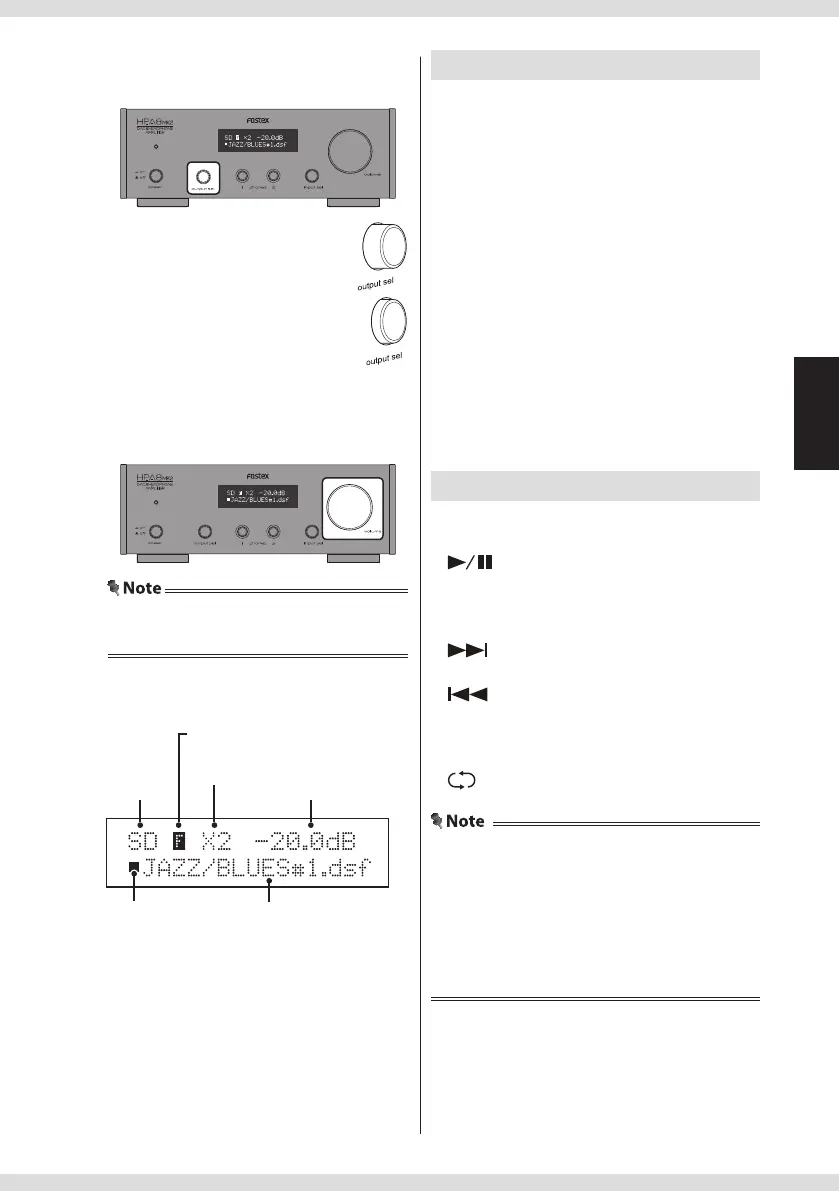
4 Select the output source.
Select headphones or analog output.
• Listening via headphones:
Do not push in the output sel switch
• Listening via analog output:
Push in the output sel switch
5 Adjust the volume.
Turn the volume knob on the main unit, or
press the VOLUME +/– keys on the remote
controller.
• You cannot adjust the analog output volume
when the "DIRECT" setting is set to "ON".
Ejecting the SD card
Unmount the SD card by the following
procedure before ejection. Otherwise, the
data may be damaged.
1 Stop playback.
Press the
key on the remote controller.
2 Press the ENTER key on the remote
controller.
SD (SDHC) card is unmounted, and "EJECT" is
displayed.
3 Push in the card gently until a clicking
sound is heard.
The card pops out a little.
4 Grasp the card and pull it out straight.
Using the remote controller
You can control the product using the
remote controller.
: Start/pause playback of current le
: Stop playback
ENTER : Select a folder or unmount the
SD card
: Press to move to next track/hold to
fast-forward
: Press to move to previous track/
hold to fast-rewind
<
: Next folder
<
: Previous folder
: Repeat on/o
• You can select the repeat playback range with the
"SD REPEAT MODE" setting (page 16).
• If you change the settings on the menu screen
during SD card playback, the changes are stored
when you stop playback. Also, the volume setting
of the "IN/VOL MEM" setting is stored when you
stop playback.
<Display during playback>
Input source
name
Repeat mode indicator (page 16)
Upsampling indicator
(page 14)
File information/Folder name/File
name
Play/Stop
indicator
Volume


 To Next Page