8
Preparation
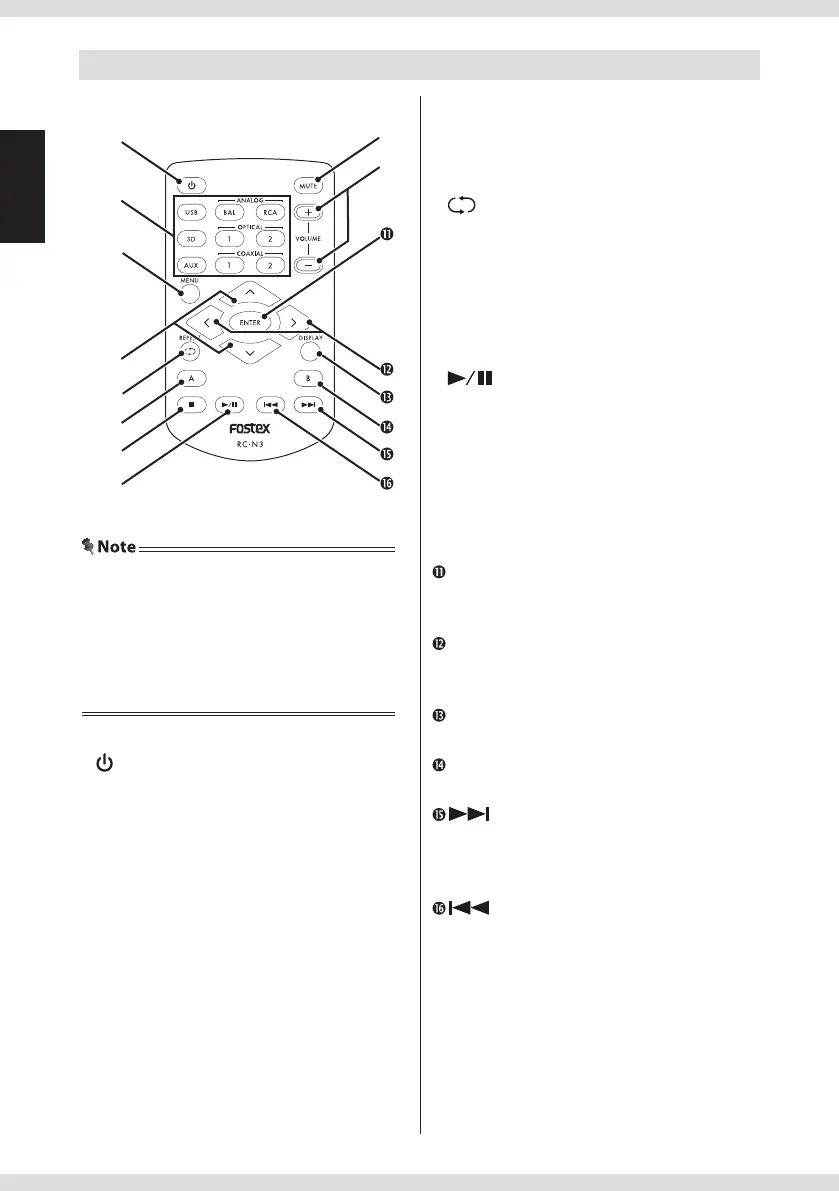
Remote controller
key
Not used.
Input source selection keys
Selects the input source.
USB: [USB] terminal
SD: [SD CARD] slot
AUX: [AES/EBU] terminal
ANALOG BAL: Not used
ANALOG RCA: [ANALOG IN] terminal
OPTICAL1: [DIGITAL IN - OPTICAL 1]
terminal
OPTICAL2: [DIGITAL IN - OPTICAL 2]
terminal
COAXIAL1: [DIGITAL IN - COAXIAL] terminal
COAXIAL2: Not used
MENU key
Displays the menu screen.
<
/
<
keys
Selects folders when using an SD card.
key
Turns the repeat function on/o when
using an SD card.
A key
Not used.
key
Stops playback when using an SD card.
key
Starts/pauses playback when using an SD
card.
MUTE key
Mutes/restores the sound each time it is
pressed.
VOLUME +/− keys
Adjusts the volume.
ENTER key
Determines the selected menu or value, or
unmounts the SD card.
</> keys
Selects items and values on the menu
screen.
DISPLAY key
Turns the display on/o .
B key
Not used.
key
While using an SD card, moves to the next
track when pressed, and fast-forwards the
currently playing track when held down.
key
While using an SD card, moves to the
previous track when pressed, and fast-
rewinds the currently playing track when
held down.
• The included battery is for checking operation.
Replace it as soon as possible.
• Read "Safety information" (attached sheet) and
handle the battery correctly.
• Dispose of the battery in the proper manner
according to the local regulations.


 To Next Page