129
Save/Load of Song data (VF80EX)
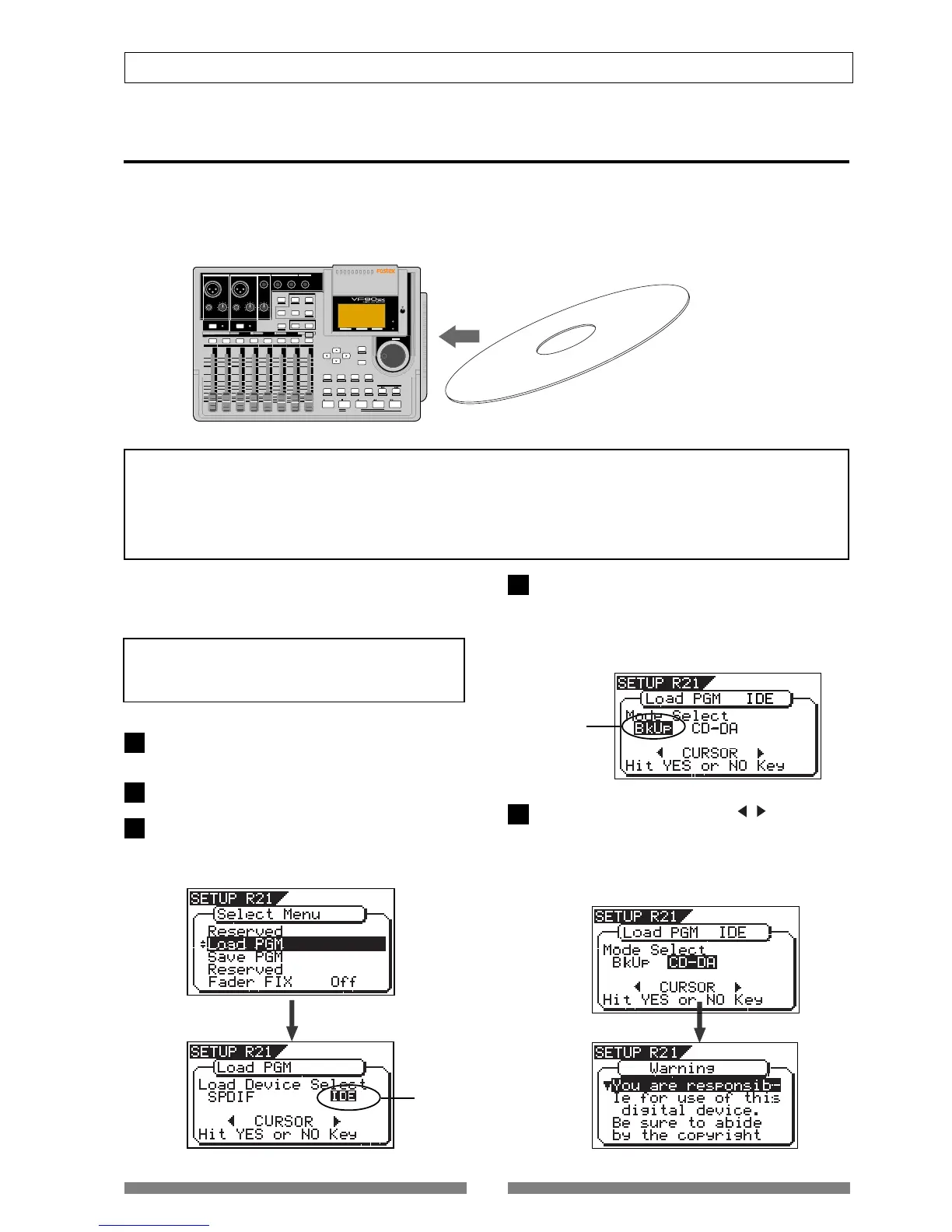
Loading from an audio CD
You can load a desired song to the VF80EX from an audio CD you created by recording on a CD-RW/CD-R
disc. When a desired song is loaded, the VF80EX automatically creates a new program on the current drive,
and the song are recorded on tracks 1 and 2 of the program. Loading data from an audio CD is operated via
the “Load PGM” menu in the Setup mode, which is the same way as loading backup data.
VF80EX
CD-RW/CD-R disc (or commercially available audio CD)
<Important note for copyright>
You can also load a material from a commercially available audio CD in the same manner, however, never use a
material for which a copyright is reserved for a commercial purpose.
Any unauthorized use will constitute infringement of such copyright and will render the infringer liable to an
action at low. Please remember that data included in a commercial audio CD (CD-DA) with copy protection being
turned on cannot be loaded into VF80EX.
The following description is assumed that you have
an audio CD created by the VF80EX (or a commer-
cially available audio CD).
After turning on the power of the VF80EX, load a
recorded audio CD disc to the CD-R/RW drive.
Press the [SETUP] key to enter the Setup mode.
Use the [JOG] dial to select (highlight) the “Load
PGM” menu and press the [ENTER/YES] key.
The display shows the screen for selecting the device
from which the data is loaded. “IDE” flashes.
<Note>
Do not carry out any VF80EX key operation until the
access process to the CD-RW/CD-R disc is completed.
Flashing
Use the [JOG] dial (or [CURSOR] / key) to select
(highlight) “CD-DA”, then press the [ENTER/YES]
key.
A warning message for copyright appears.
You can scrolls the message to read all message by
rotating the [JOG] dial.
4. Press the [ENTER/YES] key while “IDE” flashes.
After showing the model name of the connected CD-
RW drive, the display shows the screen for selecting
the load mode, in which “BkUp” flashes.
To carry out loading a song from an audio CD, select
“CD-DA”.
LOCATE ABS 0
LOCATE REC END
SEL
TIMEBASE
CURSOR
PHANTOM
ACCESS
PEAK
CH ON/OFF
LR
GUITAR
GUITAR
LINE MIC LINE MIC MIN MAX
MASTERING TRAINING
EFFECTEQPAN
SCENE SEQ.SCENE
TRACK
UNDO
SETUP
PUNCH
AUTO
LOOP PITCH SCRUB
VARI
F FWDREWINDPLAYSTOPRECORD
EXIT
ENTER
TRIMTRIM
WAVE FORM
MIX PARAMETER
PGM
FADER
MAP
ON/OFF
2TRK MODE
F1
F2
F3
SHIFT
EDIT
EDIT EDIT
MARK
DELETE
LOCATE
FOOT SW
ST OUT
PHONES
INPUT A
BOUNCE
INPUT B
+6
-10
-20
-40
-
∞
-30
0
+6
-10
-20
-40
-
∞
-30
0
+6
-10
-20
-40
-
∞
-30
0
+6
-10
-20
-40
-
∞
-30
0
+6
-10
-20
-40
-
∞
-30
0
+6
-10
-20
-40
-
∞
-30
0
+6
-10
-20
-40
-
∞
-30
0
+6
-10
-20
-40
-
∞
-30
0
PEAK
CH ON/OFF
2 3 4
5 6
7/8 2TRK1
MASTER
TRACK STATUS / TRACK SEL
TRACK STATUS
RED
REC
GREEN
PLAY
OFF
MUTE
STATUS
/SEL
EJECT
/YES
/NO
SHUTTLE
JOG
UNBAL
UNBAL
BAL
BAL
F1
F2 F3
EDIT
/REDO
REC EFF
CD PLAY
Flashing
1
2
3
5
4



 To Next Page