17
BATTERY REPLACEMENT
REPLACE THE REMOTE LEVER BATTERY
The Ride FOX Bike App will keep you informed
about the remote lever battery life and it will
indicate when it is time to replace the battery. Use
the Ride FOX Bike App to walk you through this
procedure, or follow the steps below.
1. Ensure the battery cover on the remote lever is
clean and accessible. If necessary, remove the
remote lever from your handlebar by removing
the mounting bolt.
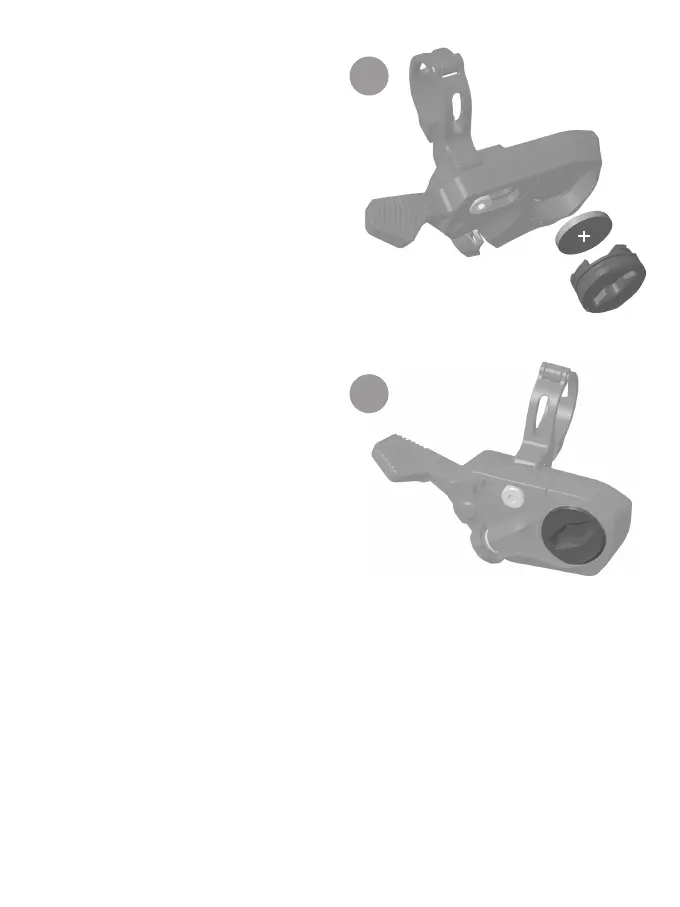
2. Use the edge of the replacement CR2032
battery to turn the battery cover counter-
clockwise and remove it from the remote lever
(Figure K).
3. Use a small-tipped tool to remove the CR2032
battery from the remote lever (Figure K).
4. Replace the battery with name brand CR2032
batteries only. Orient the battery with the
positive side facing outward (Figure K).
Make sure the new battery is flush with the
surrounding housing.
5. Align the cutouts on the battery cover with
the tabs on the remote lever. Then use the
edge of the old CR2032 battery to turn the
battery cover clockwise until it is installed into
the remote lever (Figure L).
6. Reattach the remote lever to the clamp in
the desired position on the handlebar, if
applicable.
K
L


 To Next Page