-Driver Installation
How to Use Grblcontrol (Candle)
-20-
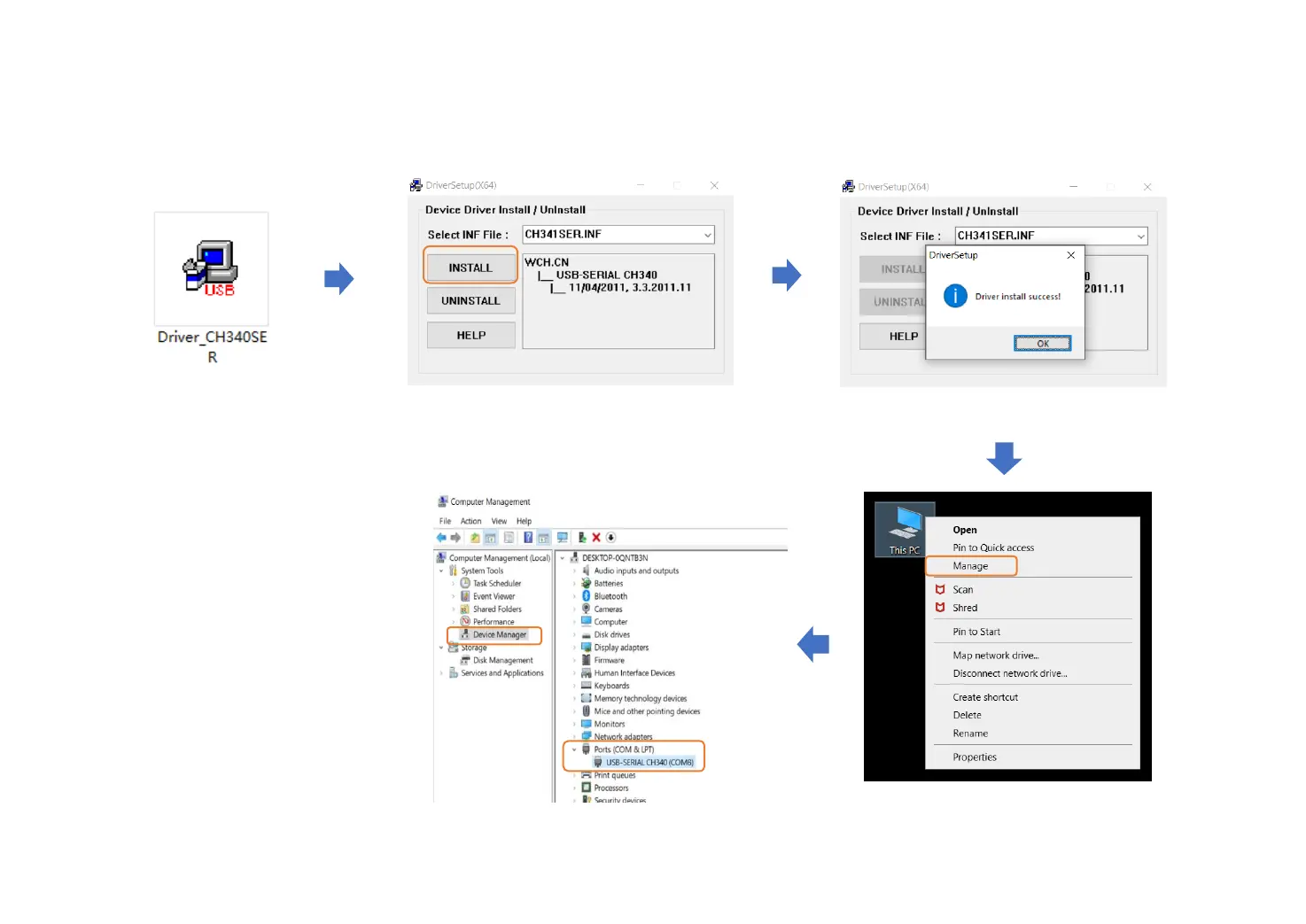
Click “INSTALL” Wait until it shows “Driver install success”
Download from U disk.
Double-click to start installation.
To Determine your Machine's COM port
• For Windows XP: Right click "My Computer"→
Select "Manage"→ Select "Device Manager".
• For Windows 7: Right click "Computer"→
Select "Manage" → Select "Device Manager"
from left pane.
• For Windows 10: Right click “This PC"→ Select
"Manage" → Select "Device Manager" from
left pane.
• In the tree, expand "Ports (COM & LPT)“ , your
machine will be the USB Serial Port (COMX),
where the “X” represents the COM number,
for example COM6.
• If there are multiple USB serial ports, right
click each one and check the manufacturer,
the machine will be “CH340”.
Connect the USB cable to the PC
and the cotroller.


 To Next Page