Home
FoxAlien
Control Systems
Masuter Pro
Page 27 (Z-Probe Operating Procedure)
FoxAlien Masuter Pro - Z-Probe Operating Procedure
32 pages
Manual
Save Page as PDF
To Next Page
To Next Page
To Previous Page
To Previous Page
Loading...
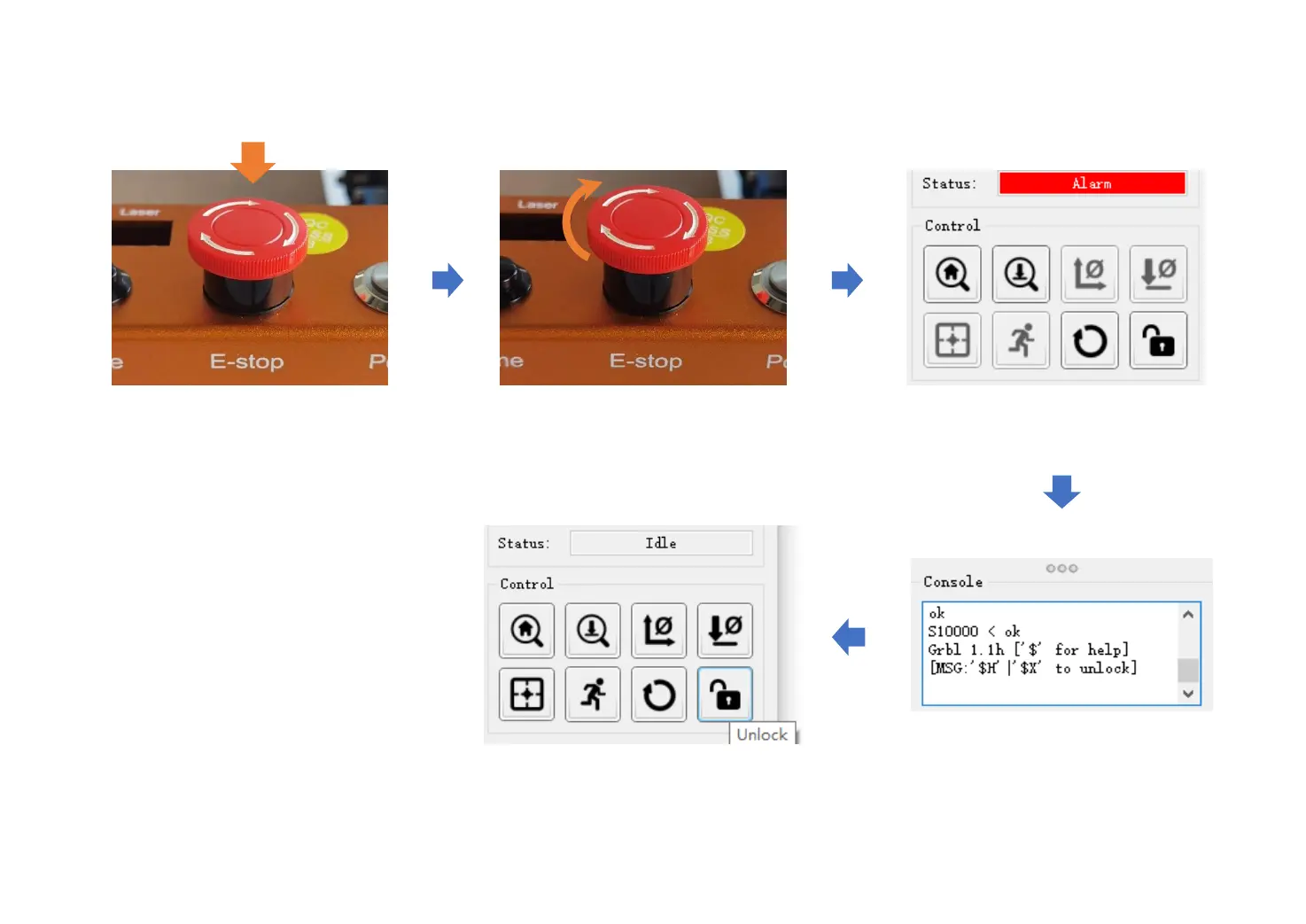
Status in software will change to
“
Alarm
”
.
Press down E-stop when the machine
malfunctions to avoid damage.
Rotate clockwise to release the E
-stop.
Print
“
[MSG:’$H’|’$X’
to unlock]
”
Click “Unlock” to normal working status.
How
to Use E-s
top
-
25
-
26
28
Table of Contents
Main Page
Table of Contents
2
Warranty & Disclaimer
3
Product Specifications
4
How to Assemble the Machine
5
Wiring Diagrams
17
XYZ Stepper Wiring Diagrams
17
XYZ Limit Switch Wiring Diagrams
18
Spindle & Light Wiring Diagrams
19
Controller Instructions
20
How to Install the Router Bit
21
How to Use Grblcontrol (Candle)
22
Driver Installation
22
Grblcontrol (Candle) Working Interface Introduction
23
Make Your First Cut
24
How to Unlock Limit Switch
26
How to Use E-Stop
27
Z-Probe Operating
28
Extended Accessories
29
Offline Controller
29
Laser Module
29
300W Spindle
30
Related product manuals
FoxAlien Masuter
31 pages
FoxAlien 4040-XE
33 pages
FoxAlien VASTO
30 pages



 To Next Page