16
Automotive Diagnostic Platform GT75 User's Manual V1.01
3.3 Establishing Vehicle Communication
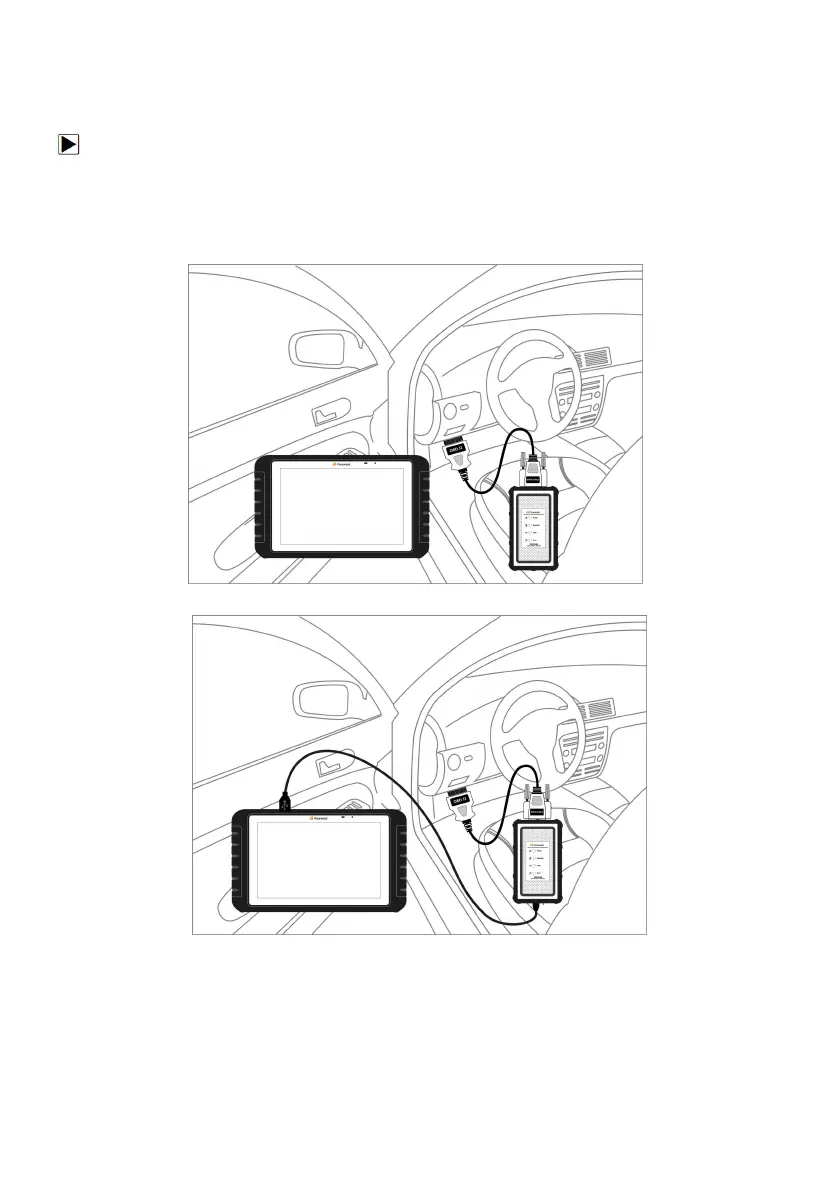
To establish communication with GT75:
1. Connect the VCI dongle to the vehicle’s DLC for both communication and
power source.
2. Connect the VCI dongle to the GT75 tablet via Bluetooth or USB
connection.
Figure 3-1 Sample Bluetooth Communication Screen
Figure 3-2 Sample USB Communication Screen
Please refer to Chapter 3.3.1.1 about the details of how to connect via
Bluetooth and Chapter 3.3.1.2 about the details of how to connect via
USB cable.
3. Check the VCI Indicator status at the toolbar. If the button turns to green,
the GT75 is ready to start vehicle diagnosis.



 To Next Page