10
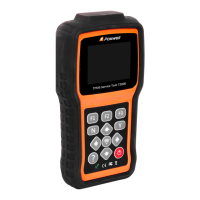
T2000 TPMS Service Tool Manual_English_V1.01
1 T10 Programmable Sensor (8 pcs) - for changing the original broken sensor.
2 USB Cable - provides connection between the TPMS Service Tool and a computer to
upgrade the tool and charges the built-in battery.
3 OBDII Cable - connecting with the vehicle to test OBDII function and TPMS system.
4 Magnet - triggers early TPMS sensors which need a magnet to activate.
5 Battery Charger - charges built-in battery via wall plug.
6 Blower Molding Case - stores the TPMS Service Tool and its accessories.
7 Warranty Card - A warranty card is required if you need any repair or replacement from us.
8 Quick Start Guide - provides brief operation instructions for the usage of the scanner.
2.1.3 Technical Specifications
Display: Backlight, 240*320 TFT color display
Working Temperature: 0 to 55 ℃ (32 to 140℉)
Storage Temperature: -20 to 70℃ (-4 to 158℉)
Power Supply: 3.7V/2200mAH Li-polymer battery, 3.3V USB power
Dimensions (L*W*H): 200*100*38mm
Gross Weight: 1.3kg
Radio reception: 315 MHz and 433MHz
3 Getting Started
This section describes how to provide power to the TPMS Service Tool. It provides a brief
introduction of applications loaded on the TPMS Service Tool, an introduction of symbol and
icons displayed on the screen and how to power on/off and charge the tool.
3.1 Power on/off the TPMS Service Tool
The T2000 is powered on/off by pressing the power switch.
To power on/off the tool
1. Press the power switch to power on the tool, and the unit will display the Main Menu.
2. Hold the power switch for one 1 seconds and the release to power down the T2000. The tool
powers down automatically after a period of inactivity. Please refer to 8.6 Auto Power-off
Interval for details.
3.2 Charging the TPMS Service Tool
The T2000 is shipped with fully charged battery, but due to self-drain it may require charging, it is
recommended to charge the tool over 3 hours before first use.
The unit charges on any of the following sources
● 12-volt wall plug
● USB connection to personal computer
IMPORTANT
Use the battery charger or USB cable included in the T2000 tool kit ONLY. The use of un-
approved power supplies may damage the tool and will void the tool warranty.
3.2.1
Charging via Wall Plug


 To Next Page