14
T2000 TPMS Service Tool Manual_English_V1.01
The tool should be placed alongside the
valve stem.
Ford branded
LF Activated
Sensors
The tool should be held 180°away from the
valve stem.
If the TPM requires a magnet, place the
magnet over the stem and then place the
tool alongside the stem
If the sensor requires tire deflation (of the
order of 10PSI), the icon will appear
on screen. Please deflate the tire and place
the tool alongside the stem
Table 5-1
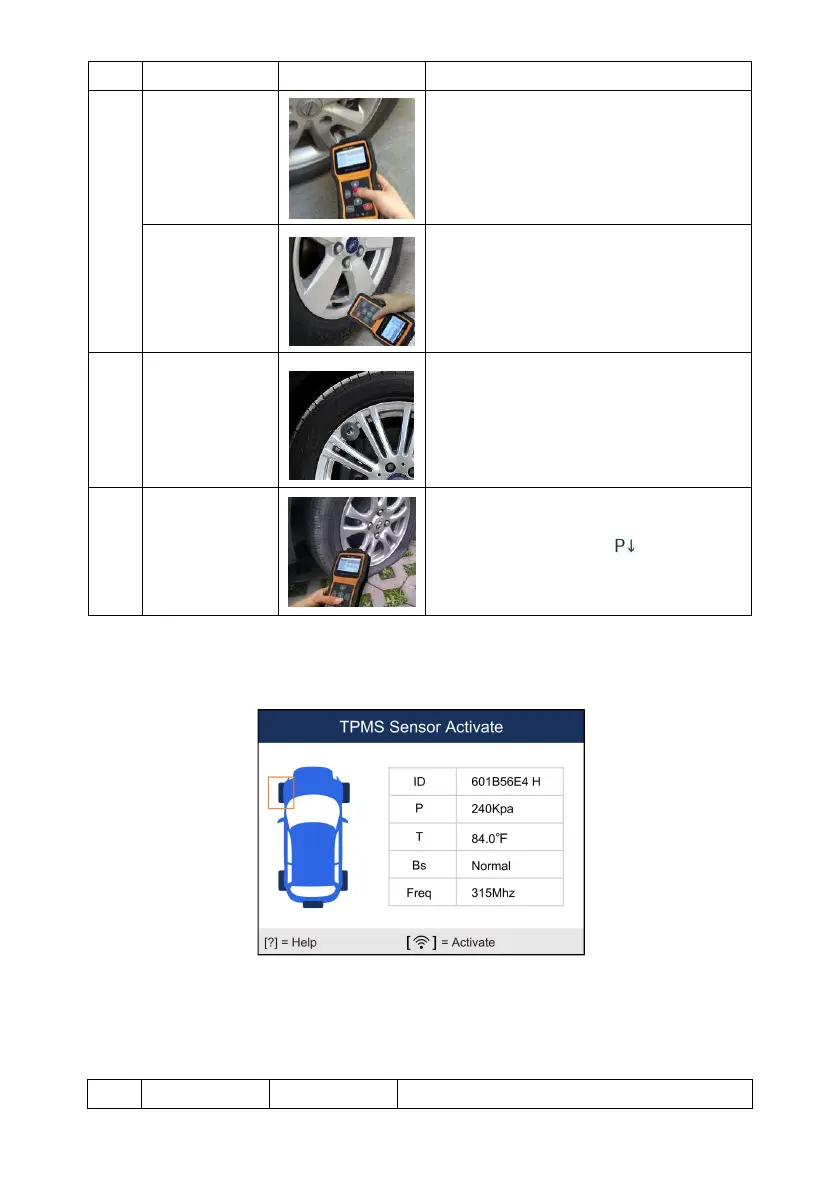
2. Press Activate to test the TPM. If test passes, TPM data is briefly displayed for 3 seconds
and then the solid spot on the vehicle icon moves around to prompt that the next wheel
should be tested. Or manually move around vehicle using UP/DOWN arrow keys.
Figure 5-5 Sample All Wheel Test Data Screen
3. TPM data is stored and can be accessed by selecting a wheel location and press the YES
key.
4. Depending on test results, one of the following possible scenarios may display.


 To Next Page