13
4. i-TTL: Fully Automatic Wireless Flash Shooting
Using Automatic Wireless Flash with a Single Slave Unit
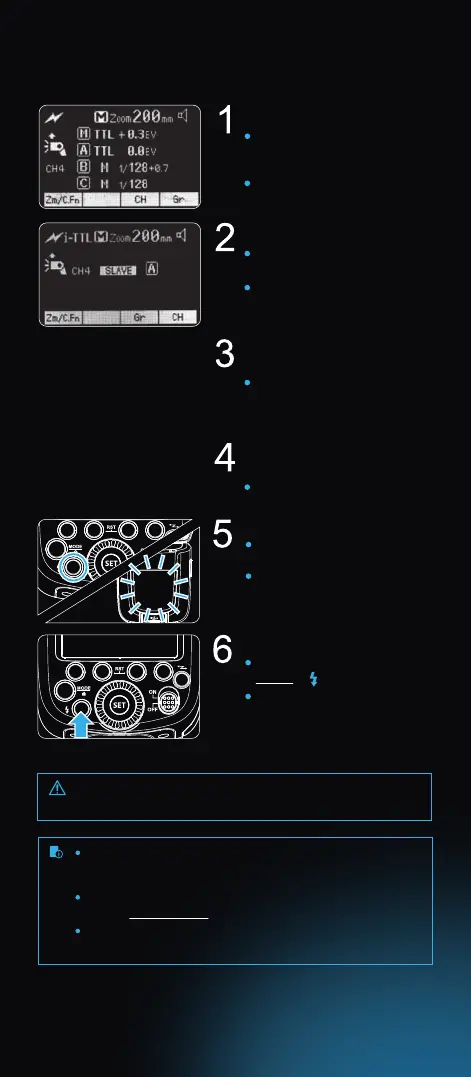
Master Unit setting
Slave Unit setting
Check the communication
channel
Position the camera
and ashes
Attach a Flashpoint Zoom TTL
ash on the camera and set it
as the master Unit.
M/A/B/C can be set as TTL
mode independently.
Set the other camera ash as
the wireless slave Unit.
The slave unit can be set as
group A/B/C.
If the master unit and slave
unit(s) are set to a dierent
channel, set them to the same
channel.
Position the camera and
ashes as the picture shows.
Check that the master ash
ready indicator is illuminated.
When the slave ash indicator
is ready, the AF-assist beam
lighting area will blink at
1 second intervals.
Check that the ash is ready.
Press the master unit’s Test
Button < >.
The slave unit will re. If not,
adjust the slave unit’s sensor’s
angle toward the master unit and
distance from the master unit.
Check the ash operation.
The slave unit might be out of order or re an unwanted ash
due to the nearby uorescent lamp or computer screen.
If the slave unit’s auto power o function is engaged, press the
master unit’s test button to power it on. Please note that test
ring is unavailable during the camera’s metering time.
The eective time of slave auto power o is adjustable.
See the Custom Menu section.
By making some settings, the auto AF-assist transmitter will
not blink after the slave unit’s ash ready indicator is lightened.



 To Next Page