8
3 SETTING UP
DAISY CHAINING
FC Controllers can be connected in series or “daisy-chained” to form a mega-controller of up to four units
operating as one. This allows access to more switches at once (reducing the need to switch layouts). You
can chain units of any type in any order, and any unit can load any of the eight layouts at any time.
Each FC supports up to four expression pedals and four external switches (see “Pedals & Switches” on p. 6).
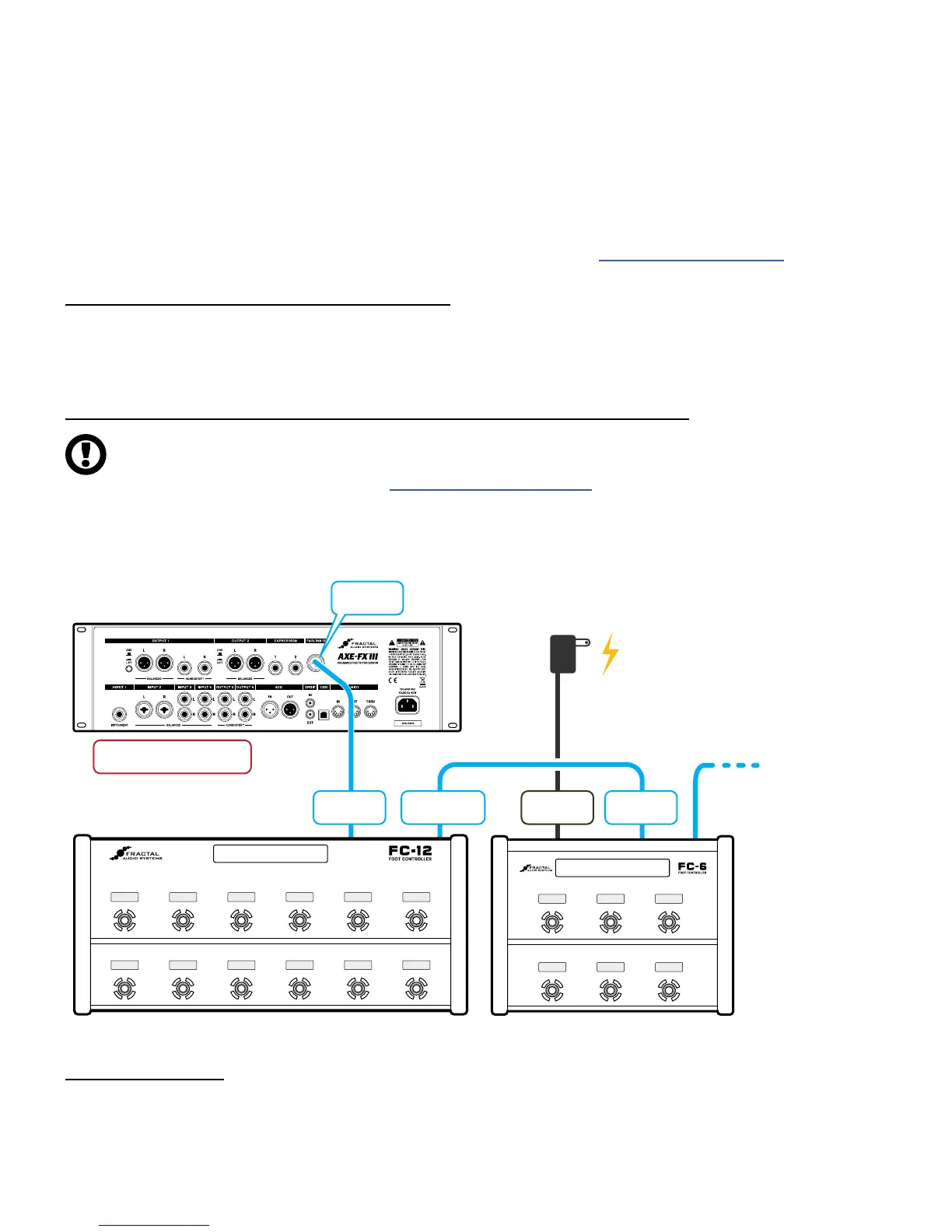
CONNECT THE FIRST FC WITH FASLINK II
Setup begins just like when you use a single FC unit. Use a generic Male-to-Female XLR cable
to connect the FASLINK™ II port of the Axe-Fx III to the FASLINK™ II port of the rst FC. This
connection powers the unit and carries communication to and from the entire chain.
CONNECT ADDITIONAL FC UNITS WITH FASLINK II AND AC POWER
IMPORTANT: Only the rst unit connected directly to the Axe-Fx III will be powered by FASLINK II.
Each unit in a daisy chain after the rst requires local power via an AC Adapter rated 9–12V 1000 ma.
Compatible AC Adapters are available at https://shop.fractalaudio.com
FC-12 or FC-6 FC-12 or FC-6
Etc.
Up to
four units
in total.
Axe-Fx III
XLR Cable XLR Cable
Each daisy-chained FC
beyond the first requires
its own 9–12V DC Power supply.
Connect all INs and OUTs
as you normally would.
FASLINK II
Port (Male)
FASLINK II
Port (Male)
Power
Receptacle
FASLINK II
Port
FASLINK II
Port (Female)
CONFIGURATION
Daisy-chained FC units require no special conguration, though you will probably wish to design custom
layouts for use in this type of setup. In fact, you can specify which layout should be loaded upon startup for
each connected FC unit by using the options on the Devices page of the FC Controllers menu under SETUP.



 To Next Page