12
4 LAYOUTS & SWITCHES
You can change the duration of the Press and Hold Timeout on the page of the FC Controllers
menu under Setup. The default is 0.5 seconds. Make it if you nd that you are activating Hold
functions when you mean to activate Tap functions. Make it to re Hold functions sooner.
If you need tight timing from a Tap switch that has a Hold function, tap and release very quickly—
even a fraction of a second early, knowing that the change will occur as your foot comes up.
PRESS & HOLD LABELS
The Mini-Display for each switch normally shows the label for the Tap function. While any switch is depressed
— even for a normal “tap” — it changes to show the label of the Hold function, even if you don’t keep holidng
the switch down until its Hold function res! Meanwhile, a special “Reveal Hold” utility switch (see p.31)
can also be utilized to cause all mini-displays to persistently show the Hold functions for their switches.
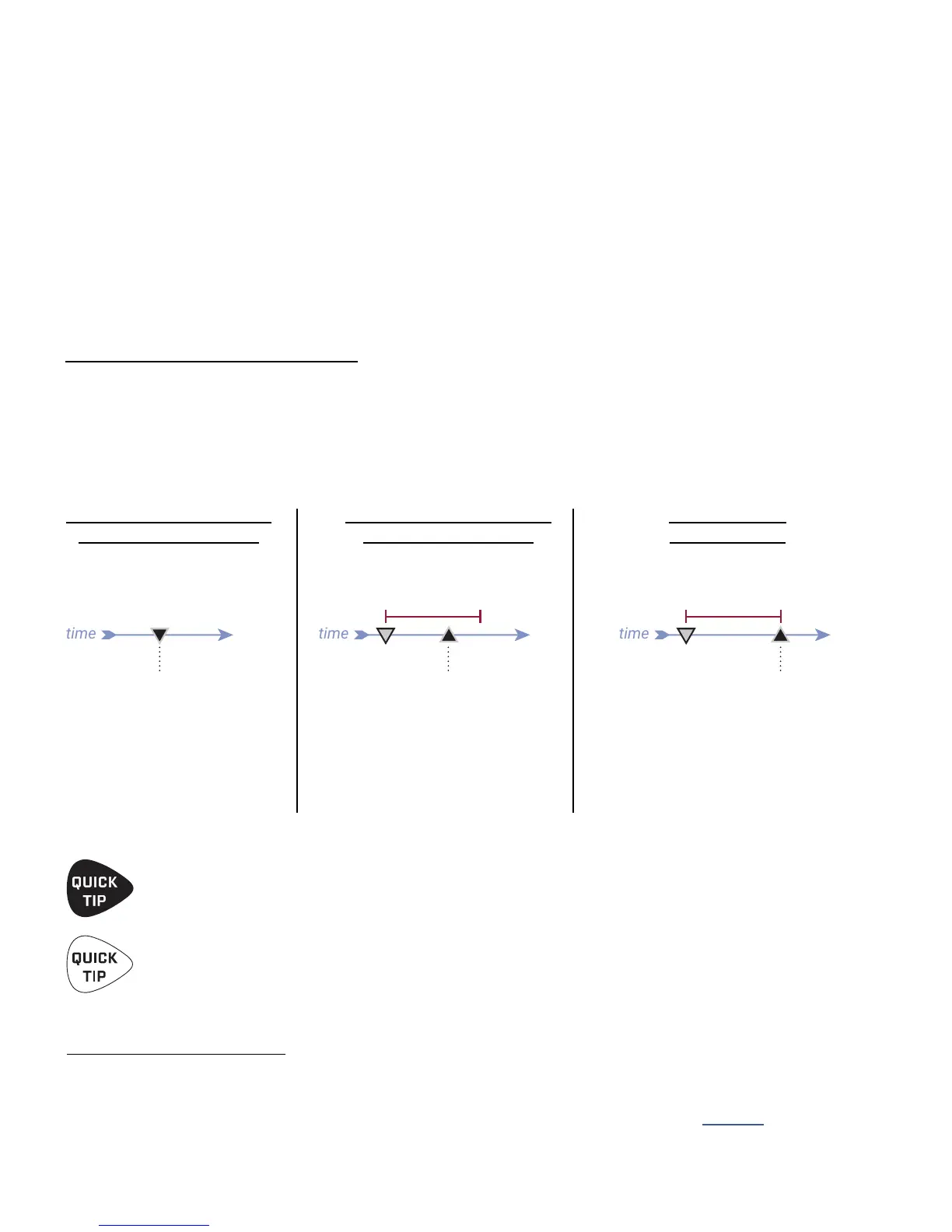
TIMING FOR A TAP FUNCTION
WITH NO HOLD FUNCTION
TIMING FOR A TAP FUNCTION
WITH A HOLD FUNCTION
TIMING FOR ANY
HOLD FUNCTION
The Tap function res
at the moment the
footswitch is depressed.
The Tap function res when
you the switch, as
long as this happens before
the Press and Hold Timeout.
If not, the Hold function
eventually res...
When you hold a switch, its HOLD
function activates at the moment
the Press and Hold Timeout runs
out—whether or not the switch
has a Tap function. This does not
cause the Tap function to re.
TAP & HOLD FUNCTIONS
Every switch in every layout can be programmed with individual TAP and/or HOLD functions.
Tap functions — used throughout history for guitar effects and beyond — are best for changes that require tight
timing. For example, a tap switch set to SELECT SCENE is ideal to change the sound precisely as a solo begins.
Hold functions on the other hand, require a “long press” and are red after a brief
delay, so their timing is less precise. Hold switches are perfect for functions like
opening the Tuner, or accessing an alternate layout such as Looper Control.
THE RULES OF SWITCH TIMING
Like every guitar product in history with “hold” footswitches, the FC must follow rules for timing so it “knows”
whether you are trying to activate the Tap or the Hold. A switch with a Hold function must briefly delay the Tap
function until it can determine which one you are trying to activate. When this is the case, the tap is activated
when the switch is instead of when it is —unless you continue holding the switch past
the “Press and Hold Timeout” window. The following illustrations help explain switch ring and timing:



 To Next Page