Home
Framery
VCR
O
Page 52 (Clean the Pod)
Framery O - Clean the Pod
58 pages
Manual
Save Page as PDF
To Next Page
To Next Page
To Previous Page
To Previous Page
Loading...
Framery O
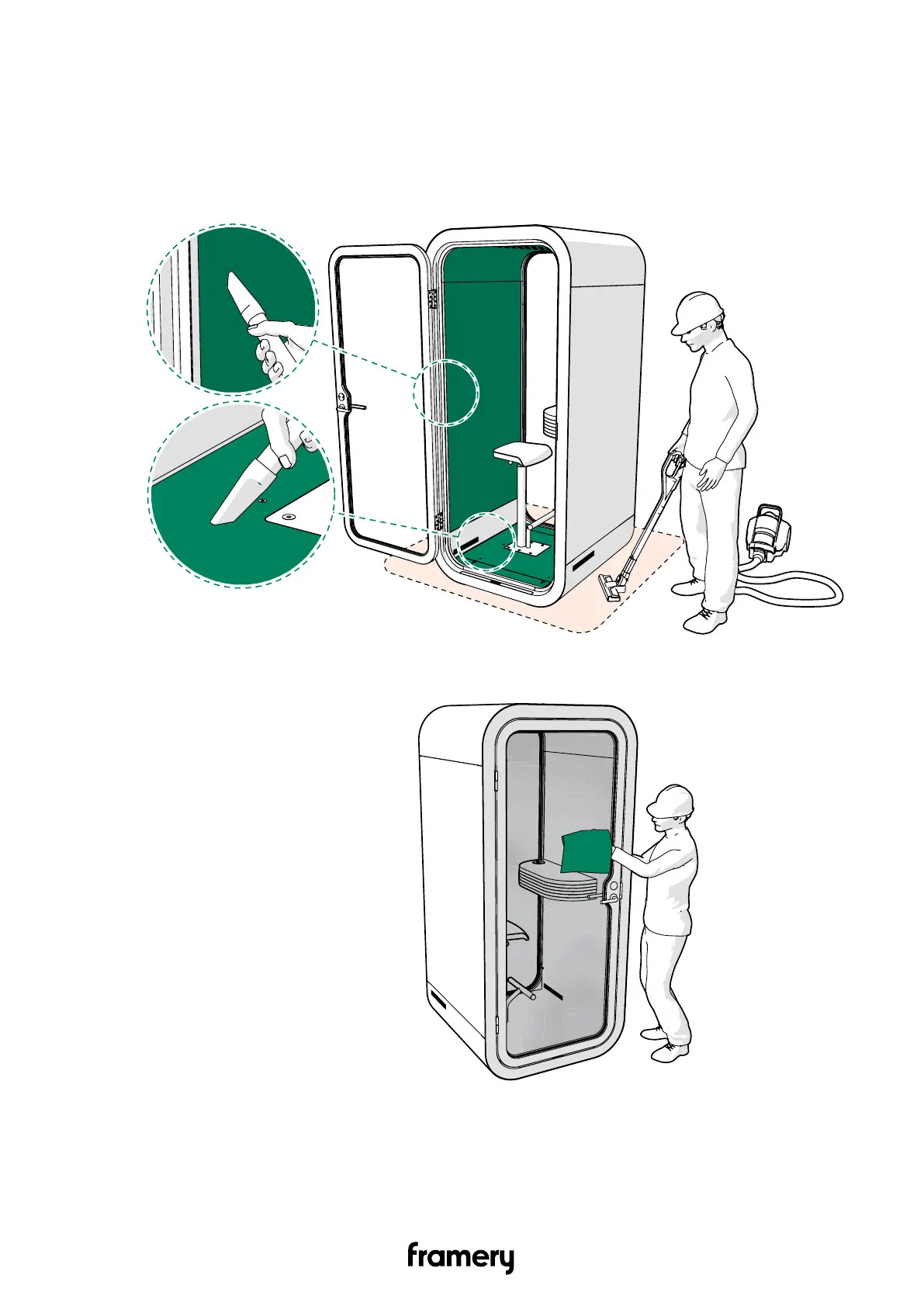
13 Clean the pod
1.
Clean the carpet, seat, pod floor
, interior panels, and pod surroundings with a vacuum
cleaner
.
2.
Clean the glasses with glass cleaner and a lint-free cloth.
52
Complete care instructions
info@frameryacoustics.com
51
53
Table of Contents
Main Page
Table of Contents
3
Important Safety and Product Instructions
5
Preface
5
Product Information
5
Copyright
5
Manual Contents
5
Warning, Information and Safety Symbols in this Manual
5
Main Safety Risks Related to the Installation, Maintenance, Disassembly, and Use of the Product
6
Installation, Maintenance, and Disassembly
6
Electrical Safety
7
Fire Safety
8
Lifting Safety
8
Moving the Product on Wheels (Optional)
9
Tools and Accessories
10
Check the Overall Condition of the Pod
11
Disconnect the Power Cord
12
Level the Floor
13
Disassemble the Necessary Parts
15
Remove the Body Covers
15
Remove the Cover Panels
16
Straighten the Pod
18
Service the Door
20
Replace the Seal
20
Replace the Hinges
21
Adjust the Door Height
24
Replace the Lock Case
28
Remove the Door Handle
28
Replace the Lock Case
30
Reinstall the Door Handle
31
Replace the Strike Plate
34
Tighten All the Screws
36
Clean the Fans
38
Check All the Electrical Connections
41
Reassemble
43
Install the Floor Cover Panels
43
Install the Wall Cover Panels
43
Install the Roof Cover Panels
44
Install the Bottom Body Covers
45
Install the Roof Body Covers
47
Install the Wall Body Covers
50
Clean the Pod
52
Check the Functionality of Electrical Components
55
Other manuals for Framery O
Installation Instructions
82 pages
Troubleshooting Instructions
96 pages
Maintenance Instructions
54 pages


 To Next Page