F3Dn Service Manual Advanced Troubleshooting Guide / Section 1.3
For Technical Support, Call 800-537-2653. Copyright © 2006 Franke, Inc. All rights reserved.
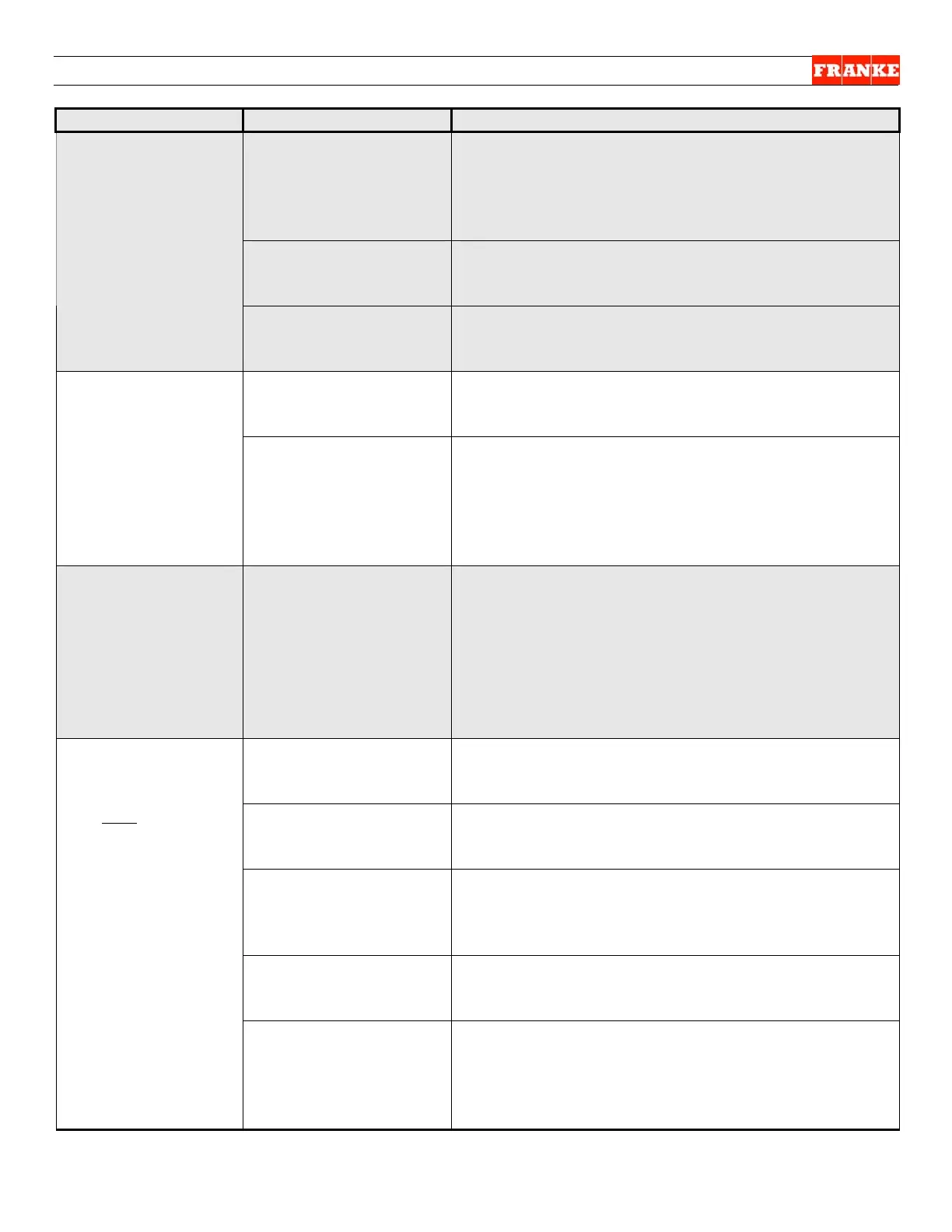
The Problem Possible Cause What To Check & Do
Does PC Control
Board have 24-Volt DC
power input from
supply?
No = replace Power Supply per Section 2.17; Yes
= check momentary +24-VDC and –24-VDC input to
Door Open Motor by removing basket and
reinserting it into dispense position. Did 24-Volt DC
signal occur?
Door Open Motor/Slide
Assembly?
Check Slide Assembly for binding components. If
OK = replace 24-Volt DC Door Open Motor per
Section 2.8
NO Fries
Dispensed:
[Dispense Doors Do
Not Open]
Continued…
PC Control Board? If 24-Volt DC Power, Door-Open Motor & Slide
Assembly are OK, replace PC Control Board per
Section 2.18
Door Closing Spring? Are doors partially open and easily moved by hand?
Yes = Replace Door Closing [Extension] Spring per
Section 2.10
Product Dispensing
Doors Remain
OPEN
Broken Link? Door
Open Sensor?
Check for broken link between door shaft blocks on
rear of unit. Yes = Replace using Spring & Link
Repair Kit P/N 18000798. No = Locate Door Open
Sensor and actuate flag on rear of unit. Is sensor
functioning? No = Replace Door Open Sensor per
Section 2.13
LOAD READY
Indicator LED On,
Doors Open…But
No Product
Dispensed
Load Cell Calibration? Remove upper back panel. Press Load Size button
and record “T=” numbers (5 digits) on LED display
on upper right of PC Control Board. Numbers
should vary by 50 – 100 counts when load size is
changed between: Small-Medium-Large. If not,
Load Cell Calibration may be incorrect (calibrated
for 0 weight); See Section 3.7 for Load Cell
Calibration procedure.
Hopper Low On Fries? Is LOW PRODUCT light on Operators Panel
flashing? Yes = Refill hopper with fries; No =
Continue…
Load Size Setting? Is LOAD SIZE selected correctly (Small, Medium or
Large)? Yes = Continue… No = Select correct load
size and restart this Lane.
Frozen Fries Bridge? Have French Fries formed a bridge inside hopper
(thawed and re-frozen)? Yes = Break bridge inside
hopper by gentle hand agitation of product. No =
Continue…
Product Chute
Alignment?
Is metal Product Chute assembled correctly inside
freezer? Yes = Continue… No = Reassemble F3Dn
parts correctly, per Operating Manual.
Wrong Load Size:
Too Few Fries
Load Cell Calibration? Recalibrate Load Cell per Section. 3.7. Did
recalibration procedure correct “too few fries”
problem? Yes = Return unit to service; No = See
Load Size Adjustment procedure in Section 3.4
[Note: Usually required at installation only.]



 To Next Page