Franke Kaffeemaschinen AG Configuration | 10
User manual SB1200 FM CM 67
1
2
3
7
4
5
6
Test
General Coffee
Back
Save
Brewing quantity
Water quantity
Grinding quantity
Grinder 1
Grinder 2
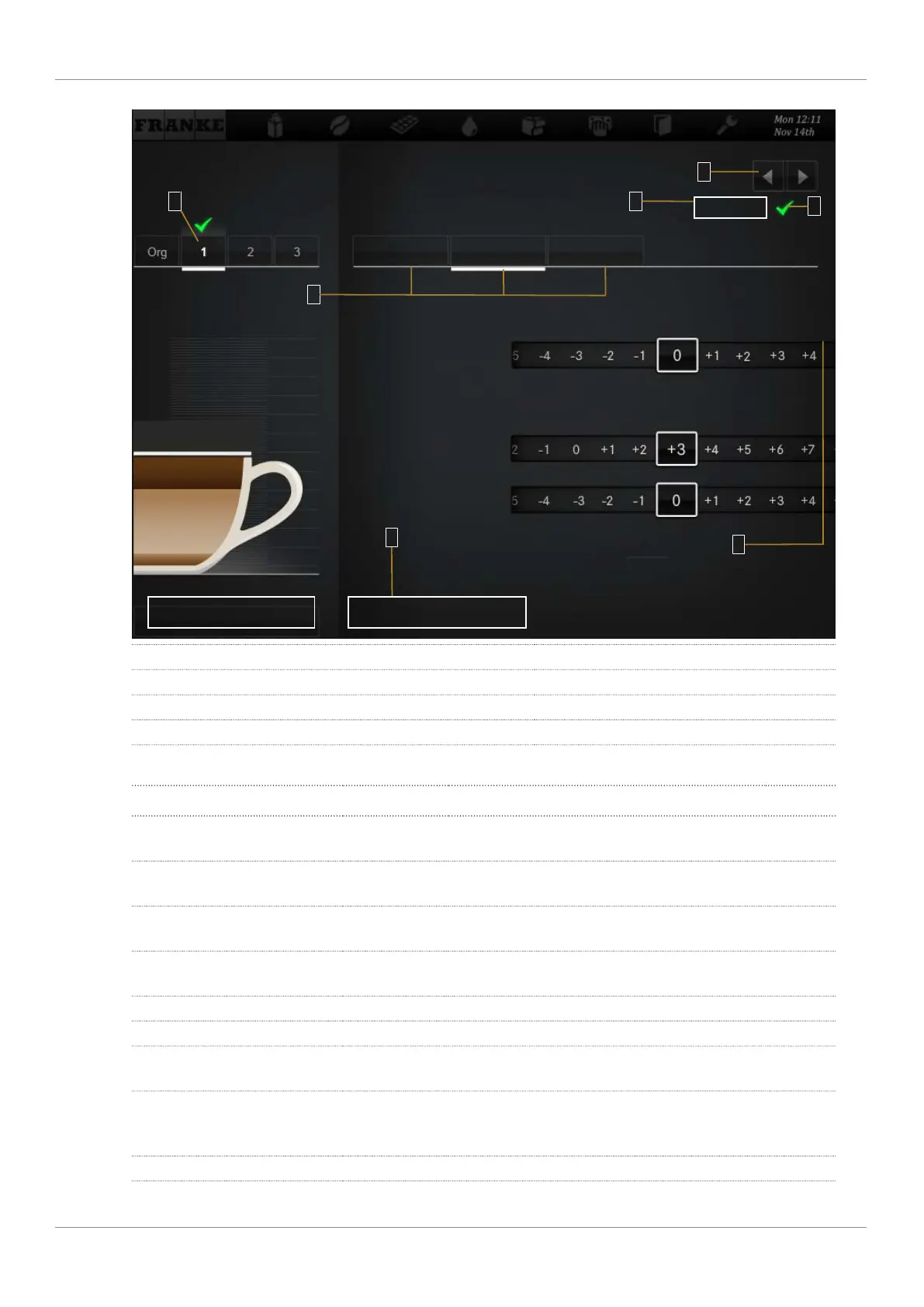
1 Select variation 2 Select area
3 Save settings 4 Select product
5 Confirm variation 6 Prepare a test product
7 Adjust parameters
Setting drinks
Desired action Menu item Information / instruction Number
Select a product Use the selection arrows to select the product to
be defined, then select the variation to be edited
4, 1
Change product designation General Enter the product description and select the prod-
uct text
2, 7
Adjust price (only available when
payment is activated)
General Determine PLU, prices, and tokens; select the Free
option
7
Adjust water quantity, grinders,
brewing quantity, and pressure
Coffee Adjust parameters 2, 7
Adjust milk quantity Milk Adjust the milk quantity in percent 2, 7
Adjust the foam quantity Foam Adjust the foam quantity in percent 2, 7
Prepare a test product Test Press Test to prepare the selected product using
the modified settings
6
Assign a drink variation that is to
be prepared with this product se-
lection
Select the variation, then confirm with the check-
mark
1, 5
Save drink settings Save 3



 To Next Page