EasyManua.ls Logo

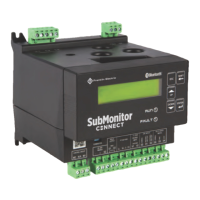
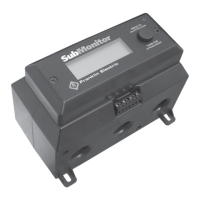
Franklin Electric submonitor - User Manual

Franklin Electric submonitor
25 pages
Print Icon
To Next Page IconTo Next Page
Loading...
Page 1
Giant Fountain
SubMonitor Motor Protection System
Owner's Manual
Otterbine Barebo, Inc.
3840 Main Rd. East
Emmaus, PA 18049 • U.S.A.
Ph#: (610) 965-6018 • 1-800-AER8TER
Fax#: (610) 965-6050
www.otterbine.com

Other manuals for Franklin Electric submonitor

Questions and Answers

  • P
    Patricia CantrellSep 3, 2025
    Why does my Franklin Electric submonitor Protection Device have False Starts?
    • J
      Jennifer SweeneySep 3, 2025
      False starts in your Franklin Electric Protection Device can be attributed to a few issues. Chattering contacts may be the cause, so check and replace them. Loose connections in the motor power circuit can also lead to false starts, so tighten any loose connections. Additionally, inspect and repair any arcing contacts.
  • P
    pmillerSep 1, 2025
    How to fix Phase Reversal in Franklin Electric submonitor Protection Device?
    • M
      Mary CollinsSep 1, 2025
      If you're experiencing phase reversal with your Franklin Electric Protection Device, it indicates an incoming power problem. Check the incoming voltage phase sequence to resolve this issue.
  • R
    Ryan FergusonAug 31, 2025
    Why does my Franklin Electric Protection Device show Overvoltage?
    • U
      uromeroAug 31, 2025
      The reason your Franklin Electric Protection Device is showing overvoltage is likely due to an unstable power supply. To resolve this, ensure the power supply is stable and not fluctuating.
  • W
    Wesley DaughertyAug 29, 2025
    Why does my Franklin Electric submonitor show Undervoltage?
    • V
      Vanessa ReedAug 29, 2025
      Undervoltage issues with your Franklin Electric Protection Device could be due to poor connections in the motor power circuit, so inspect and rectify any poor connections. Alternatively, an unstable or weak power supply might be the cause, so stabilize the power supply to avoid undervoltage.
  • J
    John KelleyAug 28, 2025
    What causes Overrange in Franklin Electric submonitor Protection Device?
    • J
      Jeremy GutierrezAug 28, 2025
      Overrange issues in your Franklin Electric Protection Device may arise from a wrong motor voltage or SFA setting, so verify and adjust the motor settings. Excessively high line voltage or motor current can also cause overrange; reduce the line voltage or motor current accordingly.
  • J
    Jennifer Martinez MDAug 27, 2025
    What causes Unbalance in my Franklin Electric submonitor Protection Device?
    • M
      Mr. Richard PetersAug 27, 2025
      Unbalance in your Franklin Electric Protection Device can stem from a few key issues. A phase loss could be the cause, so investigate and restore any lost phases. An unbalanced power supply can also lead to this problem; check the power supply balance and adjust as necessary. Lastly, issues with an open delta transformer can cause unbalance, so examine and repair any problems with the transformer.
  • A
    Alex ClarkAug 25, 2025
    What to do if my Franklin Electric submonitor indicates Underload?
    • J
      Jeffrey TaylorAug 25, 2025
      If your Franklin Electric Protection Device indicates an underload condition, consider the following potential causes. The SF Max Amps setting may be incorrect and needs adjustment. Over-pumping of the well could be the issue, so inspect and adjust the well pumping operation. A clogged pump intake, closed valve, loose pump impeller, broken shaft or coupling, or a phase loss can also cause an underload. Clear any clogs, open any closed valves, tighten the impeller, repair or replace the shaft/coupling, and investigate/restore any lost phases.
  • C
    Colleen WilliamsAug 23, 2025
    Why is my Franklin Electric Protection Device overheating?
    • M
      Mark AndrewsAug 23, 2025
      Several factors can cause your Franklin Electric Protection Device to overheat. High or low line voltage can contribute, so check and stabilize the line voltage. An overloaded motor can also lead to overheating, so reduce the motor load. Excessive current unbalance, poor motor cooling, high water temperature, and excessive electrical noise from nearby VFDs can also be culprits. Balance the current, improve motor cooling, lower the water temperature, and reposition the VFD to reduce electrical noise interference.

Summary

SubMonitor Motor Protection System Overview

Before Installing the SubMonitor System

Read both manuals thoroughly and ensure power is off before working on motor or controls.

Limited 3 Year Warranty

SubMonitor Submersible Pump Motor Protection System Features

Simple Programming

Explains how to set up the SubMonitor by selecting motor ratings like voltage, Hertz, and SF Amps.

SubMonitor Components

SubMonitor Wiring and Connections

Detailed instructions and diagrams for connecting power leads and control circuits to the SubMonitor unit.

Lightning Arrestor Installation

Guidance on installing a lightning arrestor for surge protection and proper grounding.

Quick Guide to Setup

Additional Programmable Options

Password Protection

Event History Functionality

Information Logged in Event History

Details the types of data stored by the SubMonitor, including trip events, currents, and voltages.

Reviewing Recorded Events

Instructions on how to navigate and view logged events, requiring a password if protection is enabled.

Types of Events Logged

Lists the specific events recorded by the SubMonitor, such as trip types, resets, and motor changes.

Key to Parameters in Event History

Other Features

Operation Without the Display Unit

Describes the SubMonitor's functionality and indicators when the detachable display unit is disconnected.

Special Conditions for Use

Power Factor or Surge Capacitor

Explains how to connect power factor or surge capacitors correctly to avoid losing motor overheat protection.

Programmable Options Reference

Troubleshooting Common Faults

Product Specifications

Mounting Dimensions and Instructions

Important Notes

Franklin Electric submonitor Specifications

General IconGeneral
Frequency50/60 Hz
Enclosure RatingNEMA 4X
Operating Temperature-40°C to 70°C
Storage Temperature-40°C to 85°C
Protection TypePhase Loss, Phase Reversal

Related product manuals