11
OPERATION GUIDE
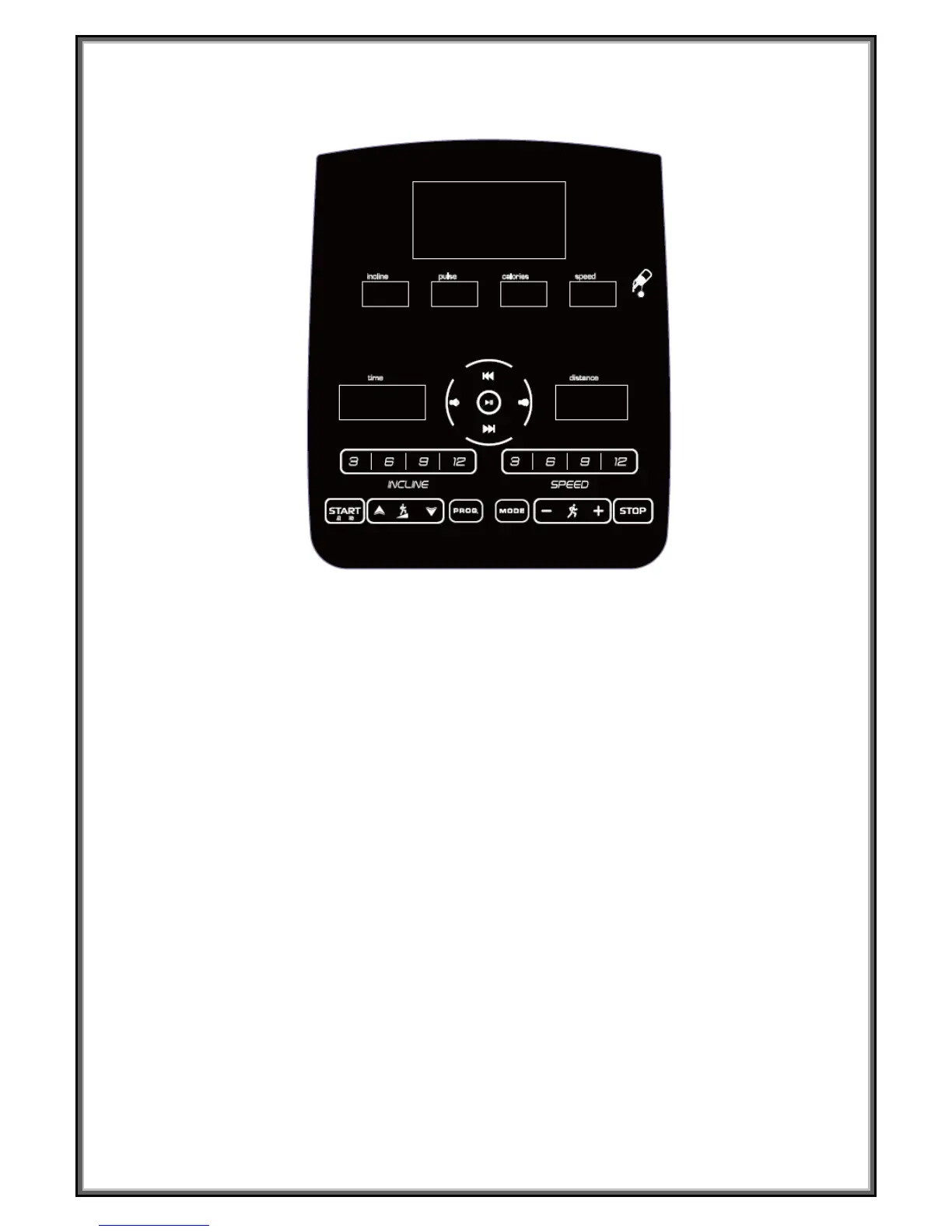
WINDOW DISPLAY:
1.” Time” window: Display running time. Display the exercise time positive direction clock from 0:
00-18 hours and 12mins ,when count to the end, the machine will not stop and count again from
0:00;When count down, it will show from the setting time to 0:00, when down to 0:00 , the machine
will stop smoothly and show ‘ End ’, and will enter into stand by mode.
2.” Distance” window: Under the standby mode , press the “program” button, the window will display
“ P1,P2, … … ,P23-P24-U01-U02-U03-FAT ” Circulatory; During operation, display the running
distance positive direction clock from 0.00-99.9, when up to 99.9, it will count again from 0; When
count down, it will show from setting data to 0; When down to 0, the machine will stop smoothly and
show ‘ End ’, enter into the initial situation after 5 seconds.
3.” Calories” window: Display runner’s calories. When display calories, it will count from 0 to 999,
when up to 999, it will count again from 0; when count down, it will count from the setting data to 0,
when down to 0, the machine will stop smoothly and enter into standby mode.
4. “Pulse “window: When the runner holds handle pulse with two hands, the system can calculate
the runner’s heart beat and window will display the runner heart beat, the range is 50-200 beats/min
( this data is just for reference, can not be used as the medical data).
5. “Speed “window: Under the initial situation, this window will show speed, the speed range is
0.5-22km/h. Under the program setting mode, display the speed date of the first section for each
program.
6” Incline” window: When display incline, this window will show inline from level 0 to level 18. Under
the program setting mode, display the incline date of the first section for each program.
7. MATRIX window: When press “START” button, the matrix window will show “3-2-1”.Under stand


 To Next Page