WALKING BELT CENTERING AND TENSION ADJUSTMENT
DO NOT OVERTIGHTEN the walking belt. This may cause reduced motor performance and
excessive roller wear.
TO CENTER WALKING BELT:
● Place treadmill on a level surface
● Run treadmill at approximately 3.5 mph
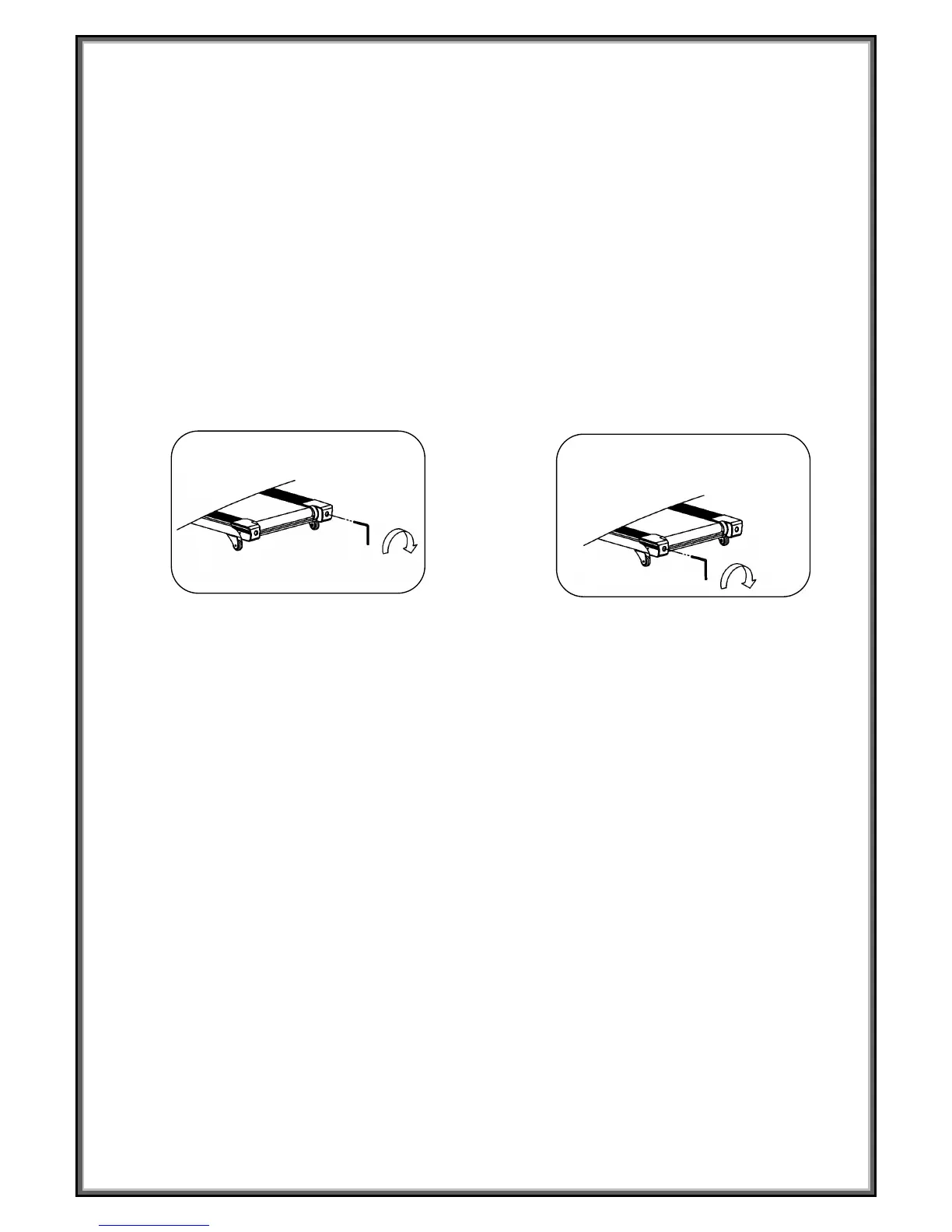
● If the belt has drifted to the right, turn the right adjusting bolt 1/2 turn clockwise and the left
adjusting bolt 1/2 turn counterclockwise
● If the belt has drifted to the left, turn the left adjusting bolt 1/2 turn clockwise and the right
adjusting bolt 1/2 turn clockwise and the right adjusting bolt 1/2 turn counterclockwise
Picture A If the belts has drifted to the RIGHT Picture B If the belts has drifted to the LEFT
WARNING: ALWAYS UNPLUG THE TREADMILL FROM THE ELECTRICAL OUTLET BEFORE
CLEANING OR SERVICING THE UNIT.


 To Next Page