To change the headlights from low to high beam, or
high to low beam, push the control lever away from the
instrument panel (Fig. 3.6). When the headlights are on
high beam, an indicator light on the instrument panel
12
1
23 4 6
5781 1910
11
1
26 25 24 23 22 21 20 19 18 17 16 15 14 13 12
12/18/97 f610041
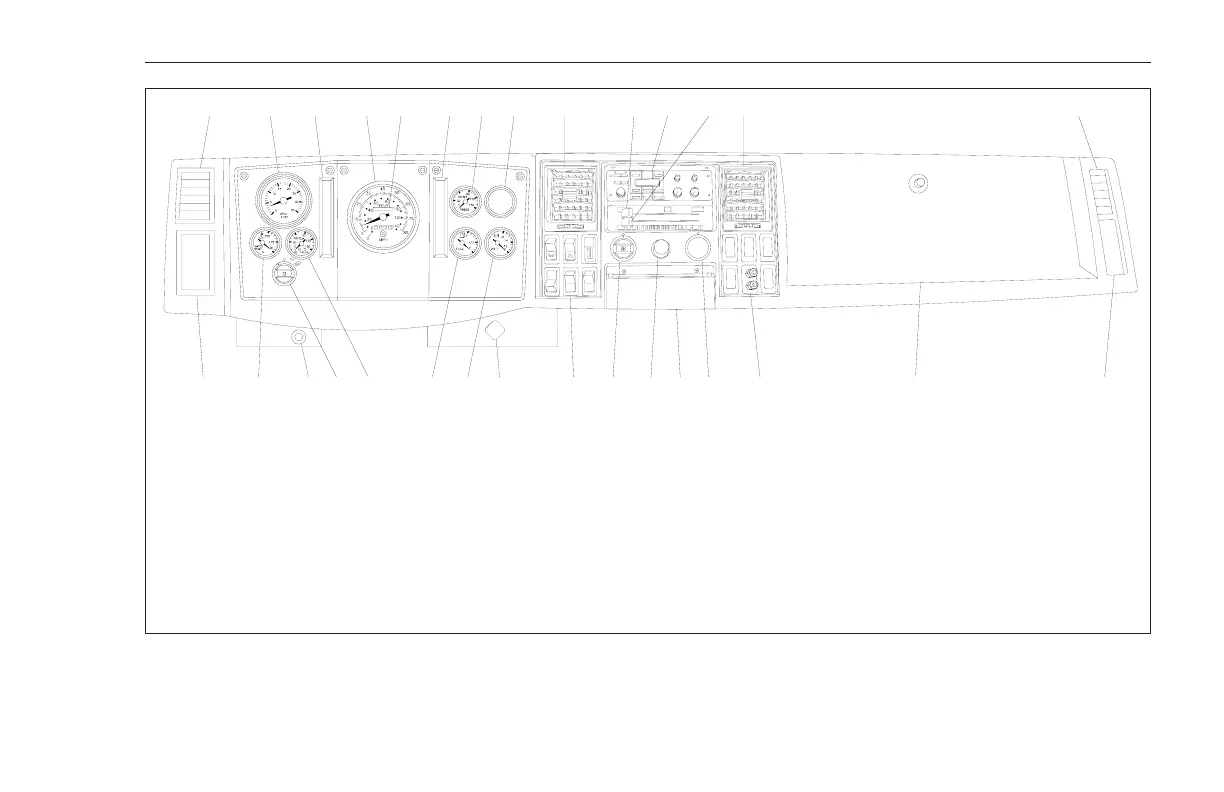
1. Face Level Vent
2. Tachometer
3. Warning and Indicator Light
Module
4. Speedometer
5. Odometer
6. Warning and Indicator Light
Module
7. Dual Air Pressure Gauge
8. Not Used
9. Heater/Ventilation Mode Selector
10. Radio (optional)
11. Temperature Control
12. Interior Grab Handle
13. Glove Compartment
14. Radio Hot Post (optional)
15. Not Used
16. Ashtray
17. Cigar Lighter
18. Fan Speed
19. Left Switch Bank
20. Parking Brake Control
21. Voltmeter
22. Fuel Gauge
23. Oil Pressure Gauge
24. Headlamp Switch
25. Hand Throttle, Vernier Type
(optional)
26. Water Temperature Gauge
Fig. 3.1, Instrument and Control Panel Layout (typical)
Driver Controls and Instruments
3.2











 To Next Page