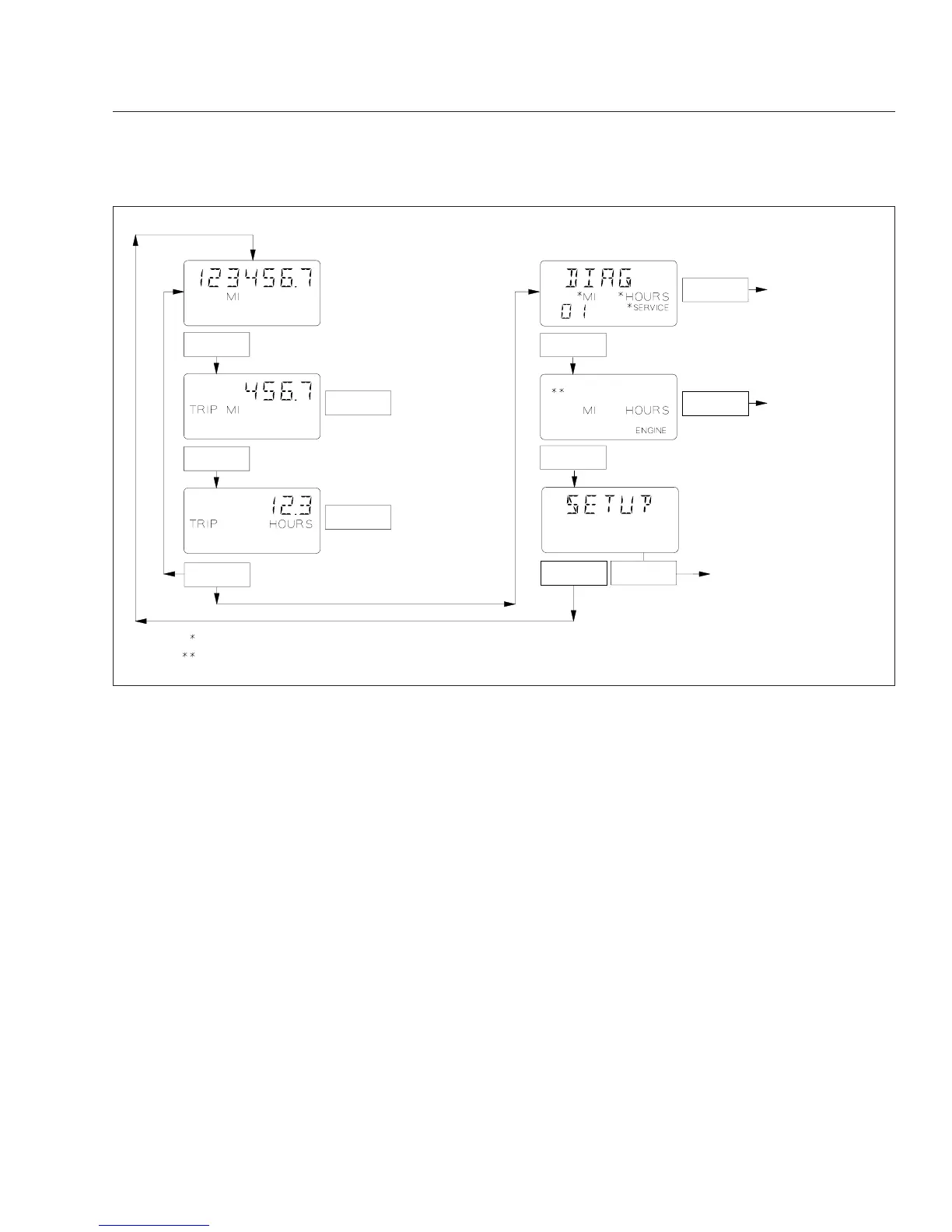
brake released, only the odometer, trip miles, and trip
hours can be accessed. Park the vehicle and set the
parking brake to access additional screen functions.
See Fig. 2.6.
Trip Miles, Trip Hours
When the odometer is displayed, push the mode/
reset switch once to display trip distance. Push it
again to display trip hours. Both numbers are calcu-
lated from the last time the value was reset. Hold the
switch when each number is displayed to reset trip
miles or hours to zero.
Diagnostic Screens
During vehicle start-up, with the parking brake on,
the ICU4 or ICU4-2 display any active fault codes for
three seconds each until the parking brake is re-
leased. With active fault codes on display, push the
mode/reset switch once to display the initial diagnos-
tic screen (DIAG) and the total number of active
faults. If service cycle screens are enabled, and ser-
vice distance or time has been exceeded, the text
SERVICE will be displayed with the other fault mes-
sages. This will inform the vehicle operator that the
service interval has been exceeded and vehicle ser-
vice is required.
Specific fault code information can be displayed only
with the vehicle parked and the parking brake set. If
the odometer screen is displayed, push the mode/
reset switch until the DIAG screen is displayed, then
hold the switch to enter the fault code screen se-
quence. Once the initial fault code is displayed, push
the switch to cycle through additional diagnostic
codes relating to the first fault. Hold the switch to dis-
play additional faults or return to the DIAG screen. If
service cycle screens are enabled, service interval
information is displayed before fault code information
is displayed.
If the word SERVICE appears on the DIAG message
display screen, service cycle screens are enabled.
Hold the mode/reset switch at the DIAG screen to
f040693
Push
With park brake off
Go to the Diagnostic
and Engine Display
Screens figure.
Hold
If "SERVICE" is displayed Service Cycle screens are enabled and either "MI" or "HOURS" is also displayed.
On some vehicles "OIL LVL" appears in the top row of the display, if equipped and enabled.
Default Odometer
Display Screen
To Reset Trip Miles
To Reset Trip Hours
Hold
Hold
Hold
Push
Push
Push
Push
Push
Hold
For setup screens.
Go to the Diagnostic
and Engine Display
Screens figure.
With park brake on
06/01/2004
Fig. 2.5, ICU4/ICU4-2 Mode/Reset Switch Basic Functions
Instruments and Controls Identification
2.6











 To Next Page