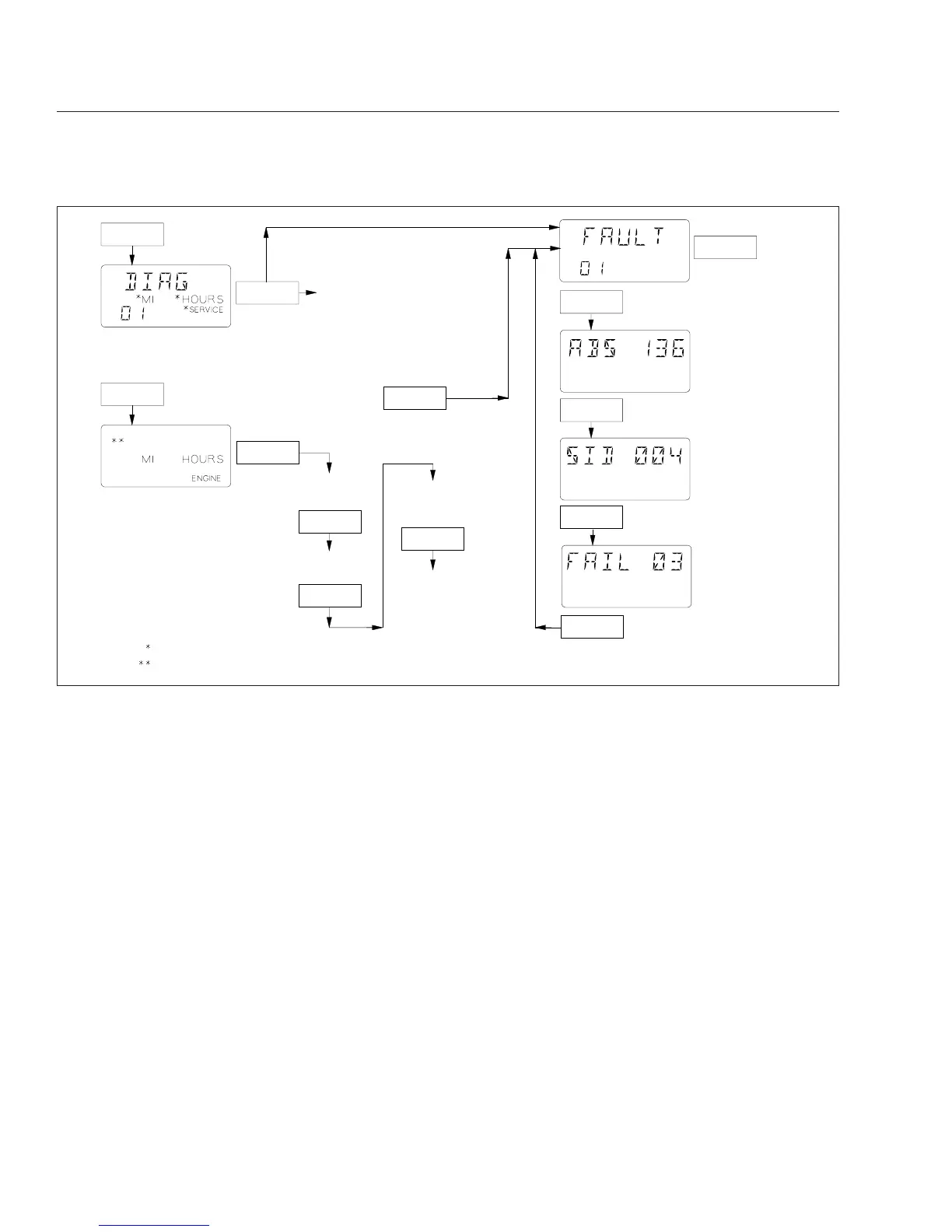
display miles or hours remaining until the next sched-
uled service. If MI appears on the DIAG screen, ser-
vice miles are enabled; if HOURS appears on the
screen, service hours are enabled. Either service
miles or hours can be enabled, but not both. If ser-
vice miles or hours has been exceeded, the number
flashes to indicate service is overdue.
Engine Screens
Push the mode/reset switch once following the DIAG
screen and the word ENGINE is displayed in the
lower right corner of the digital display. Hold the
switch to display total engine miles. Hold it again to
display total engine hours. If OIL LVL is displayed
earlier with ENGINE (only on vehicles with
Mercedes-Benz engines; if equipped and enabled)
hold the switch again to access oil level screens.
Instrumentation Control Unit 3
(ICU3 and ICU3 ’07)
Figure 2.7 shows the instrument panel for Columbia
vehicles equipped with the ICU3 and ICU3 ’07. The
ICU3 is on vehicles with engines that were manufac-
tured up until December 31, 2006, and the ICU3 ’07
is on vehicles with engines that were manufactured
January 1, 2007 or later. They can be differentiated
by the ISO icons used on the ICU3 ’07.
The ICU3 and ICU3 ’07 electronic dashboards can
accept information from the various sensors installed
on the vehicle and feed it to electronic gauges. Only
air gauges operate mechanically.
There can be up to eight gauges on the driver’s in-
strument panel (six electronic and two mechanical).
The ICU3 or ICU3 ’07 can not drive gauges located
on the auxiliary instrument panel.
The dash message center is the heart of the ICU3
and ICU3 ’07. It has a set of warning and indicator
To display total
engine miles.
To display tolal
engine hours.
To display OIL LVL
screens (if equipped
and enabled).
To display specific
OIL LVL amount
over or under full.
For additional faults,
if any, or return to
DIAG screen.
04/28/2004 f040695
Push
Hold
Push
Push
Push
Hold
Hold
Hold
Push
Hold
Hold
Hold
Push
Then
If "SERVICE" is displayed Service Cycle screens are enabled and either "MI" or "HOURS" is also displayed.
On some vehicles "OIL LVL" appears in the top row of the display, if equipped and enabled.
Service Cycle Screens (if enabled):
Holding the button displays Service
Miles or Service Hours, remaining or
exceeded, to service target. If
numbers flash, the service target is
exceeded and service is overdue.
Also, the "SERVICE" screen will be
displayed as an active Fault Code
when service miles or hours are ex−
ceeded.
If Service Cycle screens not enabled
Or
Fig. 2.6, ICU4/ICU4-2 Mode/Reset Switch Diagnostic and Engine Display Screens
Instruments and Controls Identification
2.7











 To Next Page