
 Need help?
Do you have a question about the Frigidaire FFPA1422R1 and is the answer not in the manual?
General guidelines to prevent accidents and ensure safe operation.
Essential electrical safety practices, including grounding and cord use.
Critical warnings to avoid serious injury or death from misuse or hazards.
Advice on protecting the unit and testing the power cord.
Section to record model and serial numbers and register the product.
Explains common sounds the unit might make during operation.
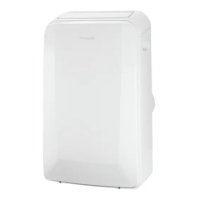
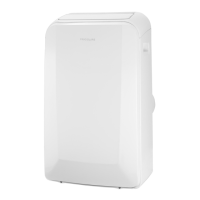
Identifies key components and features of the portable air conditioner.
Lists all parts and their quantities included in the package.
Instructions for setting up the exhaust hose for cooling mode.
Step-by-step guide for installing the unit in a double-hung window.
Step-by-step guide for installing the unit in a sliding window.
Overview of the unit's control panel buttons and indicators.
Description of the remote control buttons and their functions.
How to operate the unit in cooling mode, including hose requirements.
How to operate the unit in heating mode (if applicable).
Instructions for operating the unit in dry mode.
Explanation of the auto mode's function and limitations.
How to operate the unit using only the fan function.
Detailed guide on setting delay start and stop timers.
How to use sleep mode and control louver swing.
Information about filter reminder and draining condensate.
Explanation of error codes and fan speed selection.
Provides extra operational tips and features.
Step-by-step guide on cleaning the air filters.
Instructions for cleaning the unit exterior and storing it for winter.
Troubleshoots issues like unit not turning on or insufficient cooling.
Addresses rapid cycling, noise, and incorrect room temperature issues.
Lists conditions and parts not covered by the warranty.
Information on how to contact for service and warranty claims.
This document outlines the use and care of a portable air conditioner, providing essential information for safe and efficient operation.
The portable air conditioner is designed to provide cooling, heating (on some models), dehumidifying, and fan-only operation for indoor spaces. It features a control panel and a remote control for convenient operation. The unit is equipped with a current detection device in the power supply cord to reduce the risk of fire.
Cooling Mode: In this mode, the appliance must be placed close to a window or opening so that warm exhaust air can be ducted outside using the exhaust adaptor hose. The user can set the desired temperature and fan speed. The unit will automatically select cooling, heating (not applicable for cooling-only models), or fan-only operation based on the selected temperature and room temperature.
Heating Mode (on some models): For heating, the exhaust adaptor hose is not required. The user can set the desired heat setting. Fan speed selection is not available in heating mode.
Dry Mode (Dehumidifying): In this mode, the exhaust adaptor hose is not required, but the collected water must be discharged. The fan runs at low speed, and the display shows the room temperature. Doors and windows should be kept closed for best effect.
Fan Mode: In this mode, neither the exhaust hose nor the drainage hose is needed. The user can choose the desired fan speed, and the display will show the room temperature.
Auto Mode: When set to Auto mode, the air conditioner automatically selects cooling, heating (if applicable), or fan-only operation based on the user's selected temperature and the current room temperature. The unit controls the room temperature around the set point. Fan speed cannot be selected in Auto mode.
Sleep Operation: This feature adjusts the selected temperature gradually over time to promote comfortable sleep. The temperature increases by 2°F after 30 minutes, and by another 2°F after an additional 30 minutes. This new temperature is maintained for 7 hours before returning to the originally selected temperature. This mode can be canceled at any time.
Swing Operation: The louver on the unit can swing automatically to distribute air. The user can also stop the louver at a desired angle by pressing the SWING button again.
Timer Operation: The unit allows for both delay stop and delay start settings, whether the unit is ON or OFF. The timer can be set in 0.5-hour increments up to 10 hours, and then in 1-hour increments up to 24 hours. The control confirms the setting automatically after 5 seconds. To cancel the timer, the timing can be set to 0.0.
The portable air conditioner is designed for ease of use with a clear control panel and a remote control. The unit has carrying handles on both sides and castors for easy mobility.
Installation: The appliance should be positioned on a flat floor with a minimum of 12 inches clearance around it, and within reach of a single circuit outlet power source. The exhaust hose, which can extend from 15 inches up to 59 inches, is connected to adaptors and then to a window sliding kit. The window sliding kit can be installed in both vertical and horizontal windows, with adjustable lengths to fit various window sizes. It is important to keep the hose length to a minimum and avoid sharp bends or sags for optimal performance. Foam seals are provided to ensure a tight seal around the window kit.
Power Supply: The power supply cord includes a current detection device. Users should regularly test this device by pressing the TEST button and then the RESET button. If the cord fails to reset or is damaged, it must be replaced by the product manufacturer.
Temperature Display: The control panel can display temperature in either Fahrenheit or Celsius. To switch between units, press and hold the "TEMP" Up and Down buttons simultaneously for 3 seconds.
Safety Features: The unit includes several safety precautions. It is important to ensure proper grounding, avoid using extension cords or adapter plugs, and never bypass the grounding prong. The unit should not be operated without the outside protective cover in place. In case of malfunction, operation should be stopped immediately, the power cord disconnected, and an authorized servicer called.
Troubleshooting: The manual provides a comprehensive list of common occurrences and their solutions, such as the unit not operating, air not feeling cold enough, ice forming on the cooling coil, or the unit turning on and off rapidly. Fault codes like "AS," "ES," "E4," and "P1" are explained, indicating issues like sensor failures or a full bottom tray, with corresponding solutions.
Regular maintenance ensures the longevity and efficiency of the air conditioner.
Air Filter Cleaning: The unit has two air filters (Filter A and Filter B). Filter A is located behind the grill of the back panel, and Filter B is removed by loosening screws and taking down the air inlet grille. The filters should be washed with liquid dishwashing detergent and warm water, rinsed thoroughly, and allowed to dry completely before being replaced. Alternatively, the filters can be vacuumed clean. A "Check Filter" reminder light illuminates after 250 hours of operation, prompting the user to clean the filters. This light can be reset by pressing the "Filter" button.
Cabinet Cleaning: The cabinet and front of the unit can be dusted with an oil-free cloth or washed with a cloth dampened in a solution of warm water and mild liquid dishwashing detergent. Harsh cleaners, wax, or polish should not be used on the cabinet front. Excess water should be wrung from the cloth before wiping around the controls to prevent damage.
Winter Storage: If the appliance is to be stored during winter, it should be covered with plastic or returned to its original carton to protect it.
General Care: The manual emphasizes the importance of occasional ventilation during use and advises against directing airflow at fireplaces or other heat-related sources. It also cautions against climbing on, placing objects on, or hanging objects off the unit, and against placing containers with liquids on it. The unit should be turned off at the power source when not in use for extended periods. Periodic checks of the installation accessories for damage are recommended. The radiator fins should not be subjected to heavy pressure, and the unit should always be operated with the air filter in place. The intake grille, discharge area, and outlet ports should not be blocked or covered. Electrical/electronic equipment should be kept at least one yard away from the unit, and flammable gases should not be used or stored near it.
 General
| Type | Monobloc mobile air conditioner |
|---|---|
| Sleep mode | Yes |
| Timer type | Digital |
| Cord length | 1.95 m |
| Noise level | 55 dB |
| Certification | UL/CUL |
| Ionic function | No |
| Number of speeds | 3 |
| Airflow (low speed) | 686.4 m³/h |
| Airflow (high speed) | 844.4 m³/h |
| Refrigerating medium | R410A |
| Airflow (medium speed) | 764.5 m³/h |
| Cooling capacity (max) | 14000 BTU/h |
| Timer duration (maximum) | 24 h |
| Air conditioner functions | Cooling, Dehumidifying, Fan |
| Suitable for room area up to | 65 m² |
| Cooling capacity in watts (nominal) | - W |
| Cooling energy efficiency (EER, W/W) | - |
| Current | 11.9 A |
| Connected load | 1575 W |
| AC input voltage | 115 V |
| AC input frequency | 60 Hz |
| Hourly energy consumption (cooling) | - kWh |
| Product color | White |
 Weight and Dimensions
| Depth | 397 mm |
|---|---|
| Height | 765.1 mm |
| Weight | 33565 g |
| Package depth | 465.1 mm |
| Package width | 528.6 mm |
| Package height | 887.4 mm |
| Package weight | 39462 g |


 To Next Page