SERVICE MANUAL FS360_EN01 Version00.doc
FROMM
For further updates, see our website www.fromm-stretch.com and Login!
It is forbidden to duplicate this manual or parts thereof or any other form without the author’s authorisation © 2018
MAINTENANCE INSTRUCTIONS
Annual maintenance operations
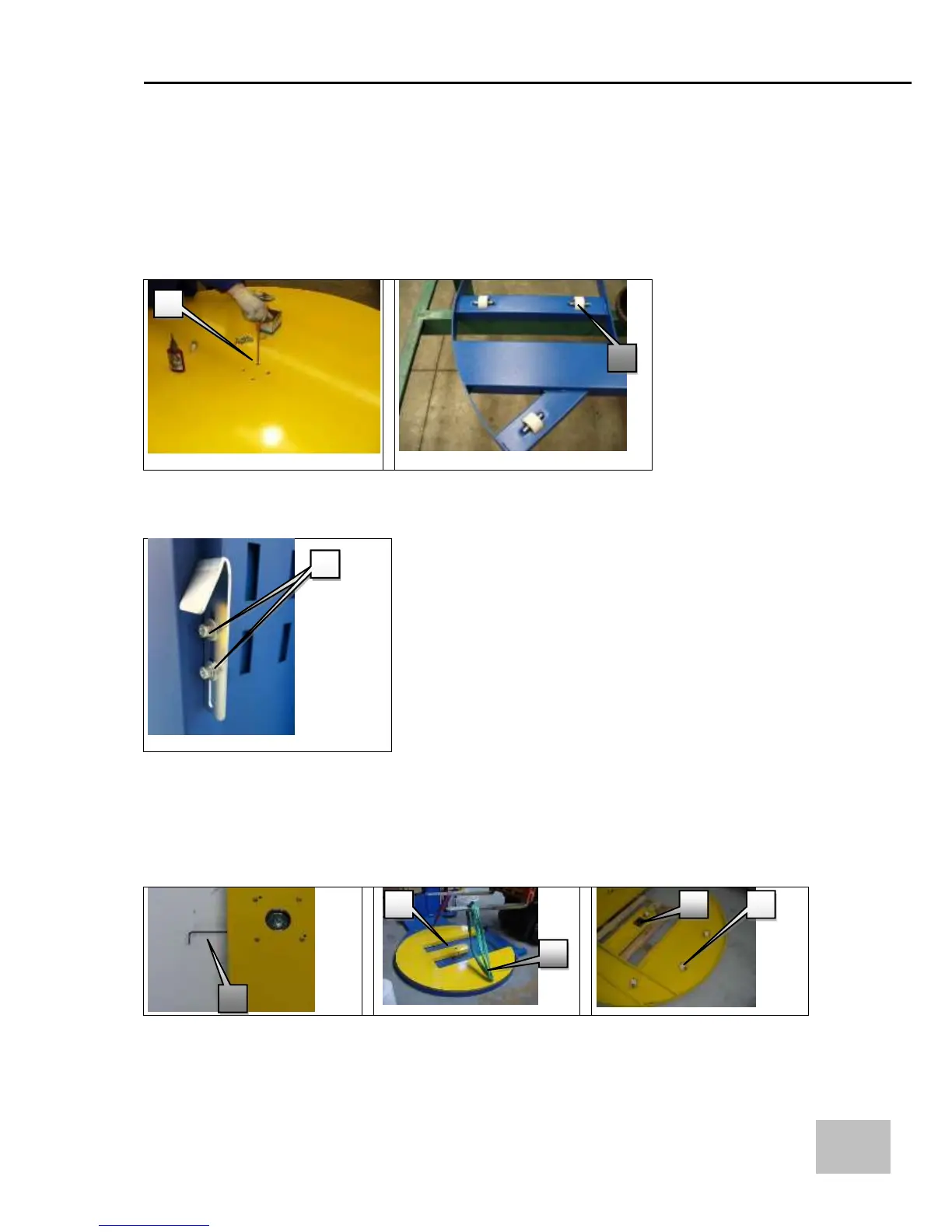
- Release the disk by removing the screws (1) in the centre of the disk (Fig.1);
- Slowly slide the disk from the base unit;
- Check the wear status of the disk’s sliding wheels (2) and, if necessary, replace them (Fig.2);
(insert them by putting them in their place)
- Carefully secure the disk to the turntable with lock tide no. 243. (Fig.1)
Note! Make sure you place the machine in ZERO position before starting this operation
Adjustment of bottom proximity sensors brackets:
In order to make any changes to the position of the limit switch, adjust the bracket using the
corresponding adjustment screws
Horseshoe
- Check the status of wear of the disk’s sliding wheels (1) (Fig.1);
Replace if necessary (insert them using the spring);
- Release the disk by loosening the nut of the turntable’s central bearing that is in the centre of the
disk (1) (Fig.1/2/3);
- Lift the disk (2) from the base and rotate it head downwards (Fig.2);
- Remove the rollers, check them and then reassemble all using the specific tools (1) (Fig.1).


 To Next Page