APP SETUP (Continued)
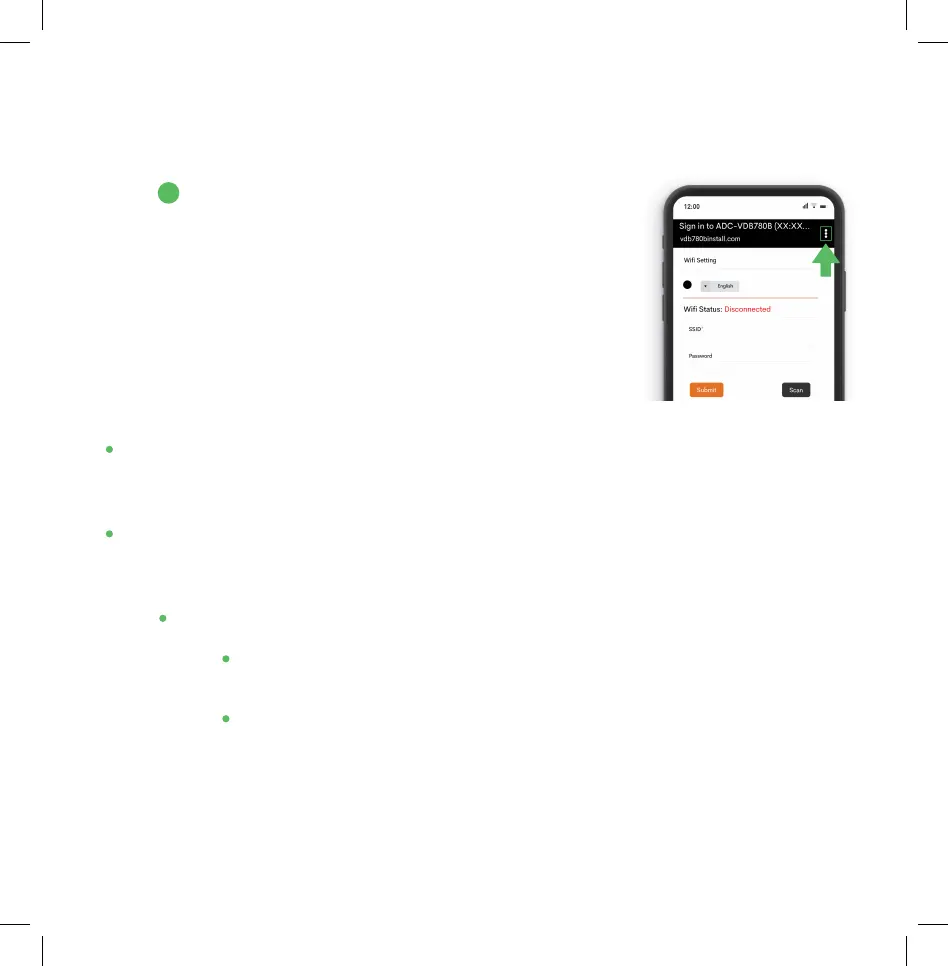
A. Android device: Tap the three dots in the top right
corner and select “Use this network as is” to remain
connected to the temporary network. Return to the
Frontpoint app to finish the setup.
• When firmware updates are available, your camera will update automatically
but it may take an additional 15 minutes to complete setup. The progress bar
will not move along steadily- each update will take a variable amount of time.
• If your installation fails, press “Retry”- the firmware updates may have caused
the installation process to time-out. “Restart” will ask you to start again from
the beginning.
• A failure could also be caused if earlier steps were not successful:
• Double check that the Smart Chime is listed within “Manage Devices” in
the app. If not, please finish setting up the Smart Chime.
• Make sure you select the “Chime (XX:XX:XX)” network after connecting
to the “ADC-VDB780B (XX:XX:XX)” network- not your home network.
B
8


 To Next Page