Frymaster L.L.C., 8700 Line Avenue 71106, P.O. Box 51000, Shreveport, Louisiana 71135-1000
318-865-1711 FAX 318-862-2394
Printed in the United States Service Hotline
Page
15
1-800-24-FRYER
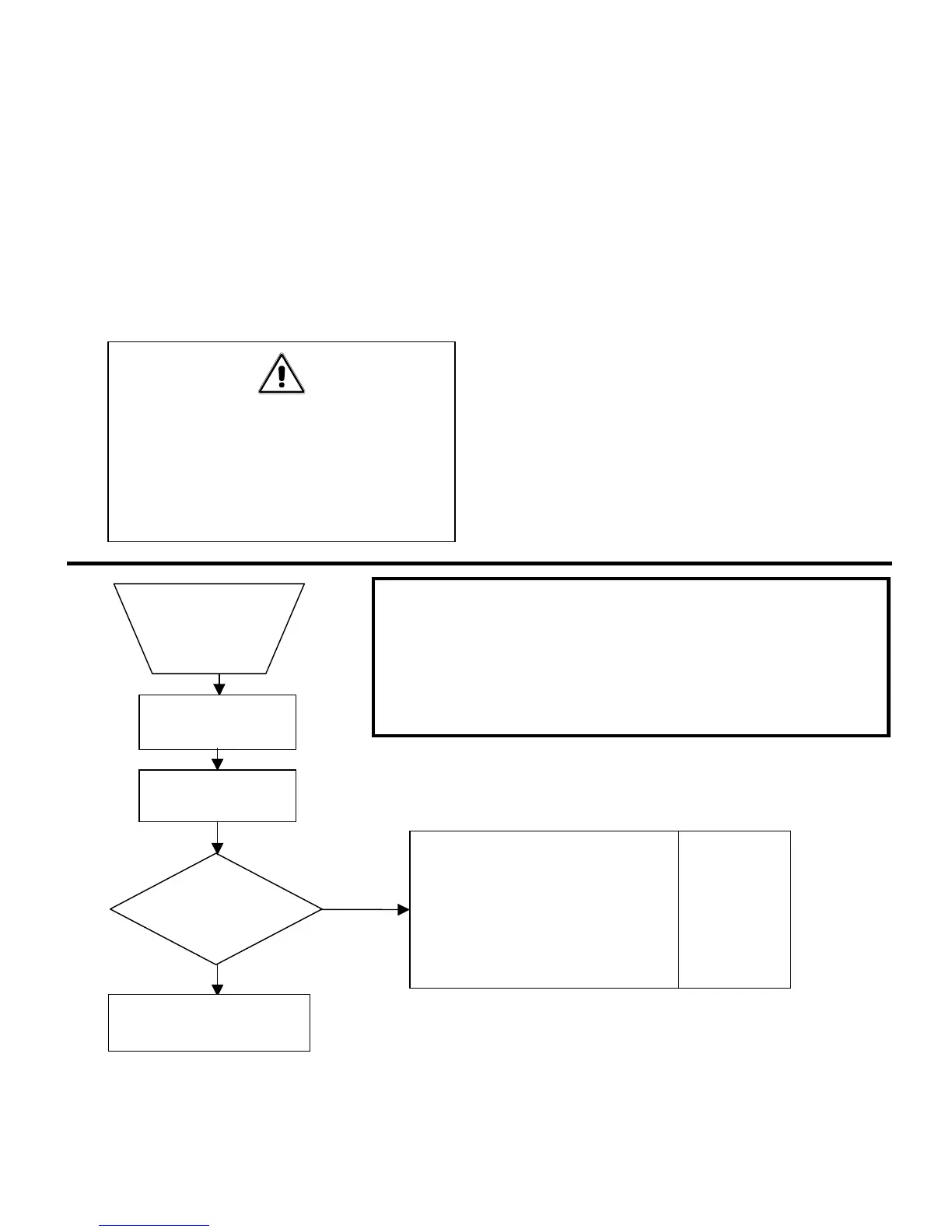
9.4 Troubleshooting Flow Charts:
1. Follow the flowchart on pages 15 - 18 to help locate and troubleshoot the most likely
encountered problems. The flowchart will give possible solutions/corrective actions to be
taken.
2. To use the flowchart, start at the top of the diagram. Follow each step in sequence. If the
answer to a question is “yes”, proceed downward to the next step. If the answer is “no”,
follow the arrow to the right to the possible solutions/corrective action boxes.
3. The left box offers possible solutions. The right box gives the corresponding test procedure
to verify the possible solution or corrective action. Test procedures are found on pages 16
– 18.
WARNING!
INSPECTION, TESTING, AND REPAIR
OF ELECTRICAL EQUIPMENT SHOULD
BE PERFORMED BY QUALIFIE
D
PERSONNEL.
Notes: * REdY, HI, or PROB may also appear. REdY
indicates the temperature is near set temp. HI
indicates the temperature is above set temp. PROB
indicates a defective probe circuit (air RTD or heate
RTD).
** STD = Standard troubleshooting test.
N/A = No a
licable test.
YES
Unit powers up
and display reads
LO
Push ON/OFF
switch.
Plug in to power
source.
Set up for test per
section 9.3.1.
Follow each step
in sequence.
1. Incorrect or no voltage
applied.
2. Tripped wall circuit breaker.
3. Blown 20A fuse.
4. Transformer has failed.
5. Computer is faulty.
6. Wiring connection is faulty.
NO
1. STD **
2. STD
3. STD
4. Test A
5. Test B
6. STD
Go to page 16 and
continue.



 To Next Page